Visitor statistics - understand your eCommerce traffic
See how many people visit your webshop, where they come from and how they behave. Understand sessions, bounce rate and traffic sources.
What are visitor statistics?
Visitor statistics give you an overview of traffic to your online store. You can see how many people visit your site, where they come from, and whether they stay or leave the site immediately.
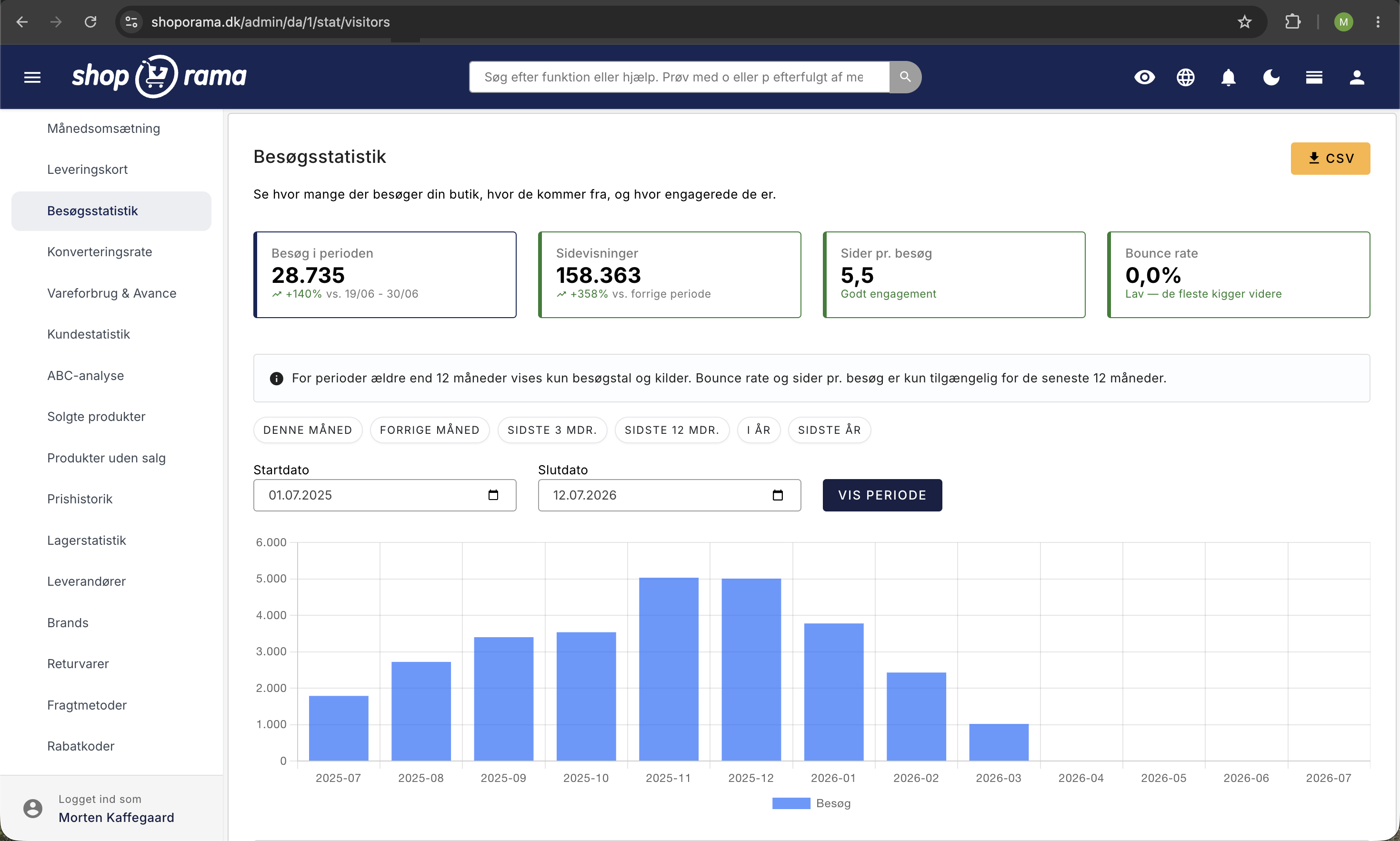
You’ll find the statistics under Statistics → Visitor Statistics in the admin panel.
Visit Statistics requires internal tracking to be enabled. You can enable it under Webshop → General by checking the box next to "Enable Visit Statistics."
Key Metrics
At the top of the page, you’ll see four cards with key metrics for the selected period, compared to the previous period:
- Visits during the period — number of unique sessions. A visit counts as one user per day, regardless of how many times they return on the same day
- Page Views — the total number of pages viewed. A single visitor can view many pages
- Pages per visit — average number of pages per session. More than 3 pages indicates good engagement
- Bounce rate — the percentage of visitors who leave the site after viewing only one page. Below 40% is good for an online store; 40–60% is normal; above 60% may indicate a problem
Charts and Overviews
The page displays three visual overviews:
- Visits over time — a bar chart showing visits per day (periods under 31 days) or per month (longer periods)
- Traffic Sources — a pie chart showing where your visitors come from: direct traffic, Google (organic and paid), Facebook (organic and paid), and other sources
- Average by day of the week — displayed for periods longer than 28 days. Shows which days of the week typically have the most visitors, so you can time your campaigns and newsletters
Traffic Sources
The statistics automatically track where your visitors come from:
- Direct — visitors who type your URL directly or use a bookmark
- Google Organic — visitors from Google search results (free traffic)
- Google Paid — visitors from Google Ads (paid traffic)
- Facebook Organic — visitors from Facebook posts and links
- Facebook Paid — visitors from Facebook ads
- Other sources — visitors from other websites, newsletters, etc.
For each source, you can see the number of visitors, pages per visit, and the percentage of total traffic.
Select a time period
Use the quick options: this month, last month, last 3 months, last 12 months, this year, or last year. You can also select a custom time period.
Export data
Click the download button to export visitor data as a CSV file for further analysis in Excel or Google Sheets.
Tips for increasing your traffic
- SEO — write good product descriptions and meta titles so you rank higher in Google
- Social media — share products and content on Facebook and Instagram
- Newsletters — send regular newsletters to your customers to bring them back
- Google Ads — use paid advertising to reach new customers
- Blog — write relevant blog posts that can attract organic traffic
Want to see if your visitors are actually buying? Check your conversion rate statistics.
Need help? Contact us at support@shoporama.dk.
Related articles
Statistics and analytics in Shoporama
Get an overview of Shoporama's built-in statistics tools: dashboard, revenue, profit margin, ABC analysis and much more. Learn how to use data to...
Conversion rate - understand and improve your stats
Understand what your conversion rate means and how to use the statistics page in Shoporama to track your progress over time.
Sales per channel - see which channels are driving revenue
Find out which channels are generating revenue in your online store. Shoporama's sales per channel statistics show revenue, orders and AOV per...
Tracking in your Shoporama webshop
Enable Shoporama's built-in tracking and send precise tracking data to Facebook, Google Ads, GA4, TikTok, and more. Server-side, GDPR-compliant,...
Google Analytics 4 (GA4) on your Shoporama online store
How to set up Google Analytics 4 on your Shoporama online store. Built-in GA4 integration with e-commerce events, server-side tracking and Consent...
Related features
Bounce rate
Bounce rate is the percentage of visitors who leave your online store after just one page. Learn what a good bounce rate is, the causes of high...
TOF
TOF (Top of Funnel) is the first stage of the sales funnel where you create brand awareness. Learn about TOF channels, metrics and strategy for...
Organic traffic
Organic traffic is visitors from unpaid search results. Learn how to increase organic traffic to your online store with SEO, content and technical...
Reach
Reach is the number of unique people who see your content on social media or in ads. Learn about organic, paid and viral reach and how to increase it.
UTM parameters
UTM parameters are tags added to your links that show which campaigns and channels are driving traffic and sales. Learn about the 5 parameters and...
Statistics and analytics
Dashboard, revenue, profit margin, ABC analysis and more. Shoporama's built-in statistics tools give you insights to run your online store profitably.