Delaware-themed configuration and customization
Complete guide to setting up the Delaware theme on your Shoporama online store. Footer, mega menu, colors, payment icons, Trustpilot, Instagram link and much more.
Delaware is Shoporama’s most widely used theme. It’s modern, responsive, and built on Tailwind CSS, so it works great on both desktop and mobile. Virtually all aspects of its appearance and behavior can be customized from the Design section in the admin panel without writing code. This guide walks you through the most important settings.
Two versions: Delaware is available as Delaware (English admin labels) and DelawareDK (Danish admin labels). They are functionally identical, so choose the one that matches your team. Both run on Smarty 4.
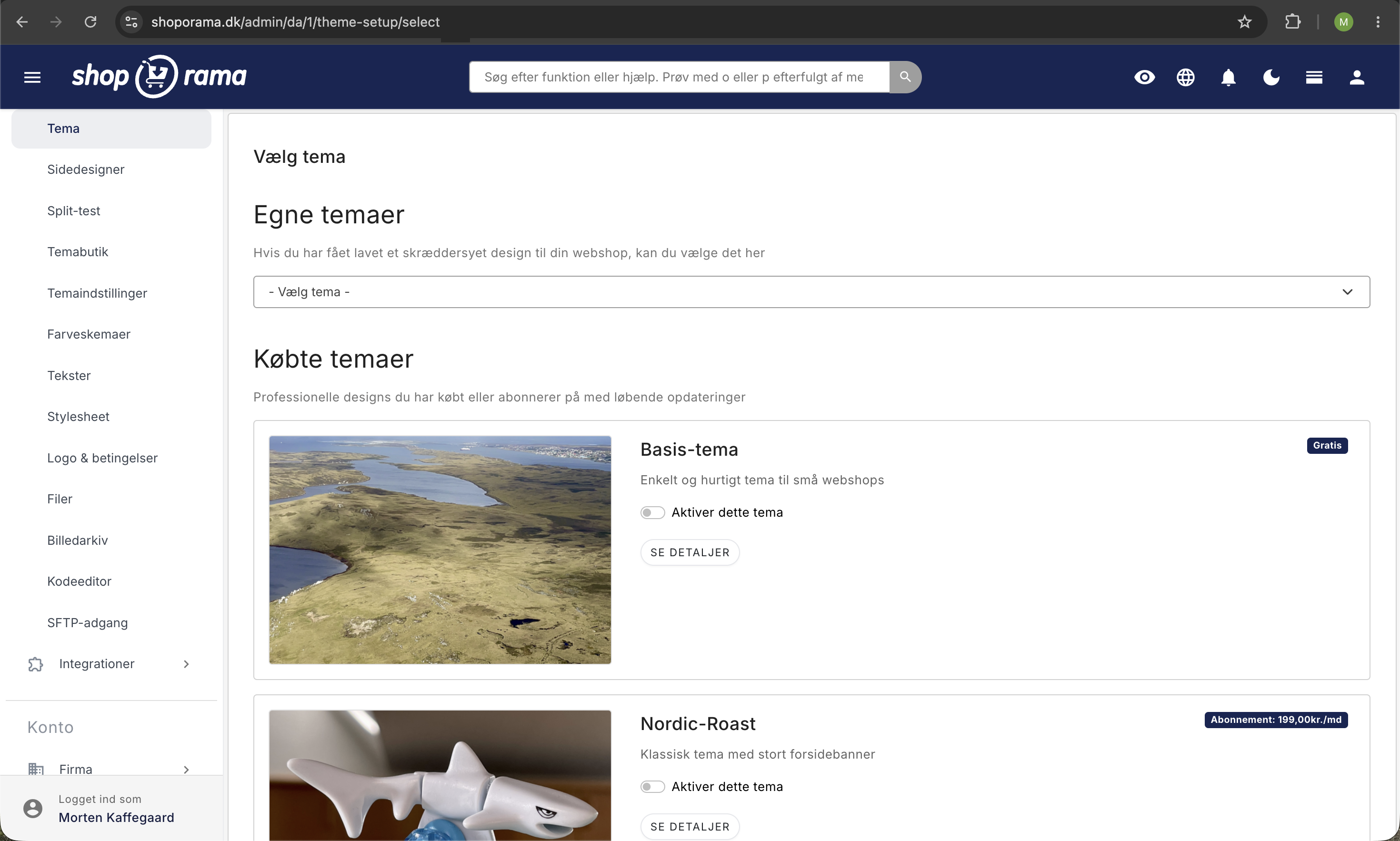
Where to Find the Settings
Almost everything is managed from Account → Webstore → Theme → Settings. The fields are grouped into sections such as General, Company, Theme, Badges, Product, Checkout, Integrations, and Custom Code. Each field has a brief description on the page itself, so you often won’t need to refer to this guide.
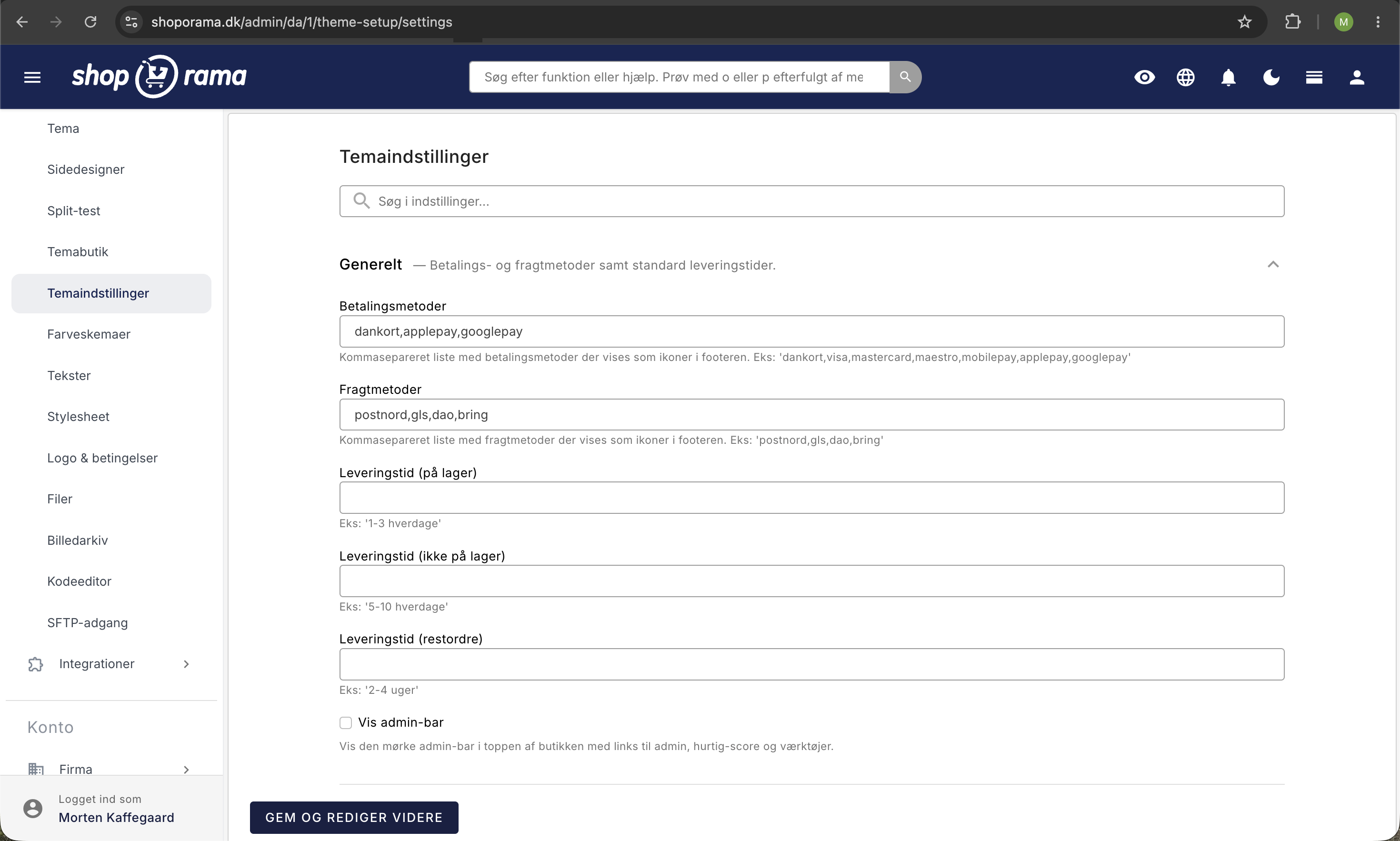
Logo, Colors, and Badges
Under Theme, you can:
- Enter the URL for the logo and favicon (upload the file itself under Theme → Files and copy the URL)
- Select the primary and action colors as hex codes, e.g., #1a73e8
- Enter alt text for the logo (important for accessibility and SEO)
Under “Badges,” you can customize the colors of the small badges that appear on products, such as “On Sale,” “New,” “In Stock, ” and “Volume Discount.”
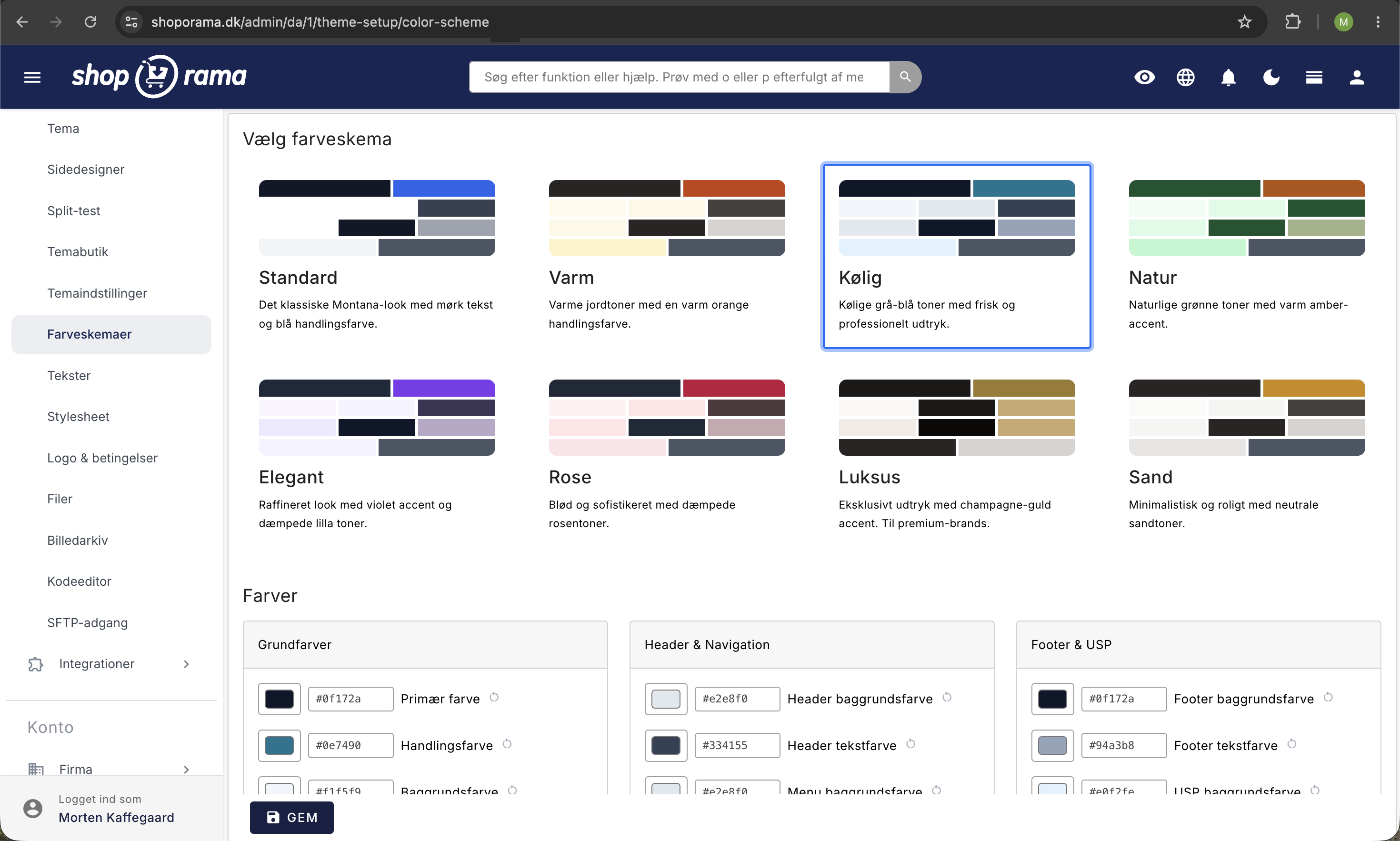
Footer Menus
Delaware has space for three menus in the footer. Here’s how to add them:
- Go to Content → Menus
- Create a new menu and give it one of these tags: footer_menu_1, footer_menu_2, or footer_menu_3
- Add the menu items you want to display
- The menu’s name automatically becomes the heading in the footer
Megamenu
A megamenu is a large, multi-column dropdown typically used as the main navigation, allowing customers to quickly navigate a large product selection.
In Delaware, the mega menu is activated by the CSS class `megamenu ` (exactly this string—not `mega_menu ` and without spaces). The class is set in the Class field for each individual menu item in the main navigation—not on the menu itself. You’ll find the field under Content → Menus → Edit a Menu Item.
The structure itself requires three levels: the main navigation contains a menu item with the class “megamenu,” which points to a mega menu container; the container has one menu item per column, which points to a column menu; and the first item in the column menu becomes the column header (the rest become links). If you set the “show_image” class on the first menu item in a column, and it’s a category, a product, or a landing page, the object’s image will appear as an eye-catcher at the top of the column.
Payment and shipping icons in the footer
You don’t need to upload images of payment cards or shipping carriers. Delaware has built-in SVG icons, which you can select from two fields under General.
The Payment Methods field (path: payment_methods) is a comma-separated list, e.g.:
dankort,visa,mastercard,maestro,mobilepay,applepay,googlepayThese names are built-in as icons in Delaware:
- dankort, visa, mastercard, maestro
- mobilepay, applepay, googlepay, paypal
- Klarna, Viabill, Anyday, Bank Transfer, Invoice, EAN
Enter the names in lowercase, without spaces between the commas. A name that isn’t available as a built-in icon is simply skipped without an error.
The Shipping Methods field (path: shipping_methods) works the same way, for example:
gls,postnord,ups,burdTip: If a logo is missing as a built-in icon, you can add your own SVG icon via Custom Code or contact support so we can add it to the theme.
Trustpilot Integration
Delaware uses Trustpilot’s official widgets. Each widget requires its own Template ID, which you copy from Trustpilot’s Business Portal. The fields are located under Integrations:
- Enable Trustpilot
- Enter your Trustpilot Business ID (path: trustpilot_business_id)—this is your store’s unique ID on Trustpilot
- Fill in the Template ID for the widgets you actually want to display:
- Trustpilot Template ID Carousel (trustpilot_template_id_carousel)—a large carousel element typically displayed on the homepage and in the checkout
- Trustpilot Template ID Micro Star (trustpilot_template_id_micro_star)—compact stars in the header and the first step of the checkout
- Trustpilot Template ID Micro Review Count (trustpilot_template_id_micro_reviewcount) – a small text widget showing the number of reviews in the footer
- Trustpilot Template ID Micro Trustscore (trustpilot_template_id_micro_trustscore) – overall score in the header and checkout sidebar
- Trustpilot Template ID Product Mini (trustpilot_template_id_product_mini) stars below the product name on the product page
- Trustpilot Template ID Product Reviews (trustpilot_template_id_product_reviews) full list of reviews on the product page
- Trustpilot Template ID Starter (trustpilot_template_id_starter) is used if you haven’t received any reviews yet
Important: A Template ID is not the same as your Business ID. The Template ID is retrieved per widget in Trustpilot’s Business Portal under Showcase → Trustboxes. You can omit the widget fields you don’t use; Delaware won’t display them without a Template ID.
Instagram, Facebook, and other social media links
Delaware displays small icons in the footer that link to your social media profiles. Enter the URLs under Company:
- Instagram URL (path: instagram_url)
- Facebook URL (facebook_url)
- YouTube URL (youtube_url)
- Google URL (google_url)
Enter the full URL, e.g., https://www.instagram.com/dinprofil/. If you leave the field blank, the icon will not appear.
Note: Delaware does not have a built-in Instagram feed or photo gallery. The Instagram URL field is solely a link to your profile. If you want to display actual Instagram images on the homepage, you’ll need to add a third-party solution like Behold or Elfsight and embed it via the Page Builder. There is no Access Token in the theme settings.
Value Propositions (USPs)
You can display up to four Value Propositions, typically below the header or in the footer. These could be “Free shipping on orders over 500 kr.”, “30-day return policy”, or “Fast delivery”. Set them up under “Value Propositions,” where each USP has fields for text, description, icon, and, if applicable, a link.
Homepage and Page Builder
The homepage is built using the Page Builder, where you can add sections such as hero banners, product carousels, image galleries, text, and blog feeds. You can drag and drop sections and edit the content without touching the code.
Product Page Features
Under “Product,” you can enable or disable a wide range of features:
- "Others Also Bought," " Similar Products," and " Related Products," each with autocomplete from the same category
- Wishlist —both simple (browser-based) and full (requires login)
- Tabs for product attributes, shipping, returns, payment, and questions
- "In Stock" badge, backorder message, promotion message
- Image gallery with thumbnails and lightbox
- Washing instructions and size guide
- Omnibus price display showing the lowest price over the last 30 days for sale items
Checkout customizations
The sections Checkout: General, Checkout: Cart, Checkout: Address, and Checkout: Approve control each phase of the checkout process. Here, you can, among other things, enable or disable login, gift cards, Apple Pay/MobilePay quick checkout, newsletter sign-up, and upselling, as well as choose whether you’re targeting private (B2C), business (B2B), and/or public sector (B2G/EAN) customers.
Site Notice (top banner)
Do you want to announce a promotion, a holiday closure, or a general message? Enable Site Notice and write a message, optionally including a close button. You can display different text on desktop and mobile and choose how many days the banner should remain closed after the customer clicks it away.
Other Integrations
Under Integrations, in addition to Trustpilot, you can also enable:
- Pricerunner by entering your account ID
- E-mærket by entering the URL to your E-mærket page
- Viabill for installment payments (requires a Viabill shop ID)
- AnyDay for installment payments (requires an AnyDay price token)
- Clerk.io for smart search and product recommendations (requires an API key)
Customizations (Custom CSS and JS)
If you need to add your own CSS or JavaScript, you can do so via Custom Code. Enable " Enable Custom CSS " or "Enable Custom JS " and insert your code. This is the easiest way to make small design adjustments or add external scripts without modifying the theme’s files.
Frequently Asked Questions
Which version of Smarty does Delaware run on?
Delaware and DelawareDK run on Smarty 4. This is the latest version, and it’s also the one we recommend for all new themes on Shoporama. If you customize the templates yourself, you can therefore use newer Smarty 4 syntax such as <{$foo = 123}> and <{foreach $items as $item}>.
What is the difference between Delaware and DelawareDK?
The features are completely identical. The only difference is the language used in the admin labels for the theme settings: Delaware uses English labels (e.g., “Theme,” “Company,” “Integrations”), while DelawareDK uses Danish. The text on the store’s front page is controlled independently of this via the store’s language setting.
My payment icons aren’t showing up in the footer—what went wrong?
Check that the “Payment Methods” field under “General” is filled in with a comma-separated list, e.g. , visa,mastercard,mobilepay. Enter the names in lowercase and use only names from the list above. A name that isn’t built-in as an icon will be skipped without an error.
Which Trustpilot field should I fill out?
First, enter your Trustpilot Business ID (your store’s ID). Then, enter one Template ID for each widget you want to use. For example, if you only want stars to appear under the product name, enter the Trustpilot Template ID “Product Mini.” Leave the other Template ID fields blank so they won’t appear.
Can I display my latest Instagram photos directly on the homepage?
Not out of the box. Delaware only displays a link to your Instagram profile in the footer. If you want a live photo feed, you can add a third-party solution, such as Behold or Elfsight, which you embed via an HTML block in Page Designer.
Where do I enter footer text with my company address and business registration number?
Company name, address, city, ZIP code, business registration number, phone number, and email are entered under “Company” in the theme settings. This information is automatically displayed in the footer and is also used for structured data (Schema.org), so Google can better understand your store.
Does Delaware use Theme Builder?
Yes. Delaware is fully supported by Theme Builder, so you can adjust colors, sections, and layout with a visual preview. The fields in this guide are exactly the same as those you’ll find in Theme Builder, just displayed in table form.
How well does Delaware work on mobile?
Delaware is built with Tailwind CSS and is fully responsive. The mega menu collapses into an off-canvas mobile menu, images are automatically scaled to fit the screen size, and checkout is optimized for touch. You can also choose separate text for the Site Notice on mobile.
Can I use the mega menu and the regular menu at the same time?
Yes. You can even mix them within the same main navigation. Only the menu items that have the CSS class `megamenu` will expand into a large mega menu—items without that class will appear as a regular dropdown. And you can still have separate menus for the top and the three footer positions.
Should I choose Delaware or DelawareDK?
Choose DelawareDK if your team works in Danish and prefers Danish admin labels. Choose Delaware if you prefer English or are working on an international store. If you switch between them later, your settings won’t be lost.
Do you need help with Delaware? Email us at support@shoporama.dk.
Related articles
Page designer
Lær hvordan du bruger Sidedesigner i Shoporama til at opbygge sidelayouts med blokke som hero-sektioner, produktlister, bannere og meget mere, helt...
Setting up the front page
Lær hvordan du sætter forsiden op i din Shoporama-webshop. Forsiden er en kategori, som du kan tilpasse med Sidedesigner i understøttede temaer.
Variables in a Shoporama theme
Overview of global and page-specific Smarty variables available in Shoporama themes.
Own stylesheet (Custom CSS)
Add custom CSS to your Shoporama online store and admin backend. Customize colors, fonts, layout and hide elements without changing theme files.
What themes are there on Shoporama?
Complete overview of all free themes on Shoporama: Delaware, DelawareDK, California, Alaska 2, Washington, Montana, and the classic Smarty 2 themes...
Implement Theme Builder in your theme
Guide to implementing Shoporama's Theme Builder in your theme so the merchant can build pages visually.