Open baskets - View and restore abandoned shopping carts
Not all customers complete their purchases. In fact, about 70% of all customers abandon their shopping carts without making a purchase. In Shoporama, you can view all open shopping carts, follow up on them, and automatically send reminder emails to customers who abandon their carts.
What is an open cart?
An open cart is a shopping cart in which a customer has added products but has not completed the purchase. The cart is linked to the customer’s browser via a cookie and a token and is stored for up to 4 days so the customer can return and complete their purchase from the same browser.
Overview of open shopping carts
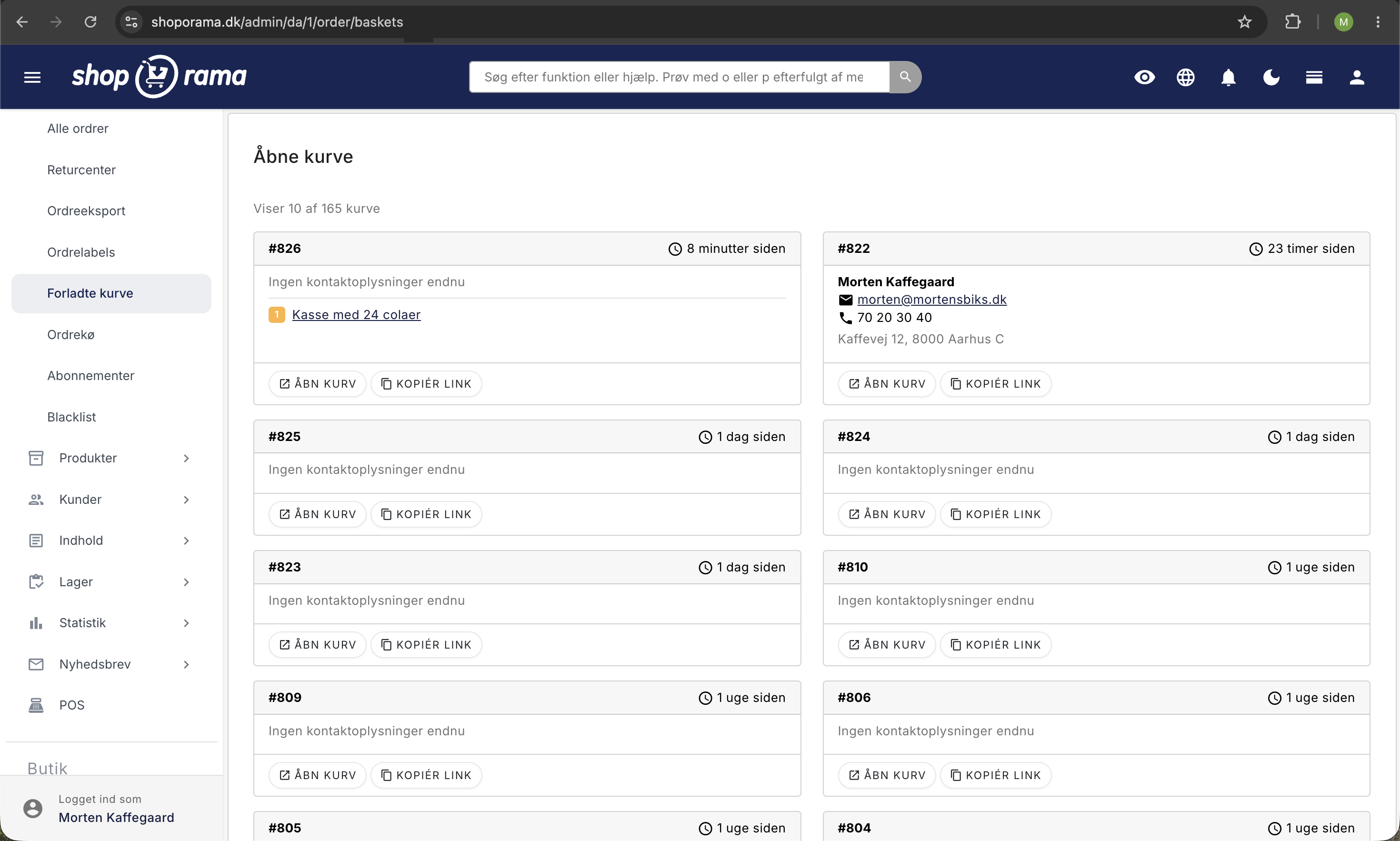
You can find the overview under Orders → Abandoned Carts in the admin panel. Here you’ll see a list of all active, uncompleted carts with the following information:
- ID, the cart’s unique number
- Last Updated: When the customer was last active in the cart
- Products: the quantity and names of the products in the cart, with links to the product pages
- Session: the contact information the customer entered (name, address, email, etc.) as well as a direct link to the cart
The list is sorted by most recent activity, so the newest shopping carts appear first. You can scroll through the pages if there are many open shopping carts.
Link to the Cart
Each open cart has a unique link that restores the customer’s cart. You can copy the link and send it to the customer manually—for example, via email or phone—if a customer contacts you to complete a purchase they started earlier.
This is also how the customer can return to their cart on their own if they switch devices. The link contains a token so the cart can be opened on a different device (e.g., if the customer started on their phone and continues on their computer).
Automatic email for abandoned carts
Shoporama can automatically send a reminder email to customers who abandon their cart. The email lists the items in the cart and includes a direct link so the customer can easily return and complete the purchase.
How to enable this
- Go to Settings → Web Store
- Find the “Email for Inactive Cart” field
- Enter the number of hours that should pass before the email is sent. Examples:
- 24 = 1 day
- 168 = 1 week
- 336 = 14 days
- Save the settings
Leave the field blank to disable the feature.
When is the email sent?
The system checks every 5 minutes for carts that meet these criteria:
- The customer has entered an email address
- The cart contains products
- The cart is still open (not converted into an order)
- The set number of hours has elapsed since the last activity
- The shopping cart is no more than 7 days old
- A reminder has not already been sent for this cart
Each cart receives only one reminder email so as not to annoy the customer.
Note: A reminder about an abandoned cart may be considered marketing. Make sure your checkout flow includes consent for this type of communication so that you comply with marketing laws and the GDPR.
Customize the email
The reminder email uses the basket_mail.html template in your theme. You can customize both the subject line and the content via the theme settings under the Emails section. The email automatically includes a list of the products in the cart with images, names, and prices, as well as a link to restore the cart.
Abandoned Cart Statistics
To view historical data on abandoned carts, recovery rates, and the effectiveness of your reminder emails, go to Statistics → Abandoned Carts.
Common Causes of Abandoned Carts
To reduce the number of abandoned carts, it’s helpful to know the most common causes:
- Unexpected costs, shipping, fees, or sales tax that only appear at checkout
- Requirement to create an account; many customers prefer guest checkout
- Checkout takes too long; too many steps or fields in the order flow
- Lack of payment options—the customer cannot find their preferred payment method
- Lack oftrust—no trust marks, reviews, or SSL certificate
Tip
Be sure to display shipping rates clearly on the product page or in the shopping cart—not just at checkout. This significantly reduces surprises and abandoned carts. You can offer free shipping on orders over a certain amount as an effective way to encourage customers to complete their purchase.
Need help? Contact us at support@shoporama.dk.
Related articles
Manage your orders in Shoporama
Guide to managing orders in Shoporama - from receiving to shipping and status updates.
Customize your checkout
Guide to customizing the checkout flow in your Shoporama online store, including payment methods, shipping, customer fields and gift cards.
Free shipping over a certain amount
Here's how to set up free shipping for orders over a certain amount in Shoporama. The threshold is set per country under Shipping → Countries or...
Related features
Cart abandonment rate
Cart abandonment rate is the percentage of customers who leave the cart without buying. Learn about common causes, solutions and abandoned cart...
Customer database
Complete customer database with profiles, order history, segmentation, customer groups and exports. Identify your best customers and communicate in...
Statistics and analytics
Dashboard, revenue, profit margin, ABC analysis and more. Shoporama's built-in statistics tools give you insights to run your online store profitably.