Age verification on products
Here's how to set an age restriction of 15, 16, or 18 for products in Shoporama so that the customer's age is verified when paying with ePay. Includes an overview of Danish age restrictions.
If you sell products that require the customer to be of a certain age to purchase them—such as alcohol, tobacco, e-cigarettes, over-the-counter medications, or fireworks—you can set an age restriction on the product. Shoporama sends the age restriction to the ePay payment gateway, where the customer must confirm their age before the payment can be processed.
Setup
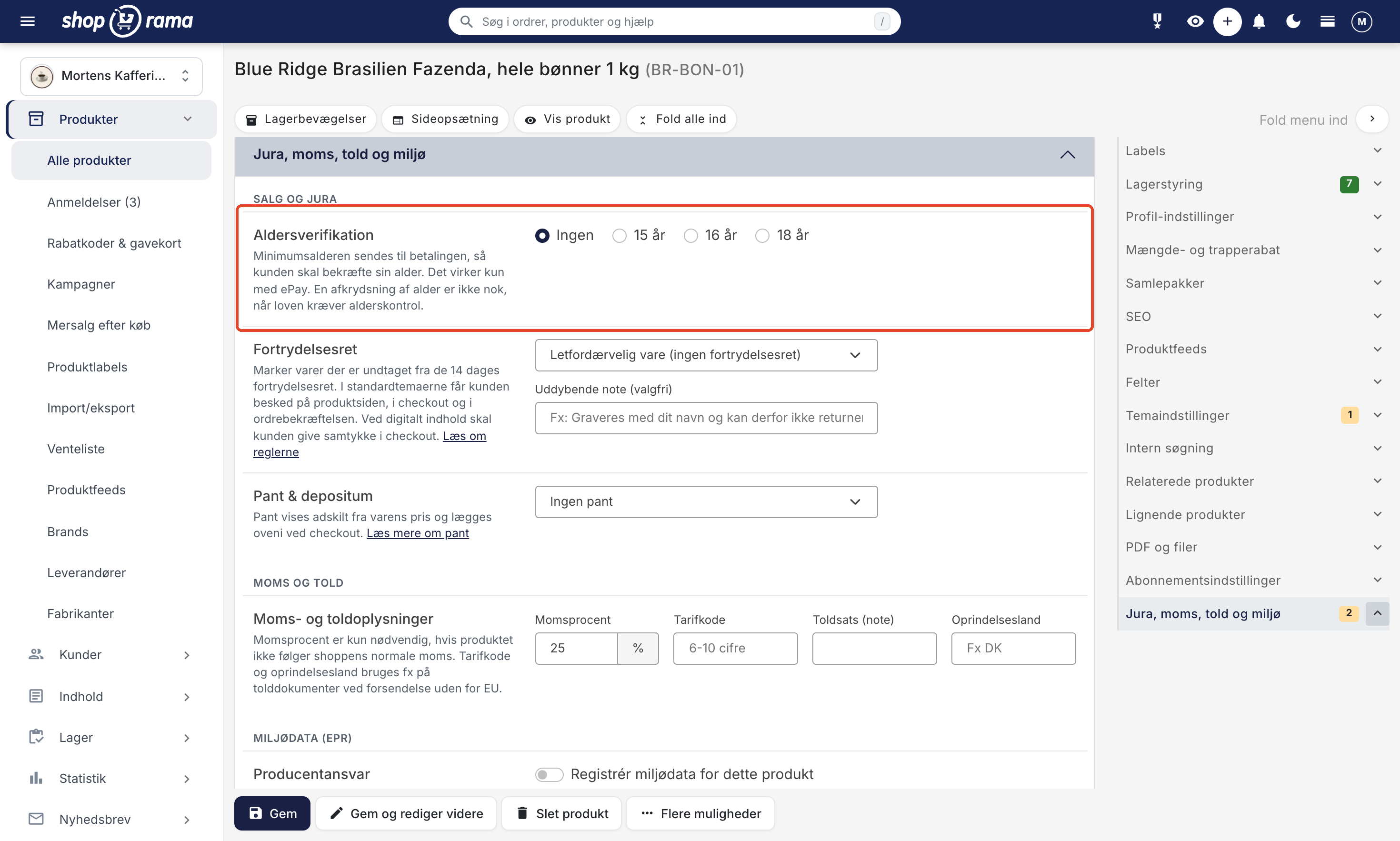
You set the age restriction for each individual product:
- Edit the product in the admin panel.
- Expand the “Legal, VAT, Customs, and Environment” tab. It’s located at the bottom of the product page, and you can also navigate to it via the menu on the right.
- Under the “Sales and Legal ” section, select the following under “Age Verification”:
- None: no age limit
- 15 years: the customer must be at least 15 years old
- 16 years: the customer must be at least 16 years old
- 18 years: the customer must be at least 18 years old
- Save the product.
Which age restriction should I choose?
The age limit is determined by the laws governing each specific product type. The Danish age limits for the most common products are:
- Alcohol with 1.2% or more: 16 years old.
- Alcohol with more than 6% alcohol by volume: 18 years old.
- Tobacco, nicotine products, and e-cigarettes: 18 years.
- Over-the-counter medications: 15 years of age. Over-the-counter pain relievers taken orally may not be sold to persons under 18 years of age. The sale of over-the-counter medications outside of pharmacies requires a license from the Danish Medicines Agency, and online sales must be reported to them.
- Category F1 fireworks, such as sparklers and table bombs: 15 years of age. Standard New Year’s fireworks require a minimum age of 18. Distance sales of fireworks, such as through an online store, must be reported to the authorities before you begin selling.
Read more on the authorities’ websites: age verification for online sales of alcohol, tobacco, and nicotine, and the sale of medications outside of pharmacies.
This overview is for guidance only and does not constitute legal advice. Regulations are subject to change, and it is your responsibility to be familiar with the requirements that apply to your products.
A simple age check is not enough
As of October 1, 2024, online retailers selling alcohol, tobacco, nicotine products, or e-cigarettes to consumers must have an effective IT system for age verification. The customer’s age must be verified before the sale is completed. A pop-up or a checkbox where the customer confirms that they are over 18 is no longer sufficient. The verification must also not take place only when the item is shipped or delivered.
How does it work?
When a customer pays for an order containing age-restricted products, Shoporama sends the age restriction to ePay. In ePay’s payment window, the customer must confirm their age using MitID before the payment can be processed. If the customer pays with MobilePay, ePay uses the age that MobilePay already has on file.
If the order contains multiple products with different age restrictions, the highest age restriction applies. For example, if a customer has both a beer (16+) and a whiskey (18+) in their cart, the customer must be at least 18 years old.
Note
- Age verification only works with ePay. If the customer selects a different payment method—such as invoice, bank transfer, or another payment gateway—their age will not be verified.
- Age verification must be enabled in your agreement with ePay, and ePay may charge a fee per verification. Contact ePay to have it activated.
Order View
In the order list in the admin panel, a badge with the age restriction (e.g., “18+”) appears on orders containing age-restricted products. This gives you a quick overview of which orders required age verification.
Display the age restriction in the store
It’s good customer service to inform customers about the age restriction before they reach checkout. For example, include it in the product description and in your terms and conditions. In the Montana theme, you can also display an image—such as an age restriction sign for alcohol—using the theme settings “Footer Image ” and “Image in Cart and Checkout.” Learn more about theme settings.
Frequently Asked Questions
Where do I set the age limit?
Edit the product, expand the “Legal, VAT, Customs, and Environment” tab, and select None, 15 years, 16 years, or 18 years under “Age Verification” in the “Sales and Legal” section. Remember to save.
Do non-alcoholic wine and a 4.5% cider have the same age limit as wine?
No. Beverages with an alcohol content of less than 1.2% have no age limit. A 4.5% cider requires a minimum age of 16 because it contains 1.2% or more, but no more than 6%. Regular wine typically contains more than 6% and therefore requires a minimum age of 18. Always check the actual alcohol content on the label.
Is it enough for the customer to check a box indicating they are over 18?
No. For online sales of alcohol, tobacco, nicotine, and e-cigarettes, the law requires an effective IT system that verifies the customer’s age before the sale is completed. A checkbox or a pop-up is not enough. ePay’s age verification using MitID is an example of an electronic verification method.
Does age verification work with all payment methods?
No, only with ePay. This applies to both “ePay” and “ePay (old version).” If you also offer, for example, invoice, bank transfer, or another payment gateway, the customer’s age will not be verified when they select those options. In that case, you must ensure age verification yourself in another way before the sale is completed.
Is there a cost for age verification?
ePay may charge a fee per age verification using MitID, and the feature must be enabled in your agreement with ePay. Contact ePay for pricing and activation.
Can I set the age limit for multiple products at once?
Not at this time. Age verification is set on an individual product basis and cannot be configured via table editing, CSV import, or the REST API. If you have many items, start with those that require customers to be 18 years old.
How can I see which orders contain items with an age restriction?
In the order list, there’s a badge showing the highest age restriction—for example, “18+”—on orders with age-restricted items. This way, the people packing the orders can see it right away.
Do I need to verify the customer’s age myself when the package is shipped?
If the order was paid for via ePay with age verification, the customer’s age was verified before the purchase was completed. If the order was paid for in another way, Shoporama has not verified the customer’s age. The law requires that age be verified before the sale is completed, so a check at the time of shipment is not sufficient. Therefore, make sure that customers purchasing age-restricted items are verified at the time of purchase.
If you have any questions about age verification, please email support@shoporama.dk.
See also
Related articles
Billy's Billing integration
Guide to setting up Billy's Billing in Shoporama. Automatically transfer orders to your accounts, synchronize products and post payments.
Settings for transactional emails
How to set when Shoporama automatically sends transactional emails like abandoned baskets, payment reminders and product reviews.
Hreflang and alternate tags for multilingual webshops
Guide to creating hreflang alternate tags for products in Shoporama stores running in multiple languages.