AI assistant in the text editor
Learn how to use Shoporama's built-in AI assistant to generate product texts, image descriptions and text suggestions.
Shoporama has a built-in AI assistant that helps you write product text and descriptions. The AI assistant uses OpenAI’s models to suggest text, complete sentences, and describe product images directly from the text editor. It can also generate logos and sample images elsewhere in the admin panel.
This is not the same as “Webshop with Claude”: This article is about the built-in text-generation AI in the editor, which uses OpenAI to help with product texts, descriptions, and images.
If you want to use chat to create products, run campaigns, retrieve sales figures, or edit the homepage, check out Manage Your Store with AI or read our page on Webshop with Claude.
Setup
The AI assistant works right away. By default, it uses Shoporama’s own OpenAI key, so you don’t need to set anything up to get started. If you’d rather use your own key, enter it under Account → Webshop on the ChatGPT tab. You can create an API key on OpenAI’s platform.
Which models are used?
Shoporama automatically selects the right model for each task, so you don’t have to decide for yourself:
- Text generation uses gpt-4o, OpenAI’s fast multimodal model
- Image recognition (e.g., alt text based on a product image) uses gpt-4-vision-preview
- Image generation (logos, example images) uses GPT-Image-1
The model selection may change over time as OpenAI releases newer and better models. You don’t need to configure anything yourself.
Features
- Text completion: Start typing a sentence, and the AI assistant automatically suggests a conclusion
- Text suggestions: Get several alternative ways to phrase a sentence
- Image descriptions: The AI assistant can automatically generate alt text for your product images based on the image’s content
- Image generation: Generate sample images or demo logos directly in the admin panel
Where does it work?
The AI assistant is available in the text editor when you’re editing products and other content pages. Just start typing, and the assistant will suggest text based on the context.
Tip: AI-generated text is a starting point. Always review and customize the text so it matches your store’s tone and style.
AI Assistant page: multiple products at once
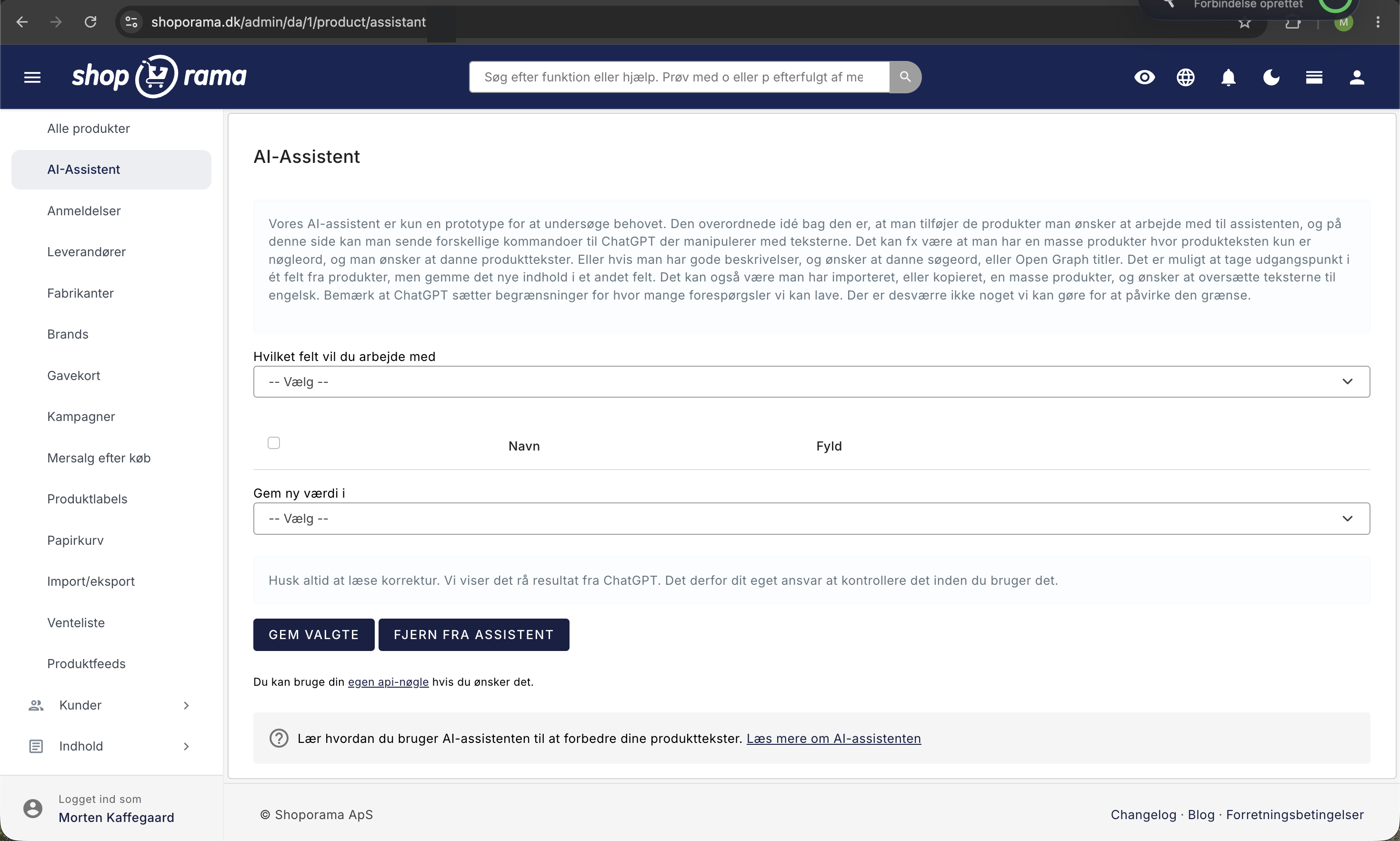
In addition to the help in the text editor, Shoporama has a standalone page where you can work with multiple products at once. You’ll find it under Products and then AI Assistant. The idea is simple: you add the products you want to work with to the assistant, select which field the text should be retrieved from, write an instruction, and let the assistant run through the rows. Afterward, you review the suggestions and save the ones you can use.
This is especially useful when you’ve imported or copied many products where the text consists only of keywords, or when there’s a field that none of the products have filled out—such as Google Shopping titles, Open Graph titles, or alt text for images. Instead of opening 300 products one by one, you work in a single long list where you can see the current text and the suggestion side by side.
Note: The AI Assistant page is still a prototype. It works, but it’s intentionally kept simple, and changes may be made. Feel free to write to us if you’re using it and let us know what you’d like to see added.
How to add products to the assistant
- Go to Products and then All Products.
- Filter or search for the products you want to work with, for example by category, brand, or supplier.
- Check the boxes next to the products you want to include.
- In the Bulk Edit bar at the bottom of the page, click “With the selected items ” and select “Add to AI Assistant.”
- Go to Products and then AI Assistant. The products are now listed.
The Assistant displays 100 products at a time with a pagination button at the bottom. The products will remain there until you remove them yourself, so you can easily spread the work out over several days. If you need to select and filter efficiently in the product list, there are several useful features in Bulk Edit Products.
Here’s how to run a batch
- Select a field from the “Which field do you want to work with?” dropdown. The page will now retrieve the products’ current content for that specific field.
- Fill in the “Description of the Assistant.” This is the role the AI will play—for example, that it’s a copywriter creating sales-oriented product descriptions for an online store.
- Fill in the “Instructions.” This is the actual task, such as having the AI write a product description based on the keywords it receives.
- Check the boxes next to the products to be processed. Checking the box at the top of the table selects all items on the page, and the shortcut Cmd/Ctrl + A does the same.
- Click Run for the selected items. The products are processed one at a time, and the field displays “Wait, processing” while the task is in progress.
- Review the suggestions in the New Value column. You can edit directly in the field before saving.
- Under “Save new value in,” select the field where the result should be saved.
- Click "Save Selected." Only the products with checkmarks will be saved.
The table has five columns: a checkbox with the product ID, Name with an image and link to the product, Details with background information about the product, the field’s current content, and finally New Value, where the suggestion appears. The role and instructions are saved for the next time you visit the page, so you don’t have to re-enter them.
Important: Nothing is saved automatically. If you leave the page or switch fields in the top dropdown, any suggestions you haven’t clicked “Save Selected” on will disappear.
Which fields can the assistant fill in?
The assistant works with twelve fields on the product. Eleven of them can be used both as a source—that is, what the AI reads—and as a target—that is, the field where the result is saved. Image captions have their own view, where the source is the image itself, and the result is always saved on the image.
| Fields in the assistant | What it is |
|---|---|
| Name | The product’s name as customers see it in the store. |
| Description | The long product description on the product page. |
| Image captions | The alt text for each individual product image. It works a little differently than the other fields; see the section below. |
| List description | The short text that themes use as a brief introduction, and which many product feeds fall back on if the long description is missing. |
| Google title | The page title in Google search results. It’s called “Title” on the product’s “Fields” tab. |
| Google Description | The snippet below the title in Google search results. Called “Description” on the product’s “Fields” tab. |
| Google Shopping Title | The title used in the Google Shopping feed instead of the product name. If the field is empty, the product name is used. |
| Primary keyword | The word the product page should rank for. Used for the product’s SEO check. |
| Open Graph title | The headline that appears when the product is shared on platforms such as Facebook or LinkedIn. |
| Open Graph description | The text below the headline when the product is shared on social media. |
| Keywords | Additional words for the store’s own search function, so customers can find the product more easily. |
| Internal note | A note for your own use only. It is never displayed in the store, but appears below the product name in the assistant’s list. |
If you’d like to learn more about how each SEO field affects your visibility, there’s a guide on SEO in Shoporama, and the keyword field is described in the Search Function in Shoporama.
Save the result in a field other than the source
The greatest strength of this page is that the source and destination do not have to be the same field. The “Save new value in” dropdown is initially set to the field you’re working on, but you’re free to choose a different one. This opens up workflows such as:
- Read the long “Description” and save a short summary as the Google description.
- Read the “Description” and save relevant synonyms as “Keywords” so the store’s search function can find the product using multiple terms.
- Read the “Name” field and save a longer, more descriptive version as the Google Shopping title.
- Read the description and save one sales pitch as the listing description.
- Read the Name and save a suggestion for the Primary Keyword, which you can then fine-tune manually.
Be careful with the dropdown menu. If you select the wrong field, you’ll overwrite something you didn’t intend to, and there’s no undo button. Therefore, always test it out on a handful of products before checking the entire list.
Fill: What the assistant knows about the product
The “Details” column contains the background information provided for each individual product. Shoporama automatically compiles this from the product’s own data:
- Brand Name
- Supplier
- Product name
- The content of the additional fields your theme adds to the products
- The categories the product belongs to
- Variants and other attributes from the product profile, such as sizes, colors, material, or fit
You can edit the field directly in the table before running the assistant. If any important information about a product is missing, you can enter it to get better text. Conversely, if there’s something the AI shouldn’t include, you can delete it.
This is also a good reason to keep your master data organized. The more thoroughly the brand, supplier, categories, and profile attributes are filled out, the more the assistant has to work with, and the less generic the descriptions will be.
Image captions: alt text for product images
If you select the Image Captions field, the page changes. Instead of one text per product, you get one line per image, with a small image next to the field so you can see what the text refers to. The assistant looks at the image itself and describes what it sees. It does not read either the product text or the “Fill” field in this view, so the role and instructions are the only factors that determine the tone and length.
There is no “Save New Value” dropdown in this view, because the result can only be saved in one place: as the image’s description. You select the products, click “Run” for the selected ones, make any necessary edits, and then click “Save Selected.”
Good alt texts serve two purposes: screen readers can read them aloud for visually impaired customers, and Google uses them to understand the images so they can appear in Google Images. Therefore, describe what is actually shown in the image and avoid stuffing it with keywords. You can find more information about image management in the Image Archive.
Examples of Roles and Instructions
The two fields —"Assistant Description" and " Instructions "—are what determine the quality. The role sets the tone, and the instructions define the task. Here are some combinations you can use as a starting point:
| Task | Assistant Description | Instructions |
|---|---|---|
| Product text based on keywords | You are a copywriter who writes sales-oriented product descriptions for an online store. Write in Danish and use the informal “you” form. | Write a product description of approximately 80 words based on the information provided. Avoid superlatives, and do not invent features. |
| Google title and description | You are an SEO specialist writing meta descriptions for an online store. | Write a Google title of no more than 60 characters. The product name must be included, but the store name should not be. |
| Keywords for the internal search | You are helping to improve the search function in an online store. | List 8 keywords and synonyms that customers might search for. One word or phrase per line; no bullet points. |
| Translation of imported texts | You are a professional translator specializing in e-commerce. | Translate the text into Danish. Preserve paragraphs and bullet points, and do not translate brand names. |
| Alt text for images | You are writing alt text for product images in an online store. | Describe the image in one sentence in Danish, using no more than 125 characters. Describe only what you can see. |
Three tips that make the biggest difference: specify the length in the instructions, state which language you want, and explicitly ask that no characteristics be invented. The latter is important because language models tend to fill in gaps on their own, and incorrect information about material, size, or content can lead to returns and, in the worst case, constitute misleading marketing.
Things to Keep in Mind
- Nothing is saved until you click “Save Selected.” If you change the field in the top dropdown, the page reloads, and unsaved suggestions are lost.
- Only selected rows are saved. If you uncheck a box after running the search, that row will not be saved.
- Save before switching pages. The list displays 100 products at a time, and switching pages does not count as a save.
- It doesn’t happen instantly. Products are processed one at a time—in part to avoid hitting OpenAI’s limit on the number of calls—so with many products and long texts, a run can take several minutes. Keep the tab open while it’s running.
- The same question yields the same answer. Identical queries are reused for about five minutes. If you want a new suggestion, change the instruction or the “Fill” text slightly.
- Removing items from the Assistant does not delete the product. The button only removes the selected products from the Assistant’s list. The products and their descriptions remain unchanged.
- Saved changes take effect immediately. The store’s cache is cleared when you save, so the new texts are visible right away.
If you don’t get any results
OpenAI sets a limit on how many calls can be made within a short period of time, and we cannot influence that limit. If you reach it, the Assistant will pause for about 15 minutes before trying again. In the field view, this is indicated by the “New Value” field remaining empty, and in “Image Captions,” you’ll see a message stating that the limit has been reached. The solution is to wait a bit and process fewer products at a time, or to switch to your own OpenAI key.
If, instead, you see a short text that begins with “error:”, it’s an error code from OpenAI. This is typically caused by an invalid key or insufficient balance in your OpenAI account. If you’re unsure, please send us the error code at support@shoporama.dk.
Pricing
If you’ve entered your own OpenAI API key, usage is billed directly between you and OpenAI. See OpenAI’s pricing page for current rates.
If you use Shoporama’s shared key, you’ll share the call limit with other shops. You’ll only notice this if you’re processing large volumes of products in a short period of time. If you frequently see a message stating that the limit has been reached, using your own key is the solution.
Frequently Asked Questions
Can I undo it if the assistant enters something incorrect for my products?
Until you click “Save Selected,” nothing happens to the products, and you can safely close the page. Once you’ve saved, however, the old text is overwritten, and there’s no undo button. That’s why it’s a good habit to process two or three products first, check if the result is what you want, and only then check the box for the entire list.
Nothing appears in the “New Value” column. What should I do?
First, check that you’ve selected a field at the top, that the products are checked, and that you’ve entered something in “Instructions.” If everything looks good, you’ve likely hit OpenAI’s limit on the number of calls. Wait about 15 minutes, then try again with fewer products at a time. If you see text that starts with “error:”, that’s an error code from OpenAI, and please feel free to send it to us.
I have several thousand products. Can I process them all at once?
No, and there’s a good reason for that. The page displays 100 products at a time, and they’re processed one by one, so large quantities take time and will hit the call limit. Instead, work in batches—preferably grouped by category, brand, or supplier—so the instructions can be tailored to each product group. Start with the products that are selling well or those that have no text at all; that way, you’ll see results the fastest.
Can I create Google titles based on the product description?
Yes, and that’s exactly what this page is designed for. Select “Description” as the field at the top so the assistant can read the long text, enter instructions regarding length and tone, and click “Save New Value” for the Google title. The same process works for the Google description, the Open Graph fields, the Google Shopping title, and the list description.
What is actually sent to OpenAI?
For each selected product, four items are sent: the value from the Assistant’s “Description” field, the contents of the “Fill” field, your instruction, and the current text in the field you’ve selected. If you’re working with image captions, only the value, the instruction, and the image itself are sent. Prices, stock levels, customer data, or orders are not sent.
Can the assistant change prices, inventory, or delivery times?
No. The assistant can only enter text into the fields listed in the dropdown menu and into the image descriptions. Prices, stock levels, weight, and delivery times remain unchanged. If you need to change these details for many products, you’ll need to use bulk editing or importing.
What happens when I click “Remove from Assistant”?
The selected products are removed from the Assistant’s list—and nothing else. The products remain in the store, and all their text remains unchanged. Think of the list as a work basket: you fill it with what you’re working on and empty it when you’re done, so you can see what’s missing.
Do I need to create an account with OpenAI to use the site?
No. By default, the assistant uses Shoporama’s own key, so you can get started right away. If you want to set your own limit on the number of calls and bill your usage directly through OpenAI, you can enter your own API key under Account → Webshop on the ChatGPT tab. There’s also a direct link to the field at the bottom of the AI Assistant page.
If you have any questions about the AI Assistant, feel free to contact us at support@shoporama.dk.
Related articles
Unsubscribe links in automatic emails
Give your customers the option to unsubscribe from automatic follow-up emails after purchases and product reviews - with a simple link in the email.
Order list and inventory management
Learn how to use the Shoporama order list to keep track of inventory, generate shopping lists and receive goods efficiently.
Export customers who have purchased a specific product
Guide to export a list of customers who have purchased a specific product and send them an email.
Related features
AI Assistant for your online store
Shoporama's AI assistant helps you with product texts, SEO optimization, image recognition and translations. Powered by ChatGPT and included for free.
Webshop med AI
Webshop med AI bygget ind: skriv produkttekster, byg nyhedsbreve, og styr hele butikken ved at skrive på dansk. Kunstig intelligens i Shoporama,...
AI in the webshop
AI is used in eCommerce for product copywriting, SEO, customer support and chat operations. Shoporama has AI built in on multiple levels.
Build Your Own Online Store
Build your own online store with Danish themes, a page builder, and an AI assistant. Everything is included, and you own the result. Try it free...
Create your own online store—without a developer and without coding
Create your own online store without a developer. Choose a Danish theme, build your pages with drag-and-drop, and get help from AI. Try it free for...