What does “webshop with Claude” mean?
Claude is an AI assistant from Anthropic—it works in the same way as ChatGPT, but is known for being particularly good at complex tasks and understanding nuances in Danish. With Shoporama’s built-in integration, Claude has direct access to your online store and can both read data and perform actions.
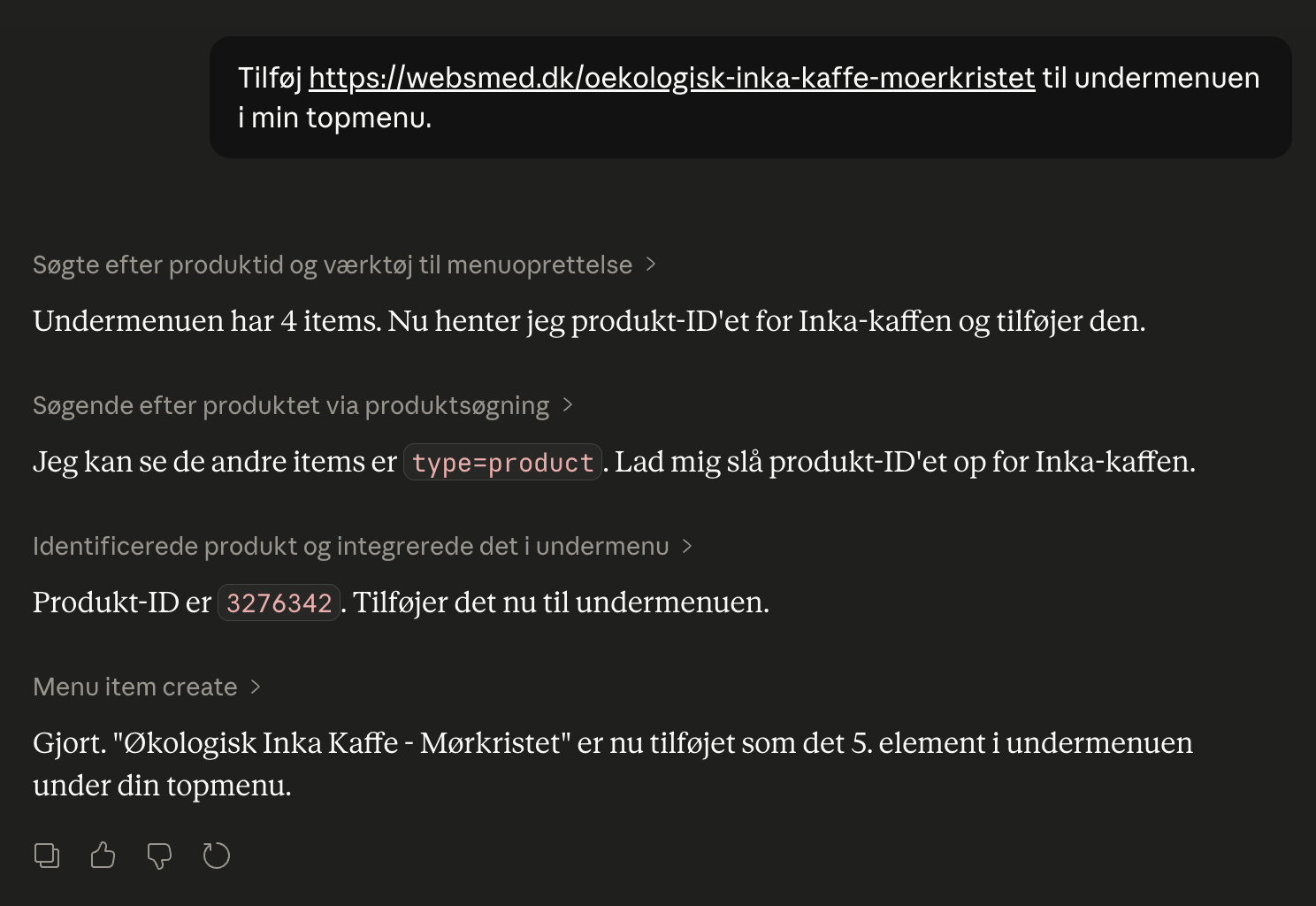
Just type in Danish what you want done—for example , “create a 15% discount code called PÅSKE26 that expires on March 31” —and Claude will handle the rest in your shop. There are over 100 different actions Claude can perform, covering virtually everything you can do yourself in the admin panel: products, orders, campaigns, pages, blog, design, statistics, SEO, and operations.
The connection is based on an open standard called MCP (Model Context Protocol). This means that it’s not just Claude that works—other AI clients that support MCP can also be connected. But right now, Claude is the easiest to set up and the one that delivers the best results in Danish.
What can you ask Claude to do?
Here are some of the most common things store owners ask Claude to do on a daily basis. The list isn’t exhaustive—over 100 actions are available, and you’ll quickly discover that “Can Claude also…?” almost always turns into “yes.”
| Area | Example prompt |
|---|---|
| Sales and Statistics | "How much have I sold this month compared to last month?" "Show me my 10 best-selling products over the last 30 days" "Which products have we sold the least of in the last quarter?" |
| Products and Categories | "Set the price of the black wool hat to 399 kr" "Create 5 new products based on this supplier PDF" "Find all products without an image" "Move all products from Summer Sale to Outlet" |
| Promotions and Discount Codes | "Create a 10% discount code named SOMMER26 that expires on June 30" "Create a promotion: Buy three items in the Coffee category and get the cheapest one free" "Create a gift card for 500 kr that can only be used once" |
| Homepage and Design | "Add a newsletter module at the bottom of the homepage" "Change the primary color of the theme to dark blue" "Add a hero banner with the text 'Spring Sale' at the top of the homepage" |
| Content | "Write a blog post about our new Colombian coffee beans and publish it" "Translate our 'About Us' page into English" "Create a landing page for the spring sale featuring 5 of our best products" |
| SEO and Operations | "Which keywords have returned 0 results in the last month?" "Which 404 errors should I set up redirects for?" "Generate a shipping label for order 1076" |
And you can combine these tasks. "Find the 10 best-selling products from last month, create a 15% off campaign for them, and write a blog post announcing the campaign." Claude handles it all in one seamless conversation.
How to get started in 5 minutes
You’ll need a Claude account (free to create at claude.ai) and your Shoporama admin login. The rest is just copy-paste:
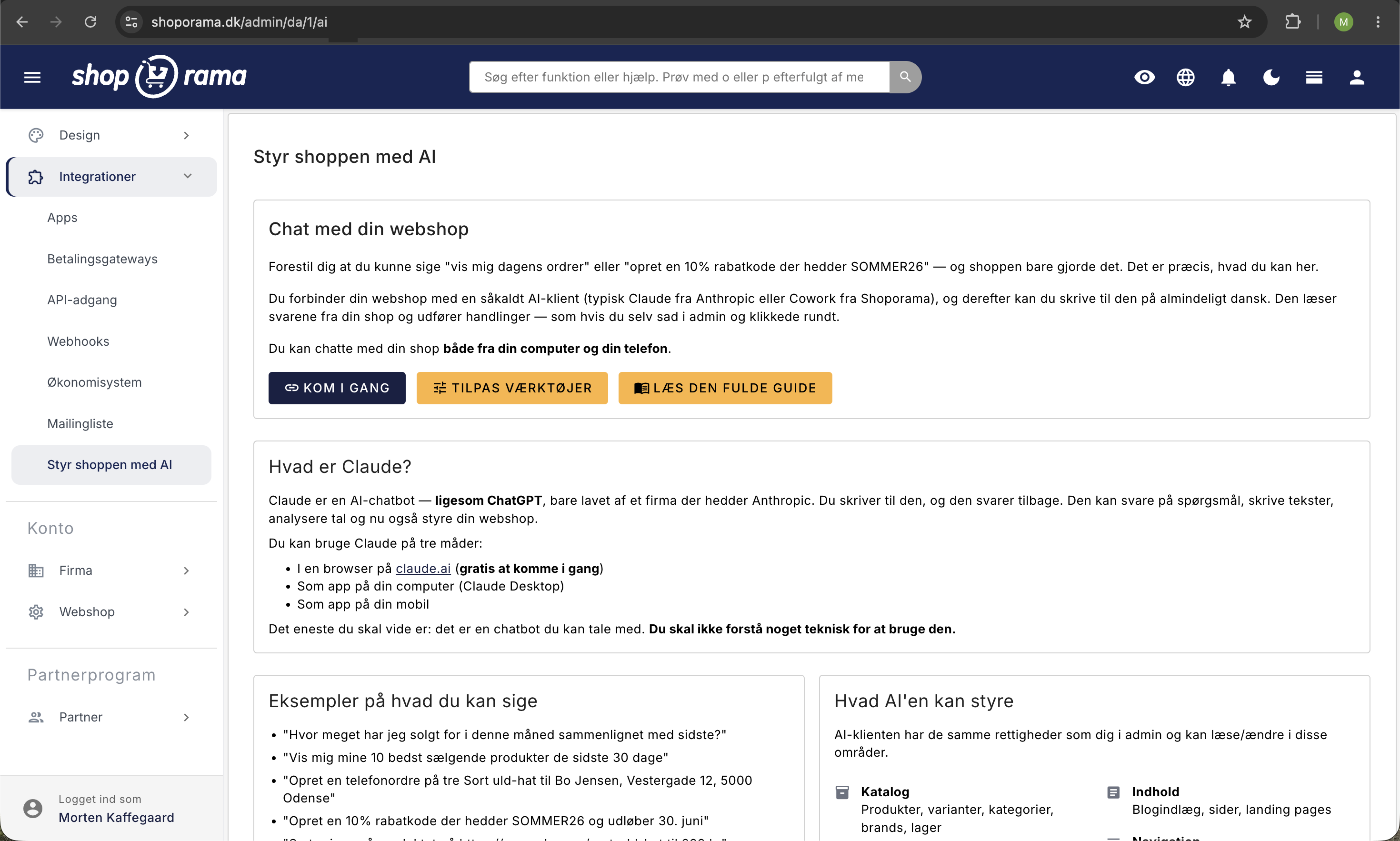
- Log in to your Shoporama admin and open Integrations › Manage Your Store with AI in the left-hand menu.
- Click “ Get Started.” Your unique MCP URL will appear at the top of the page.
- Copy the URL—this is your shop’s address for Claude.
- Open claude.ai in a browser, go to Settings › Connectors, and click “Add custom connector.”
- Paste the URL and click Authorize. Claude will open a login window where you’ll log in with your Shoporama account and select which shop the AI is allowed to work in.
You’re all set. Open a new chat and try the first prompt: Show me the 10 most recent orders. Once the connection is set up on a computer, it automatically works in Claude’s mobile app as well. If you prefer Claude Desktop over the browser, there’s a similar guide for it under Integrations › Manage the Store with AI › Get Started.
Online Store with Claude vs. Online Store with REST API
Shoporama has had a REST API for many years. It’s still there and is used by thousands of integrations—Shipmondo, e-conomic, Klaviyo, ERP systems, and more. The difference between the two approaches:
| With Claude (MCP) | With the REST API | |
|---|---|---|
| Level of difficulty | You write in Danish | You write code (PHP, Python, JS, etc.) |
| Setup | OAuth — 5 minutes | API token, Postman/Swagger, coding |
| Maintenance | None — Claude adapts | You keep your integration running |
| Best for | Daily operations, experiments, ad hoc tasks | Fixed integrations (ERP, inventory, accounting) |
| Security | OAuth 2.0 + PKCE | Bearer token |
| Audit | Built-in 90-day log | You implement logging yourself |
The two are not mutually exclusive. Most online stores use Claude for day-to-day operations and quick experiments, and the classic REST API for the fixed integrations that need to run stably year after year.
Security and Control
“Should I really give an AI access to my online store?” is a fair question. Here’s what you need to know:
- Claude has the same permissions as you. It can’t do anything you can’t do yourself in the admin panel. Nothing more.
- You choose which store it’s allowed to work in. If you have multiple stores on your account, Claude only gets access to the one you approve.
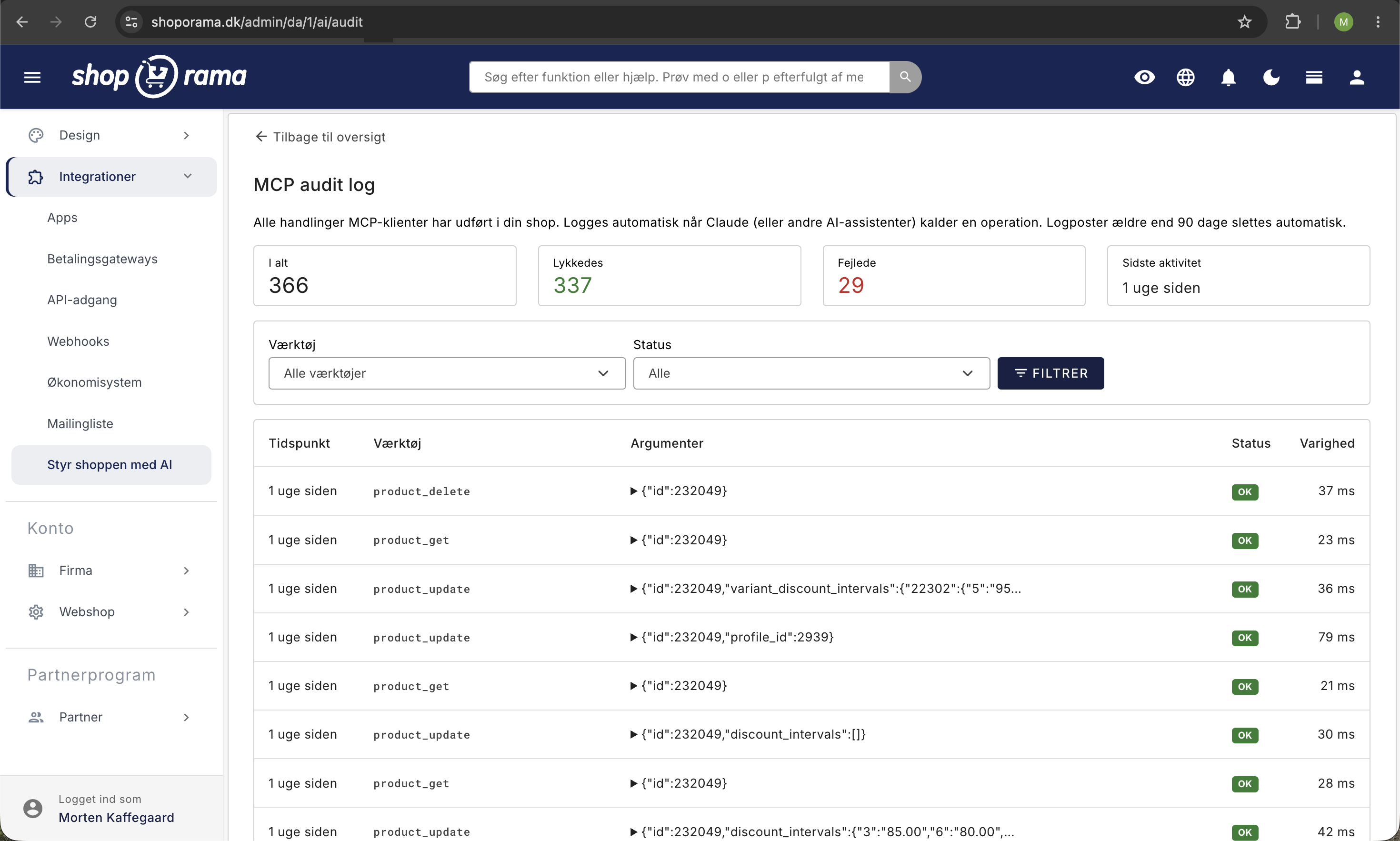
- Everything is logged. Every time Claude performs an action in your shop, it’s recorded in an audit log that you can view yourself. What, when, which call—everything. The log is stored for 90 days.
- OAuth 2.0 + PKCE. The connection is secured using the same protocol that major banks and Google use. No API keys are stored in plain text anywhere.
- You can revoke access at any time. One click in the admin panel, and the old connection is gone.
- Take a backup before making major changes. If Claude needs to clean up several hundred products or change critical settings, take a backup first—just as you would before any major manual intervention.
Does this also work with ChatGPT, Cursor, and other AIs?
Shoporama’s connection uses an open standard called the Model Context Protocol (MCP). This means that it’s not just Claude that can be connected—other MCP-compatible AI clients also work:
- Claude Desktop and claude.ai in the browser—the easiest and most direct way
- Claude in the mobile app —works automatically once the connection is set up from a computer
- Cursor —a popular AI code editor—can also control online stores via MCP
- Cline, Goose, and Cowork —other MCP-compatible clients
- ChatGPT — partially supports MCP via Custom Connectors (under development)
Right now, Claude is the easiest to set up and the one that best understands Danish. We recommend starting there. As the MCP ecosystem matures, you can switch clients without changing anything in your store.
How much does it cost?
The connection between Shoporama and Claude is free and included in all Shoporama subscriptions. There’s no extra license fee, no per-user charge, and no usage-based billing on our end.
Claude itself has a free tier at Anthropic that you can start with. If you use the AI intensively, you can upgrade to a paid plan directly through Anthropic—that’s their price and their bill. Shoporama isn’t involved.
See Shoporama’s pricing for the webshop platform itself. You can try it all for free for 30 days without a credit card.
Ready to give it a try?
The fastest way to understand the value is to try it yourself. Create a Shoporama store, log in, and tackle a small task you’ve been putting off: “Find the 10 products with the most views but the fewest sales, and suggest what I can do.”
Start your free 30-day trial —no credit card, no commitment, and you’ll be connected to Claude from day one. You’ll have an online store up and running in under an hour, and your new AI assistant will be ready to go right away.
Frequently Asked Questions
What’s the difference between Claude and Shoporama’s built-in AI copywriter?
The built-in AI only helps with writing text in the editor—product descriptions, blog posts, meta descriptions. Claude, on the other hand, can manage the entire store: create products, run campaigns, edit the homepage, retrieve sales figures, and much more. The two aren’t mutually exclusive and can be used side by side.
Is it safe to give Claude access to my online store?
Yes. Claude is granted the same permissions as the user who connects it—no more, no less. Access is secured via OAuth 2.0; you choose which store it can operate in, everything is logged in an audit log that you can view yourself, and you can revoke access at any time.
What happens if Claude misunderstands something and makes a mistake?
That can happen, which is why we recommend asking Claude to confirm important changes before they’re made—especially for deletions and bulk updates. The audit log shows exactly what was changed, so you can manually revert the changes in the admin panel. Always back up critical data before making major changes via AI.
Can I use ChatGPT or another AI instead of Claude?
The connection uses the open standard MCP (Model Context Protocol), so other MCP clients such as Cursor, Cline, Goose, and Cowork can also be connected. ChatGPT partially supports MCP via Custom Connectors. Right now, Claude is the easiest to set up and the one that best understands Danish.
Is my customers’ data sent to Anthropic when I use Claude?
When you ask Claude for something involving customer data (e.g. , “show today’s orders”), the relevant information is sent to Claude as part of the conversation—just like when you use another AI chatbot. Anthropic does not, as a rule, use the chat to train AI models. Check their privacy policy for details.
Do I need to be a tech expert to use Webshop with Claude?
No. You don’t need to know how to code, be familiar with APIs, or understand JSON. You create a Claude account, copy a URL from your Shoporama admin into Claude, and you’re all set. It takes about 5 minutes.
Does it also work on mobile?
Yes. Once you’ve set up the connection from a computer, it also works in Claude’s mobile app. You can manage your shop from a café, on the train, or from your couch without opening the admin panel.
Can multiple employees connect their own Claude accounts to the same shop?
Yes. Each employee can connect their own Claude account to the shop. Each connection receives its own unique OAuth token, and the audit log shows which connection performed which actions. Access can be revoked individually for each employee.
Is there an additional cost beyond my Shoporama subscription?
The connection between Shoporama and Claude is free and included in the subscription. Claude offers a free tier at Anthropic that you can start with. If you use it extensively, you can upgrade directly through Anthropic.
What happens if I change my mind and want to revoke access?
You can revoke access at any time in your Shoporama admin under Integrations › Manage the Shop with AI. The old connection will then no longer work.
Can I turn off some of the AI tools if Claude hits the “context limit”?
Yes. In the admin panel under Manage Your Store with AI → Customize Tools, you can disable entire sections, such as the theme, page designer, or blog. This reduces the number of tools Claude loads at startup and frees up more space for the conversation itself. Read the guide “Customize Which Tools Claude Can Use.”
What happens if Claude tries to use a tool I’ve disabled?
The call is blocked on the server, Claude receives a clear error message, and the attempt is logged in the audit log. This restriction acts as an additional security measure on top of your standard API permissions.
Also read our in-depth guide to “Manage Your Store with AI,” the blog post on “MCP and AI in Web Stores,” or check out the REST API if you prefer a coded integration.