Shipping Rates: How to Set Rates by Country and Amount
How to use the pricing matrix under "Shipping Rates": one price per country and shipping method, empty fields that default to 0 DKK, free shipping for orders over a certain amount, and the order in which shipping costs are calculated.
On the Shipping Rates page, you set the cost of each shipping method for each country. It’s set up as a table with countries in the rows and shipping methods in the columns, so you can view and edit all your shipping rates in one place.
An incorrectly set shipping rate will either cost you profit margin on every single order or cause customers to abandon their carts. Here, you’ll get the full picture: how the matrix is structured, how free shipping above a certain amount works, and the order in which shipping costs are calculated when the customer checks out.
Where can you find this page?
Go to Store → Shipping → Shipping Rates in the left-hand menu. Two things need to be set up first: at least one shipping method under Store → Shipping → Shipping Methods, and the countries you sell to under Store → Shipping → Countries. If you don’t have these set up yet, start with “How do I create a new shipping option? ” and “Countries and Currencies.”
How the pricing matrix is structured
The table is a matrix where each cell represents the intersection of one country and one shipping method. That specific combination can therefore have its own price.
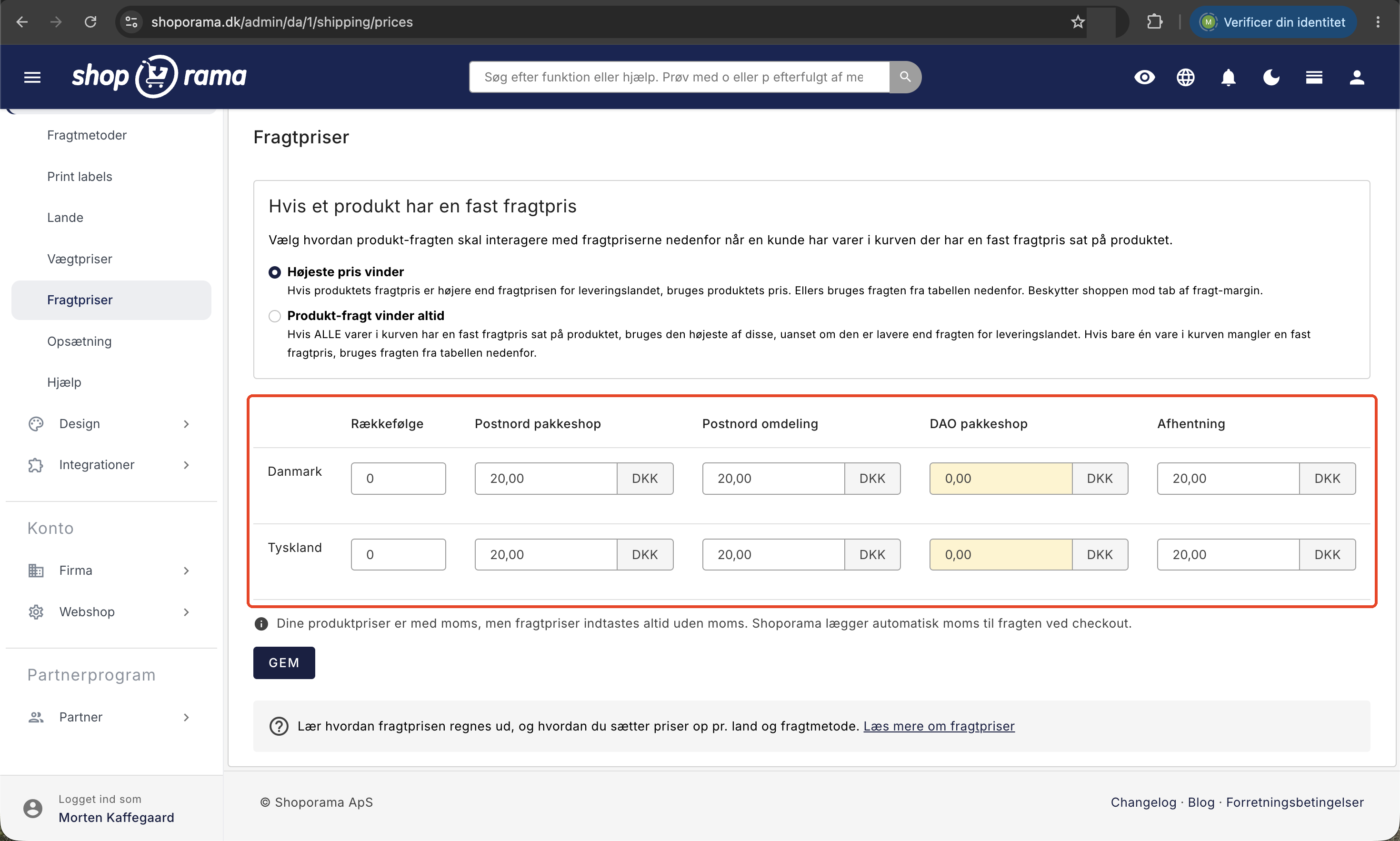
- The first column shows the country’s name. There is one row per country you have created.
- The “Order” column is a small number field with the placeholder “Weighting.” It controls the order in which the countries are listed, with the lowest number at the top.
- Next, there is one column per shipping method, labeled with the method’s name, such as “Postnord Parcel Shop” or “Pickup.”
- Each cell is a price field with the store’s currency listed to the right, e.g., DKK.
If the store offers subscription products, each cell includes an additional field with the placeholder “Price excl. tax for subscription.” This is used when the cart consists exclusively of subscriptions.
How to Enter Prices
- Go to Store → Shipping → Shipping Rates.
- Find the row for the country you want to set prices for.
- Enter the price in the cell under the desired shipping method. Prices are always entered excluding tax.
- Repeat this for all the combinations of country and shipping method you offer.
- Click Save at the bottom of the page.
Note: When you save, the entire table is reloaded with the values currently in your browser. Therefore, make sure the table is complete before clicking Save, and reload the page if it has been left open while a colleague was editing it.
Empty fields default to 0 DKK.
This is the page’s biggest pitfall. An empty price field does not mean “no price” or “this shipping method isn’t available here.” It means 0 DKK—in other words, free shipping for that combination of country and shipping method.
That’s why all fields with a value of 0 automatically get a yellow background. This highlighting isn’t an error, but a reminder that the customer gets free shipping right there. The same applies to a newly created shipping method: it appears as an empty column—i.e., 0 DKK—until you fill it in. Therefore, always go to “Shipping Rates” after you’ve created a shipping method.
Order: What Determines What
- The order of the countries (the rows) is controlled by the “Order” column on this page. For example, set Denmark to 1 and Germany to 2.
- The order of the shipping methods (the columns) is determined by the “Weight” column in the overview under Store → Shipping → Shipping Methods. Methods with the same weight are sorted by name in reverse alphabetical order, so it’s best to assign each method its own number.
If a product has a fixed shipping rate
At the top of the page is the section “If a product has a fixed shipping price.” This applies to products where you’ve entered a shipping price directly in the “Shipping without VAT” field (it’s called “Shipping with VAT” if your product prices include VAT), typically large or heavy items. You can choose between two settings, and the selection applies to the entire store.
Highest price wins
If the product’s shipping price is higher than the shipping price for the destination country, the product’s price is used. Otherwise, the price from the table is used. This is the default setting, and it protects your shipping margin: a heavy item cannot be shipped at the low standard rate just because the customer also added a small item to the cart.
Product shipping always takes precedence
If all items in the cart have a fixed shipping price assigned to them, the highest of these prices is used, even if it’s lower than the country’s shipping rate. If just one item lacks a fixed shipping price, the price from the table is used. Select this option if you want to manually control shipping on a per-item basis.
If you have items that must never be shipped for free, you can check the “Never free shipping” box for each individual product. If such an item is in the cart, the entire free shipping calculation is skipped for that order.
Free Shipping Above a Certain Amount
The pricing matrix does not include amount ranges. This means you cannot enter “0 to 499 kr. costs 49 kr., above that 29 kr.” directly in the table. Instead, the amount-based rules are controlled by the free shipping threshold, which is set in two other places and applies on top of the prices in the matrix:
- Per country: the “Free shipping over” field for the country under Store → Shipping → Countries. Applies to all shipping methods for that country.
- Per shipping method: the “Free shipping over” field for the shipping method. This takes precedence over the country’s threshold for that specific method. If the field is left blank, the country’s threshold is used.
- Exception: the “Never free shipping” checkbox on a shipping method. The shipping cost will never be 0 DKK, regardless of the order size and regardless of the threshold fields.
The cart total must exceed the amount; it cannot be exactly equal to it. A threshold of 499 triggers free shipping starting at 499.01 and up. The full details are in “Free Shipping Over a Certain Amount.”
Weight-based pricing: price based on the cart’s weight
If you want the price to increase with weight instead of being fixed, go to the sister page Store → Shipping → Weight-Based Pricing. There, you first set up weight intervals in grams—for example, 1,000, 2,000, and 5,000—and then enter a price per interval for each combination of country and shipping method.
The weight-based prices override the price from Shipping Rates as soon as the cart’s weight reaches at least one interval, and the price for the highest interval the weight reaches is used. If the cart weighs 2,400 grams and you have intervals of 1,000 and 2,000, the price for 2,000 is used. If the cart weighs less than the lowest interval, the price from “Shipping Rates” remains in effect. The weight is taken from the “Shipping weight (if applicable) in grams” field on the product page.
The same pitfall applies here as on this page, only more severe: a weight-price field that you leave blank counts as 0 DKK and results in free shipping for that weight range. It does not revert to the price listed in “Shipping Rates.” If you create weight ranges, you must therefore enter a price for each combination of country and shipping method you offer.
The order in which shipping is calculated
Shipping rates are calculated step by step, and each step can override the result from the previous one. This is typically where the explanation lies if the customer sees a price different from the one in the table:
- Free shipping for members. If “Free shipping for members” is enabled under the Loyalty Program and the customer is logged in, the shipping cost is 0 DKK, and the rest of the calculation is skipped.
- Discount code with free shipping. If the code’s minimum purchase amount (if any) has been met, shipping is 0 DKK. However, this does not apply if the selected shipping method has “Never free shipping.”
- Starting price based on the country. Before the customer selects a shipping method, the lowest price in the row for that country is used. This is typically the “starting at” price that the theme displays in the cart.
- Price for the selected method. As soon as the customer selects a shipping method, the price in the cell for that specific country and method is applied.
- Weight-based prices. When the cart’s weight reaches one of your weight intervals, the price is overwritten with the weight-based price for the highest interval the cart reaches, even if it’s 0.
- Fixed shipping prices for products. Now either “Highest Price Wins” or “Product Shipping Always Wins” takes effect.
- Subscriptions. If the cart consists exclusively of subscriptions, the subscription price from the cell is used, if it is filled in.
- Free shipping over a certain amount. If the cart total exceeds the threshold, shipping is set to 0 DKK. This is skipped if an item has “Never free shipping” and does not apply to shipping methods marked “Never free shipping.”
- VAT is added. Finally, the VAT rate of the delivery country is added, unless the shipping method is marked as VAT-exempt.
Pay special attention to step 3. The starting price is the lowest price in the entire country’s list, even if it comes from a shipping method you don’t offer in that country. If a column shows 0 for that reason, the country may display “Shipping from 0 kr.” until the customer selects a method. Therefore, enter a realistic price in the cell rather than leaving it blank.
VAT on Shipping
Shipping prices are always entered without VAT, even if your product prices include VAT. VAT is added at checkout based on the delivery country’s rate, so a German customer will be charged German VAT on shipping. If a shipping method is to be completely VAT-exempt, check the box labeled “Shipping is VAT-exempt” on the shipping method itself. Do not check it simply because the price is entered without VAT, as this applies to all methods.
How to Test the Setup
- Add a low-cost item to the cart in your own store and proceed to checkout.
- Select the country you want to test and check the shipping price before selecting a method. This is the country’s lowest price.
- Select each shipping method in turn and verify that the price matches the value in the table cell plus tax.
- Add more items to your cart until you exceed your free shipping threshold, and verify that the shipping cost is 0 kr. for the methods where it should be.
For the tech-savvy
Prices are stored with two decimal places and without a sign, so negative prices and shipping surcharges are not possible. You set a price, not a surcharge. The shipping amount is also stored on the order itself when it’s created, so later changes to the matrix won’t affect orders that have already been placed.
If you want to control which methods can be selected in a country, you do so in the “Shipping Options” field for that country, not by leaving a cell blank. For more information on when the theme should retrieve the shipping methods during checkout, see “Building the Checkout Flow for Shipping.”
Frequently Asked Questions
Why are some of the fields yellow?
Because they’re set to 0. The page highlights all zero prices with a yellow background so you don’t accidentally ship packages for free. If you enter a price, the highlight disappears immediately. If the zero is intentional—for example, for in-store pickup—you can safely leave it as is.
I didn’t enter anything in a field. Does that mean the shipping method can’t be selected?
No, an empty field is saved as 0 DKK, meaning free shipping. If you want to remove a shipping method entirely for a specific country, you must deselect it under “Shipping Options” for that country in Store → Delivery → Countries.
Should I list prices with or without tax?
Excluding VAT, always—even if your store otherwise uses prices that include VAT. VAT is automatically added at checkout based on the rate for the delivery country. If you list the price including VAT, the customer will end up paying VAT twice.
Can I set tiered shipping rates where the shipping cost decreases for larger orders?
Not directly in the matrix, which only allows one price per country and shipping method. You have two options: a free shipping threshold, so that shipping is waived entirely above a certain amount, or weight-based rates under Store → Shipping → Weight-Based Rates, where the price is based on the cart’s weight in grams.
What happens if the cart contains both an item with a fixed shipping price and a regular item?
It depends on the setting at the top of the page. With “Highest Price Wins,” which is the default, the higher of the item’s shipping price and the country’s price is used. With “Product Shipping Always Wins,” all items must have a fixed shipping price; otherwise, the country’s price from the table is used.
The customer received a shipping price different from the one in the table. Where should I look?
Go through the list of calculation steps from the top. Sales tax is added afterward; weight-based rates override the fixed rate; a fixed shipping rate for a product can take precedence; a free shipping threshold can set the price to 0; and both discount codes and the loyalty program can provide free shipping. Also check that the customer was in the country you think they were in.
Do new shipping rates affect orders that have already been placed?
No. The shipping amount is saved with the order when it’s created. If you adjust the prices today, they’ll apply going forward, and existing orders, invoices, and accounting records remain unchanged.
Can I offer free shipping to a single country without affecting other countries?
Yes. The free shipping threshold is set per country, so you can have, for example, 499 kr. in Denmark and no threshold in Germany. You’ll find the “Free shipping over” field for each country under Store → Shipping → Countries.
Do you need help setting up your shipping? Email support@shoporama.dk.
Related articles
Create a new shipping option
Guide to creating new shipping options and assigning them to countries in Shoporama.
Countries and currencies
Guide to setting up countries, VAT rates, VAT zones, shipping options and currency in your Shoporama online store.
Free shipping over a certain amount
How to set up free shipping above a certain amount in Shoporama. The amount limit is set per country under Store, Shipping, Countries, and applies...
Checkout flow and shipping calculation
Guide for developers to implement shipping in the checkout flow of a Shoporama theme.
Create country
Guide to creating a new country as a delivery option in your Shoporama online shop.
Set up PostNord with parcel shop
Guide to setting up PostNord with parcel shop as a shipping option in your Shoporama online shop.