Google Shopping category ID on products
Select the correct Google category for your Google Shopping feed by searching directly in the field for products and categories, or enter the ID via CSV import.
A Google category tells Google what type of item a product is, such as "Coffee" or "Dresses." The category comes from Google's own product category list (the product taxonomy) and is included in your Google Shopping feed. In Shoporama, you select it by searching directly in the Google Category field, both for products and categories.
Google does not require you to specify a category. Google automatically assigns a category to all products, but it is not always accurate. When you select the category yourself, you can be sure the product ends up in the right place—for example, so Google knows it’s clothing and therefore needs to include color and size. It can also make it easier to organize your campaigns in Google Ads.
How to select a Google category for a product
- Open the product and expand the Product Feeds tab.
- Click in the “Google Category” field and type what the product is, such as “coffee” or “dresses.” Suggestions will appear after you type two letters.
- Each result shows the category name, its path (e.g., “Food, Beverages, and Tobacco › Beverages”), and the Google ID on the far right. Use the path to check if it’s the right one: “Coffee” is under “Beverages,” while “Coffee tables” is under “Furniture.”
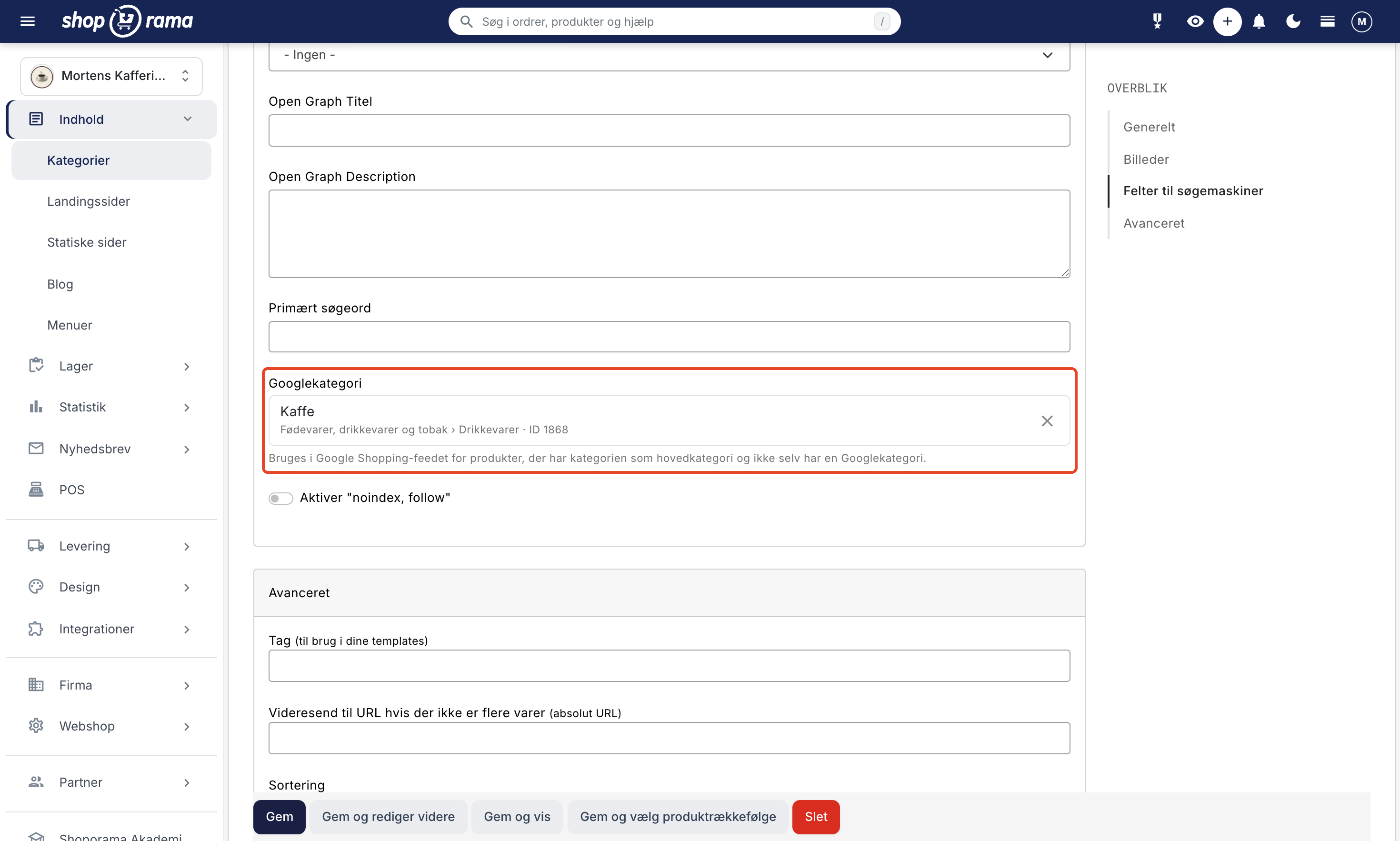
- Click on the category. The field now shows, for example, “Coffee” and below that “Food, Beverages, and Tobacco › Beverages · ID 1868.”
- Click Save.
A new window no longer opens, and you don’t have to look up the ID yourself. If you’re searching for multiple words, all the words must be included in the category, and if you already know the ID, you can search directly by the number.

Change or remove the category
- Select a different one: Click on the selected category, and the search field will reopen.
- Remove it: Click the checkmark on the far right and save. The product will then use the Google category from its main category; see below.
- Keyboard: Use the up and down arrows to scroll through the results, Enter to select, and Esc to close the list.
Google Category for Your Categories
If you have many products of the same type, the quickest way is to set the Google category for the category itself rather than for each product. Open the category under Content → Categories, and find the Google Category field in the Search Engine Fields section. It works the same way as it does for products.
How the feed selects a category for a product:
- If the product itself has a Google category, that one is used.
- If the field is empty, the Google category from the product’s main category is used (selected in the Categories tab on the product).
- If the main category doesn’t have one either, no category is included, and Google chooses one itself.
Note that a subcategory does not inherit from its parent category. Only the product’s main category matters, so set the Google category to the categories that your products have as their main category.
Once you’ve saved the category, the Google category will appear in your Google Shopping feed within about two hours for products that have that category as their main category and do not have a Google category of their own. You do not need to resave the products.
Languages and IDs
Category names appear in the language you use in the admin interface, such as Danish. It is the ID that is saved, and the IDs are the same across all languages. The category therefore applies regardless of the language or country your feed is intended for.
Categories you’ve selected previously
You won’t lose anything. Values you’ve set before are preserved and displayed like this:
- An ID is displayed with the category’s name and path, just as if you had selected it now.
- An ID that Google doesn’t recognize is displayed with the text “Unknown ID. The value is retained until you select another one.”
- Old free text, such as a handwritten path, is displayed as-is with the text "Free text. The value is retained until you select a category."
The values are sent to Google as before, until you select a new category yourself.
Assign Google Categories to Multiple Products
If you need to assign a Google category to many products at once, you have three options:
- At the category level: Assign the Google category to the main category, as described above.
- Bulk editing: Enter the Google ID in the Google Category column. See Bulk Editing of Products.
- CSV import: Use the `google_category` column with the ID.
An example of a CSV file where products are identified by their SKU:
own_id;google_category
PROD-001;1604
PROD-002;3032
Read more in Import Products via CSV. Categories can also be imported using the “google_category” column; see Import Categories via CSV.
If you need the IDs for an import file, you can find them in the Google Category field, where the ID is listed on the far right, or view the complete list in Google’s product taxonomy in Danish.
Typical category IDs
| Google Category | Category ID |
|---|---|
| Clothing and Accessories | 166 |
| Clothing and Accessories › Clothing | 1604 |
| Clothing and Accessories › Clothing › Dresses | 2271 |
| Clothing and Accessories › Handbags, Wallets, and Holders › Handbags | 3032 |
| Electronics | 222 |
| Home and Garden | 536 |
| Sports Equipment | 988 |
| Food, Beverages, and Tobacco › Beverages › Coffee | 1,868 |
Tip
Choose the most specific category. "Dresses" (2271) is better than "Clothing" (1604) because Google will then know exactly what the product is.
Frequently Asked Questions
Are the Google categories I had selected before gone now?
No. All previous values are retained and sent to Google as before. An ID is now displayed with the category name, and the old free-text description remains as is until you select a new category.
Do I need to assign a Google category to all my products?
No. The field is optional, and Google will automatically select a category if you don’t. If you’d like to manage this yourself, the quickest way is to assign the Google category to your categories; this will then apply to all products that have that category as their main category.
What happens if I forget to assign a Google category to a new product?
The product will still be included in the feed. If the main category has a Google category, that one will be used. Otherwise, the product will be sent without a category, and Google will assign one itself.
I get a lot of suggestions when I search. How do I know which one to choose?
Look at the path below the name. It shows where the category belongs, such as “Home and Garden” or “Food.” Choose the one that describes the item most accurately. If necessary, search for a more specific term, such as “dresses” instead of “clothing.”
Do subcategories inherit the Google category from the parent category?
No. A product without its own Google category uses only the one listed for the product’s main category. Therefore, set the Google category for each of the categories used as the main category.
How do I assign a Google category to several thousand products?
Use CSV import with the columns `own_id` and `google_category`, or bulk editing, where you enter the ID. If the products are spread across just a few main categories, it’s even faster to set the Google category for those categories.
How does the category appear in the feed?
It is sent as `google_product_category` in your Google Shopping feed. If there is no category assigned to either the product or the main category, the field is omitted entirely. Use the ID in import files to avoid spelling errors in a text path.
See also: Set up Google Shopping Feed and SEO in Shoporama.
Need help? Contact us at support@shoporama.dk.
Related articles
Set Up a Google Shopping Feed
Guide to Setting Up a Google Shopping Feed in Shoporama: categories, custom labels, product IDs, and catalog matching; feeds by country with the...
Include color and size in Partner Ads feed
Guide to adding color, size and gender to your Partner Ads feed in Shoporama via product profiles and extra fields.
Set up Partner Ads in Shoporama: getting started
Introduction to Partner Ads in Shoporama. Understand what it is, what you get out of it, and get started quickly with product feed and tracking.
Related features
Google Shopping feed is included in your Shoporama shop
Get an automatic Google Shopping feed with all required fields. Included for free in your Shoporama shop. Also Pricerunner and custom feeds.
From analytics to advertising: label products directly from statistics
Label products directly from ABC analysis and dead stock - and use them automatically in your Google Shopping feed for targeted campaigns.