Environmental data on products
Guide to recording environmental data on products in Shoporama. Enter packaging, electronic waste (WEEE), and battery information for EPR compliance.
Shoporama allows you to record environmental data for your products. This is relevant for extended producer responsibility (EPR) and provides you with an overview of packaging, electronics (WEEE), and batteries in your product range, which you can use when submitting reports.
Why do you need to enter environmental data?
Three areas of producer responsibility are relevant for Danish online stores. If you are a producer as defined by law, you must be able to document and report the quantities of packaging, electronics, and batteries.
- Producer responsibility for packaging. The Danish producer responsibility scheme for packaging took effect on October 1, 2025. A producer is the party that first makes the packaging available in Denmark, for example, through direct import or when the online store’s name appears on the packaging. Shipping boxes and other packaging used to ship goods are also covered. Read the guide to producer responsibility for packaging for online stores.
- Electronics (WEEE). The WEEE Directive (2012/19/EU) has been implemented in Denmark through the Electronics Waste Regulation. Since August 15, 2018, Annex 3 of this regulation has classified equipment into 7 categories. Read the WEEE Directive for Danish online stores.
- The EU Battery Regulation (2023/1542) replaces the old Battery Directive and gradually introduces new requirements, including that batteries in many products must be user-replaceable as of February 18, 2027. Read the guide to the EU Battery Regulation.
A brief explanation of the terms in the glossary: EPR, WEEE, and producer responsibility.
This section is a brief, general introduction and does not constitute legal advice. Whether you are considered a producer and what you are required to report depends on the regulations applicable to your business. If you have any questions, please contact Dansk Producentansvar or your collective scheme.
Activate environmental data
You’ll find environmental data when you edit a product:
- Expand the “Legal, VAT, Customs, and Environment” tab. It’s at the bottom of the product page, and you can also access it from the menu on the right.
- Find the “Environmental Data (EPR)” section.
- Toggle the “Register environmental data for this product ” switch under “Producer Responsibility.” This will display the fields for packaging, electronics, batteries, and registration.
- Fill out the fields relevant to the product and save.
If you turn the toggle off again for a product with environmental data, the message “When you save, the product’s environmental data will be deleted” will appear. If you save, all environmental fields for the product will be deleted.
Packaging
Specify the weight of the packaging per unit in grams, broken down by material:
- Paper/cardboard
- Plastic
- Metal
- Glass
- Wood
- Other material
Under “Weights,” select “Who is the manufacturer of the packaging in Denmark? ” with the following options:
- Not specified
- We are the manufacturer (e.g., our own imports or our name on the packaging)
- A Danish supplier is the manufacturer
The tooltip explains: “The party that first makes the packaging available in Denmark is the manufacturer, e.g., through our own imports or when the store’s name appears on the packaging. If you purchase the item from a Danish supplier, it is typically the supplier.” This field is also included in the export of environmental data, so you can see which items you yourself have specified as the manufacturer of the packaging.
Electronic Waste (WEEE)
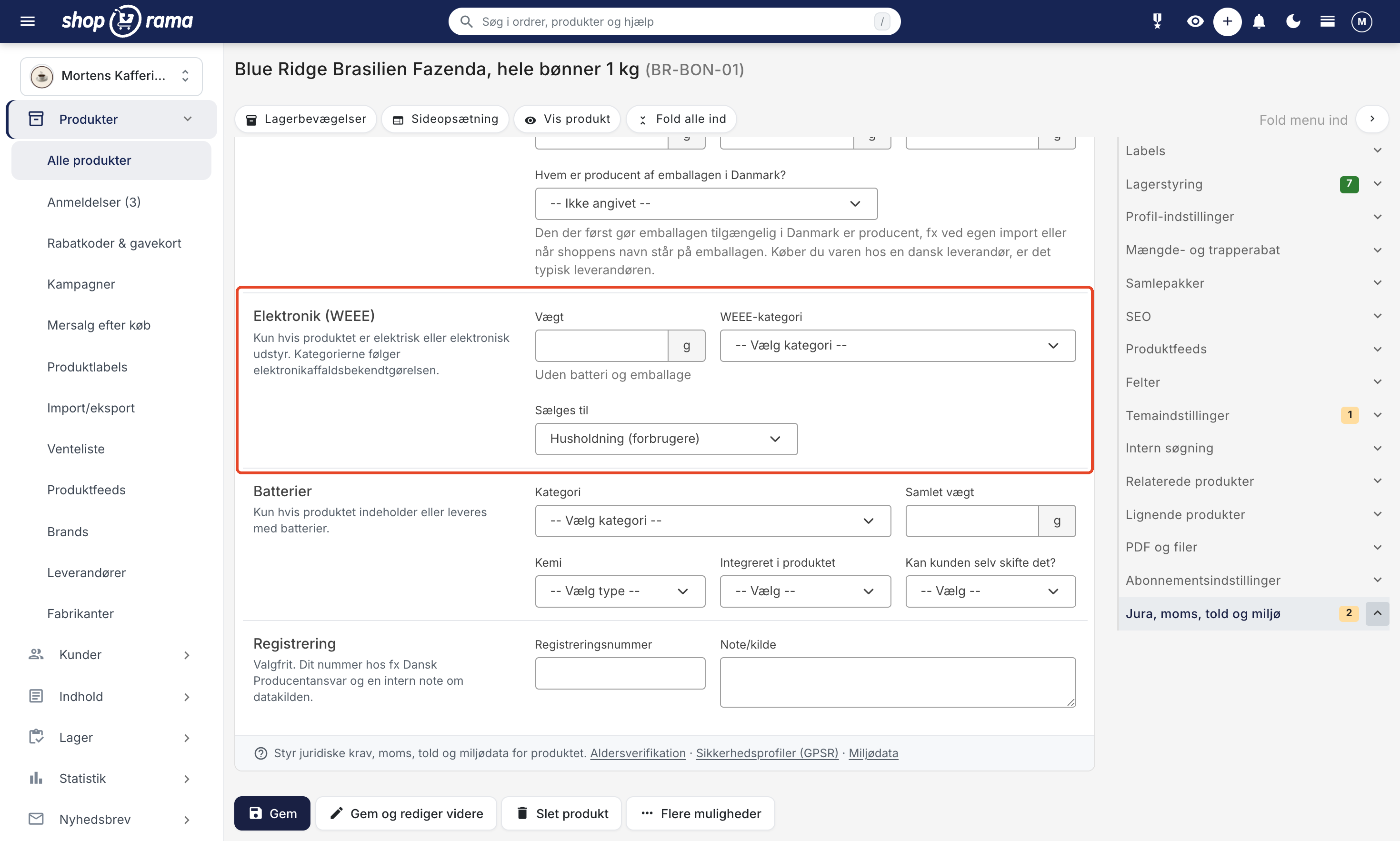
If the product is electrical or electronic equipment, fill in the following:
- Weight: the device’s weight in grams, excluding the battery and packaging.
- WEEE category: one of the 7 applicable categories from Annex 3 of the WEEE Regulation.
- Sold to: Household (consumers), which is the default, or Business (for companies only).
The 7 WEEE categories are:
- Heat exchange equipment (e.g., refrigerators, heat pumps)
- Displays and equipment with a display larger than 100 cm²
- Light sources (e.g., LED bulbs)
- Large appliances (with an exterior dimension exceeding 50 cm)
- Small appliances (no side longer than 50 cm)
- Small IT and telecommunications equipment (no side longer than 50 cm)
- Solar panels
Old categories: The 10 categories from before 2018, such as "Small household appliances" and "Toys, leisure, and sports equipment," can no longer be selected. If a product has an old category, it will appear as “Old category: … (select a new one),” and it will remain until you select a new one. Shoporama does not automatically translate because the old and new categories do not correspond.
Batteries
If the product contains batteries or comes with batteries, fill in:
- Category according to the EU Battery Regulation: Portable battery (e.g., AA, coin cell, phone), Battery for light vehicles (e.g., electric bike, electric scooter), Vehicle starter battery (SLI), Industrial battery, or Battery for electric cars.
- Total weight of the batteries in grams.
- Chemistry: Lithium-ion, Lithium-polymer, Non-rechargeable lithium, NiMH, NiCd, Alkaline, Zinc-carbon, Silver oxide, Zinc-air, Lead-acid, or Other. This field was previously labeled “Type.” "Button cell" is a format, not a chemistry, so it cannot be reselected. A previous value is retained until you select the chemistry.
- Integrated into the product: Yes, integrated, or No, removable.
- Can the customer replace it themselves?: Yes or No. This is relevant to the EU’s requirements for replaceable batteries effective February 18, 2027.
Registration
The fields are optional. In "Registration Number," you can enter your number, e.g., from Dansk Producentansvar, and in " Note/Source," you can note where you obtained the figures, e.g., a data sheet from the supplier. The note is internal and does not appear in the store.
Edit multiple products at once
If you have many products, you don’t need to open them one at a time:
- Table editing: Select the products in the product overview, click “Table Editing,” and enable the environmental columns under “Select Fields,” such as “Environment: Enabled,” packaging weights, “Packaging: Manufacturer,” “WEEE: Category,” “WEEE: End User,” “Battery: Category,” and “Battery: Replaceable by End User.” Read more in Bulk Editing of Products.
- CSV Import and Export: Use the columns env_enabled, env_packaging_paper, env_packaging_plastic, env_packaging_metal, env_packaging_glass, env_packaging_wood, env_packaging_other, env_packaging_producer, env_weee_weight, env_weee_category, env_weee_end_user, env_battery_category, env_battery_weight, env_battery_type, env_battery_integrated, env_battery_replaceable, and env_epr_registration_number. "Producer" is entered as " shop " or "supplier," "Sold to" as "empty" (household) or " business," and the yes/no fields as 1 or 0. The categories are entered using the codes listed in the section for developers below. Read more in Import Products via CSV.
Export Environmental Data for Sold Items
For reporting purposes, you can download a consolidated file containing environmental data for the items you have sold:
- Go to Orders > Order Export.
- Specify a time period using order numbers or dates, typically an entire calendar year.
- Click Download Environmental Data, and download the CSV file once the export is ready.
The file contains the product name, item number, EAN, quantity sold, and environmental data, where the weights in grams are multiplied by the quantity sold. The new columns for manufacturer, "Sold to," battery category, and "Replaceable battery" are listed last, so existing spreadsheets that read columns by position will work as before. Only products with registered environmental data are included.
Tip
Use table editing or CSV import to enter environmental data for multiple products at once, instead of filling it in manually for each product.
For Developers: Environmental Data via REST API
This section is for developers. All environmental data fields are available in Shoporama’s REST API as an ` environment` object on the product. This makes it easy to synchronize data from a PIM or ERP system.
- Retrieve: GET /REST/product/{id} returns the `environment` object if the product has environmental data.
- Update: PUT /REST/product/{id} with an `environment` object. This is a partial update, so only the fields you include will be changed. An empty string clears a field.
- Delete all environmental data: Send the `environment` object with ` enabled: false`.
- Invalid values: An unknown category, chemical, or manufacturer is rejected with error code 400. The old WEEE categories and “button-cell” are still accepted so that existing integrations continue to work.
Example Payload
PUT /REST/product/12345
{
  "environment": {
    "enabled": true,
    "packaging_paper": 50,
    "packaging_plastic": 5,
    "packaging_producer": "shop",
    "weee_weight": 320,
    "weee_category": "small_under_50cm",
    "weee_end_user": "",
    "battery_category": "portable",
    "battery_weight": 30,
    "battery_type": "li-ion",
    "battery_integrated": 1,
    "battery_replaceable": 0,
    "epr_registration_number": "12345678"
  }
}
Available fields
- enabled (boolean). Enable environmental data. false deletes all environmental data for the product.
- packaging_paper, packaging_plastic, packaging_metal, packaging_glass, packaging_wood, packaging_other (integer, grams per unit).
- packaging_total (integer, in the response only). The sum of the packaging weights.
- packaging_producer (string). shop (the shop is the manufacturer), supplier (a Danish supplier), or null (not specified).
- weee_weight (integer, grams). Weight excluding battery and packaging.
- weee_category (string). temperature_exchange, screens_over_100cm2, light_sources, large_over_50cm, small_under_50cm, small_it_telecom, or photovoltaic_panels, corresponding to categories 1–7. The old values `large_equipment`, `small_equipment`, `it_telecom`, `consumer_equipment`, `lighting`, `electrical_tools`, `toys_leisure_sports`, `medical_devices`, `monitoring_control`, and `dispensers` are still accepted and returned, but should be replaced.
- weee_end_user (string). "null" means household; "business" means commercial.
- battery_category (string). portable, lmt, sli, industrial, or ev.
- battery_weight (integer, grams, total per product).
- battery_type (string, battery chemistry). li-ion, li-polymer, lithium-primary, nimh, nicd, alkaline, zinc-carbon, silver-oxide, zinc-air, lead-acid, or other. The old value “button-cell” is still accepted.
- battery_integrated (0/1). 1 means integrated; 0 means the battery is removable.
- battery_replaceable (0/1). 1 means the customer can replace the battery themselves.
- epr_registration_number (string).
- note (string). Internal note about the data source.
You can find the full technical documentation in Shoporama’s OpenAPI specification under the `product` endpoint.
Frequently Asked Questions
Where can I find the environmental data fields in the admin panel?
Edit a product and expand the “Legal, VAT, Customs, and Environmental” section at the bottom of the page. Under the “Environmental Data (EPR)” section, toggle the “Register environmental data for this product” switch to “On,” and the fields will appear.
Do I need to fill out environmental data for all products?
You only need to fill in the information relevant to the specific product. If you sell general merchandise, this typically involves packaging. If you sell electronics, you’ll also need to fill in the WEEE fields, and if the product contains batteries, you’ll need to fill in the battery fields. Whether you’re subject to producer responsibility at all depends on your business.
What happens if I turn off "Register environmental data for this product"?
The text “When you save, the product’s environmental data will be deleted” will appear. If you save, all environmental fields for the product will be deleted, including the registration number and note. The rest of the product is not affected. If you change your mind before saving, simply turn the feature back on.
Who is the manufacturer of the packaging, and do shipping boxes count?
The producer is the party who first makes the packaging available in Denmark—for example, through their own import—or when your name appears on the packaging. If you purchase the item from a Danish supplier, the supplier is typically considered the producer of the item’s own packaging. Shipping boxes and packing materials are also considered packaging and are included. If you’re unsure about your situation, contact Dansk Producentansvar or your collective scheme.
What should I do if I ship multiple items in the same box?
State the average packaging weight per unit. For example, if you typically ship ten items in the same box, divide the box’s weight among the ten units. This ensures that the totals in the export report are as accurate as possible, regardless of order size.
My product has a built-in battery. How do I report this?
Enter the device’s weight without the battery and packaging under Electronics (WEEE), and the battery’s weight under Batteries. Select the category and chemistry, set “Integrated into the product” to “Yes, integrated,” and indicate whether the customer can replace the battery themselves. A power bank or a Bluetooth speaker is typically classified as “Portable battery.”
It says “Old category: … (select a new one).” Is my data gone?
No. The old WEEE category has been preserved and will remain until you select one of the 7 new categories. Shoporama does not automatically select a category for you because the old and new categories do not correspond. The same applies to the “Button cell” battery type: instead, select the battery’s chemistry—such as silver oxide, lithium, or alkaline—and the “Portable battery” category.
Can I edit environmental data for multiple products at once?
Yes. Use the table editor, where you can enable the environmental columns under “Select Fields,” or the CSV import with the “env” columns. If you’re a developer, you can also update the “environment” object via the REST API.
How do I retrieve the data for my report?
Go to Orders > Order Export, select the period, and click Download Environmental Data. The export includes paid orders. Canceled orders aren’t included, but credited orders are, so be sure to subtract any returned items yourself. If you have a lot of orders, the same product may appear in multiple rows, so combine the rows in Excel, for example.
Does Shoporama file the report for me?
No. Shoporama collects data on the products and provides you with an export, but you are responsible for submitting the report to Dansk Producentansvar or your collective scheme yourself. The export is not intended for bookkeeping purposes. The fees you pay should be recorded as regular expenses.
If you have questions about the environmental data fields, please email support@shoporama.dk.
Related articles
Age verification on products
Here's how to set an age restriction of 15, 16, or 18 for products in Shoporama so that the customer's age is verified when paying with ePay....
Google Shopping category ID on products
Select the correct Google category for your Google Shopping feed by searching directly in the field for products and categories, or enter the ID...
Related features
Environmental data on products
Record environmental data on your products with Shoporama. Packaging, electronics (WEEE) and batteries. Export summarized data for EPR reporting.
EPR (Extended Producer Responsibility)
EPR (Extended Producer Responsibility) is the principle that manufacturers bear responsibility for packaging, electronics and batteries throughout...
WEEE (electronic waste)
WEEE is electronic waste covered by EU Directive 2012/19/EU. Get an overview of categories, obligations for webshops and how Shoporama supports...
Producer Responsibility
Producer responsibility means that the manufacturer or importer is responsible for the disposal of the product. Get an overview of packaging, WEEE...
Danish packaging producer responsibility: what to report and how Shoporama covers it
The law came into force on October 1, 2025. How to register with DPA-System and report packaging weights directly from Shoporama without additional...
The WEEE directive for Danish webshops: requirements, categories and how to get started
Guide to the WEEE directive for webshops: DPA-System duties, the 10 categories, labeling, reporting and how Shoporama keeps track of environmental...
EU Battery Regulation 2023/1542: what webshops need to know
The new EU Battery Regulation (2023/1542) replaces Directive 2006/66 and introduces battery passport, CO2 labeling and stricter requirements. See...