OAuth - give apps access to your webshop
Learn how OAuth works in Shoporama. Give third-party apps secure access to your online store without sharing your password.
Shoporama supports OAuth, allowing third-party apps to securely access your online store without you having to share your password. When an app requests access, you log in with your Shoporama account, select which online store the app should have access to, and determine the level of access.
Here’s how it works
- The app sends you to Shoporama: You’ll be redirected to a login page on shoporama.dk
- Log in: Enter your Shoporama email and password
- Select an online store: If you have multiple online stores, choose the one the app should have access to
- Select access level: Choose between Read, Write, and Full
- Authorize: Shoporama generates an API key and redirects you back to the app
Access Levels
You can choose between three access levels:
- Read: The app can only retrieve data (products, orders, etc.) but cannot make any changes
- Write: The app can create, update, and delete data, but cannot retrieve it
- Full: The app can both retrieve and modify data in the selected online store
The access level isn’t the only restriction. If the company administrator has assigned you a role other than Full Access in the online store—such as Employee or Marketing—the app can only perform the actions permitted by that role, even if you select Full Access. Requests outside the scope of your role will be rejected. If your role changes later, the new role will also apply to the connections you’ve already approved. If you want the app to have full capabilities, have a user with the “Full Access” role approve the connection. Read more in Roles and Permissions.
Claude and other AI connections can only have the “Read” or “Full” access level, and they require the “Full Access” role. Therefore, when you connect an AI, the login page will only display the online stores where you have the “Full Access” role. If you do not have Full Access to any of your online stores, or if you are restricted to specific categories, the page will instead display the message: “Your role does not grant access to connect AI to your online stores. This requires Full Access. Contact your company administrator." No key will be created.
Security
- Your password is never shared with the app; it only receives an API key
- You choose exactly which online store the app has access to
- You determine the access level
- If the company administrator has assigned you a restricted role in the online store, that restriction also applies to the app
- API keys can be revoked at any time under Integrations → API Access
- All new access grants are logged with the time and user. If you are a company administrator, you can view them under Company → Users → Activity Log
- Access is tied to the user who authorized it. If the user is removed from the online store, the key is automatically revoked, and the app stops working
When a user is removed from the online store
If you remove a user from the online store, or if you revoke the user’s access to that specific online store, all API keys the user obtained via OAuth for the online store will be revoked. This also applies to Claude, the POS app, and the scanner app. The app will then receive a 401 Unauthorized response, and if it needs access again, it must be re-authorized by a user who has access to the online store. A revoked key may still appear on the list under Integrations → API Access, but it will not work, and you can delete it. API keys that a user with the Full Access role has created manually under Integrations → API Access are not linked to a user and are not affected. However, a key created there by a user with the Developer role is linked to that user and will also be revoked. Read more in Remove a user from your store.
Manage Access
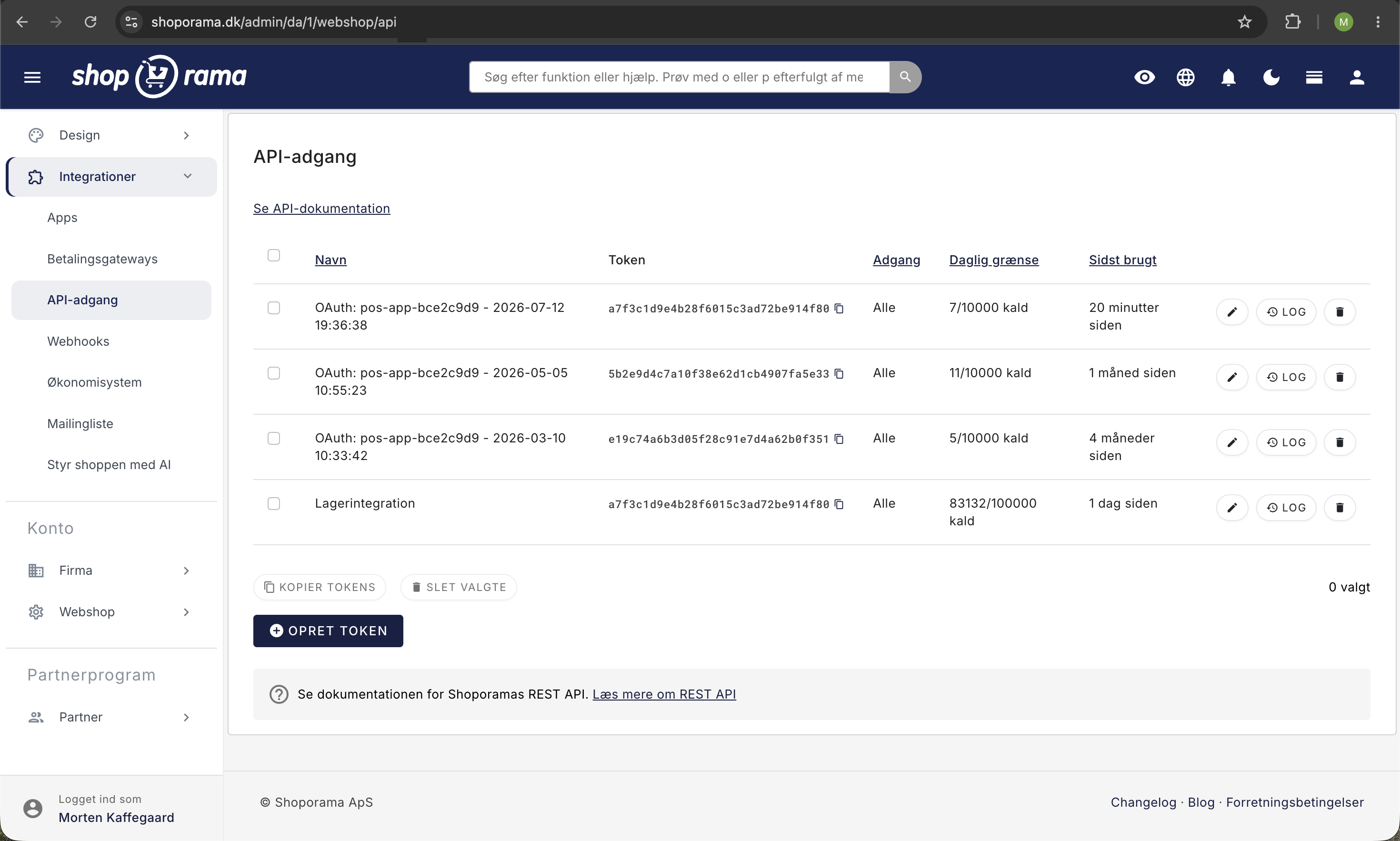
API keys generated via OAuth appear under Integrations → API Access in your admin panel with the prefix "OAuth:". Here, you can see when the key was last used, and you can revoke access if you no longer want the app to have access. Users with the Full Access role can view all keys here. Users with the Developer role can also access this page, but can only view and revoke their own keys and connections. New connections are also listed in the activity log under Company → Users → Activity Log, which only the company administrator can access.
For Developers
If you’re building an app that needs to integrate with Shoporama, you’ll find a complete OAuth guide with code examples in PHP, Laravel, JavaScript, Node.js, and Python in the API documentation. Handle a 401 Unauthorized error by sending the user through the OAuth flow again, as the key may have been revoked—for example, when the user who authorized the app has been removed from the online store. If the app receives a 403 error with the error code `insufficient_role`, the key is valid, but the role of the user who authorized the connection does not permit the request. Sending the same user through the flow again will not help. Instead, display the message from the response and ask the store to change the user’s role or have a user with the “Full Access” role authorize the connection.
Tip
If you have any questions about OAuth or API access, feel free to contact us at support@shoporama.dk.
Related articles
Facebook Conversions API
Guide to the Facebook Conversions API on Shoporama: setup with Pixel ID and access token, automatic deduplication of purchases, content_ids that...
Find or create an API key
Guide to finding your API key in Shoporama, which is used for integrations with e.g. Shipmondo.
Log in with SFTP
Guide to logging in to your Shoporama online store with SFTP so you can edit your theme.
Related features
Headless Commerce and OAuth
Use Shoporama as a headless backend with OAuth login and a comprehensive REST API. Build custom frontends, apps and integrations.
REST API - build exactly the integration you want
Full REST API with access to products, orders, customers and more. Build your own integrations, apps or a headless frontend.
REST API
REST API is a standard for system communication over HTTP. Read about REST APIs, integrations and how webshops use them.