Sales per channel - see which channels are driving revenue
Find out which channels are generating revenue in your online store. Shoporama's sales per channel statistics show revenue, orders and AOV per channel.
What does "Sales by Channel" show?
Under Statistics → Sales by Channel, you can see which channels actually lead to sales. It’s not enough to know where your visitors come from—you need to know where your customers come from. This page gives you the answer.
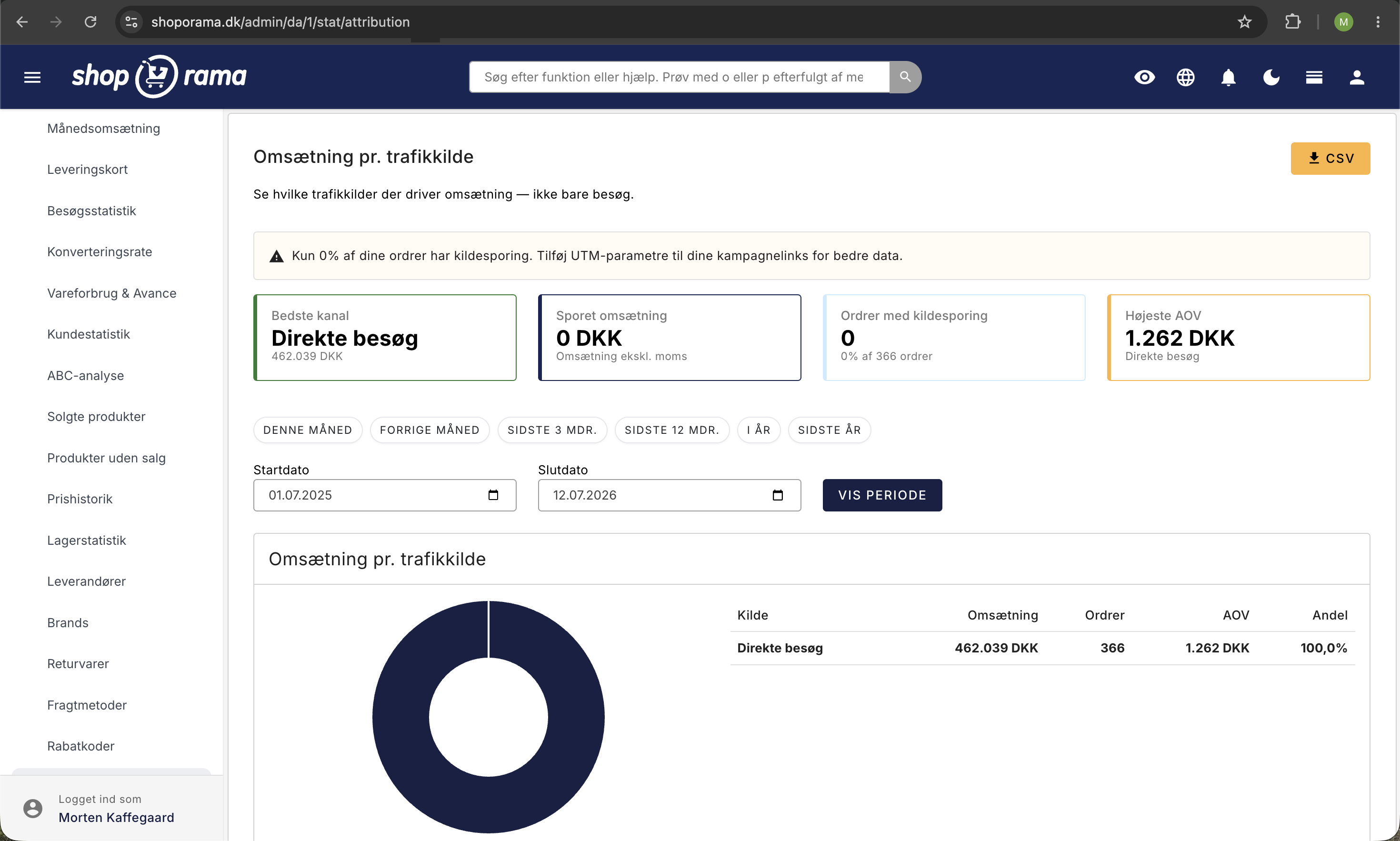
The four key metrics at the top
At the top of the page, you’ll see four cards:
- Best Channel — the traffic source that generated the most revenue during the period
- Tracked Revenue — the total revenue from orders where we know the traffic source
- Orders with source tracking — the number of orders where the traffic source is recorded
- Highest AOV — the channel with the highest average order value
Donut chart and table
The donut chart provides a quick visual overview of the distribution of revenue across channels. The table below shows detailed figures for each traffic source—revenue, number of orders, average order value, and share of tracked revenue.
What are UTM parameters?
UTM parameters are small pieces of code that you add to your links so you can track exactly which campaign, channel, or ad sent a visitor to your store. A link with UTM parameters looks like this:
dinshop.dk/?utm_source=facebook&utm_medium=cpc&utm_campaign=foraar2026
The most important parameters are:
- utm_source — where the traffic comes from (e.g., Facebook, Google, newsletter)
- utm_medium — the type of traffic (e.g., CPC, email, social)
- utm_campaign — the name of the campaign (e.g., spring2026, black-friday)
How to Add UTM Parameters
Add UTM parameters to all links in your campaigns—newsletters, Facebook posts, Google Ads, Instagram bios, etc. You can use Google’s free Campaign URL Builder to generate links with the correct parameters.
Last-touch attribution
Shoporama uses last-touch attribution, which means that the entire sale is attributed to the most recent traffic source before the purchase. If a customer first finds your store via Google but later returns via a newsletter and makes a purchase, the sale is attributed to the newsletter.
This model is simple and easy to understand, but be aware that it may underestimate channels that generate awareness (such as social media) and overestimate channels that capture customers close to the time of purchase (such as email and retargeting).
Warning about Missing UTM Data
If a large portion of your orders lack source tracking, the page will display a warning. This typically means you’re not using UTM parameters consistently in your campaign links. The more links you tag with UTM, the more complete your picture of which channels drive sales will be.
Tips
- Tag all campaign links —use UTM parameters in newsletters, social media, ads, and affiliate links
- Look at AOV by channel —a channel with fewer orders but a higher AOV can be more profitable than a channel with many small orders
- Combine with other metrics —use the conversion rate metric and the metrics overview to get the full picture
- Do you sell in multiple countries? Then “Sales by Country” shows which countries your revenue comes from and how they’re performing
- Set up server-side tracking —with server-side tracking, you’ll also capture conversions from users with ad blockers
Related articles
Statistics and analytics in Shoporama
Get an overview of Shoporama's built-in statistics tools: dashboard, revenue, profit margin, ABC analysis and much more. Learn how to use data to...
Visitor statistics - understand your eCommerce traffic
See how many people visit your webshop, where they come from and how they behave. Understand sessions, bounce rate and traffic sources.
Conversion rate - understand and improve your stats
Understand what your conversion rate means and how to use the statistics page in Shoporama to track your progress over time.
Tracking in your Shoporama webshop
Enable Shoporama's built-in tracking and send precise tracking data to Facebook, Google Ads, GA4, TikTok, and more. Server-side, GDPR-compliant,...
Sales reports and revenue in dashboard
Guide to the Shoporama dashboard: view revenue, orders, and visitors on the home page; customize the dashboard with the modules you need; and find...
Sales by Country: Compare Your Countries in the Statistics
Statistics → Sales by Country shows revenue, orders, customers, and contribution margin for each country where you sell, as well as the Sales from...
Related features
Attribution
Attribution is all about determining which marketing channels are credited for a sale. Learn about attribution models, challenges and practical...
Campaign tracking
Campaign tracking with UTM parameters and conversion tracking shows which campaigns are driving sales. Learn about UTM, tracking setup and...
UTM parameters
UTM parameters are tags added to your links that show which campaigns and channels are driving traffic and sales. Learn about the 5 parameters and...
EPC - Earnings Per Click
EPC measures revenue per click in affiliate marketing and ads. Learn about calculation, comparison with other metrics and how to improve your EPC.
ROAS
ROAS shows how much revenue you generate per ad dollar. Learn about calculation, good ROAS levels, optimization and limitations for your online shop.
TOF
TOF (Top of Funnel) is the first stage of the sales funnel where you create brand awareness. Learn about TOF channels, metrics and strategy for...
Statistics and analytics
Dashboard, revenue, profit margin, ABC analysis and more. Shoporama's built-in statistics tools give you insights to run your online store profitably.