Stock notification: Notify your customers when items are back in stock
Learn how to set up email notifications so your customers can be notified when out-of-stock products are restocked in your Shoporama online store.
Shoporama har en indbygget funktion, der lader dine kunder tilmelde sig notifikationer på udsolgte produkter. Når varen kommer på lager igen, sendes der automatisk en email til alle tilmeldte.
For at det virker, skal du have to ting i dit tema:
- En tilmeldingsformular på din produktside
- En mail-skabelon der hedder in_stock_mail.html
Alle standard-temaer (Delaware, DelawareDK, California, Alaska m.fl.) har begge dele med fra starten.
Tilmeldingsformularen
Hvis du bygger dit eget tema eller vil tilpasse formularen, ser den grundlæggende struktur sådan ud:
<form action="" method="post">
  <input type="hidden" name="out_of_stock_signup" value="1"/>
  <input type="hidden" name="product_id" value="<{$product->getProductId()}>"/>
  <input type="email" name="email" placeholder="Din e-mail" required/>

  <label>
    <input type="checkbox" name="mailinglist" value="1"/>
    Tilmeld også nyhedsbrev
  </label>

  <input type="submit" value="Giv mig besked"/>
</form>
De vigtige felter er:
- out_of_stock_signup: fortæller Shoporama at det er en lager-tilmelding
- product_id: produktets ID
- email: kundens email-adresse
- mailinglist (valgfrit): tilmelder samtidig nyhedsbrev. Dette er det officielle feltnavn brugt i Shoporamas standard-temaer (Delaware/DelawareDK)
Varianter
Hvis du bruger produktvarianter og ønsker at notificere på en specifik variant, skal du inkludere feltet attribute_value_id med variantens ID. I mail-skabelonen vil varianten være tilgængelig via variablen $variant_name.
Mail-skabelonen
Når et produkt kommer på lager igen, sender Shoporama automatisk en email baseret på skabelonen in_stock_mail.html i dit tema. Skabelonen har adgang til $product-objektet, så du kan vise produktnavn, link og andre detaljer.
Bruger du DelawareDK eller Delaware, kan du ændre mailens emne og indhold uden at røre koden. Gå til Design → Temaindstillinger og find felterne På lager-e-mail: Emne og På lager-e-mail: Indhold i afsnittet E-mails (i det engelske Delaware hedder de In Stock Email). Her kan du bruge tags som [product_name] og [product_url], der automatisk bliver erstattet med produktets navn og link. Med Mailtest kan du se, hvordan mailen ser ud, før en kunde får den.
Se ventelisten med tilmeldte kunder
Under Produkter → Venteliste ser du alle de produkter, som kunderne venter på. Der er én linje pr. produkt og variant, og listen er sorteret, så de mest efterspurgte står øverst. I produktoversigten står der også X på mailingliste ved de produkter, der har tilmeldinger. Vil du have en genvej i selve produktrækken, kan du klikke på tandhjulet yderst til højre i tabellens overskriftsrække, så Tilpas visning åbner, og slå Venteliste til under Knapper i produktrækken. Ikonet vises kun på produkter, hvor nogen venter, og holder du musen over det, står antallet. Har du ikke valgt det som ikon, ligger punktet Venteliste i stedet i menuen med de tre prikker, også kun når nogen venter. Linket X på mailingliste, ikonet, og menupunktet åbner alle produktets egen liste med tilmeldinger.
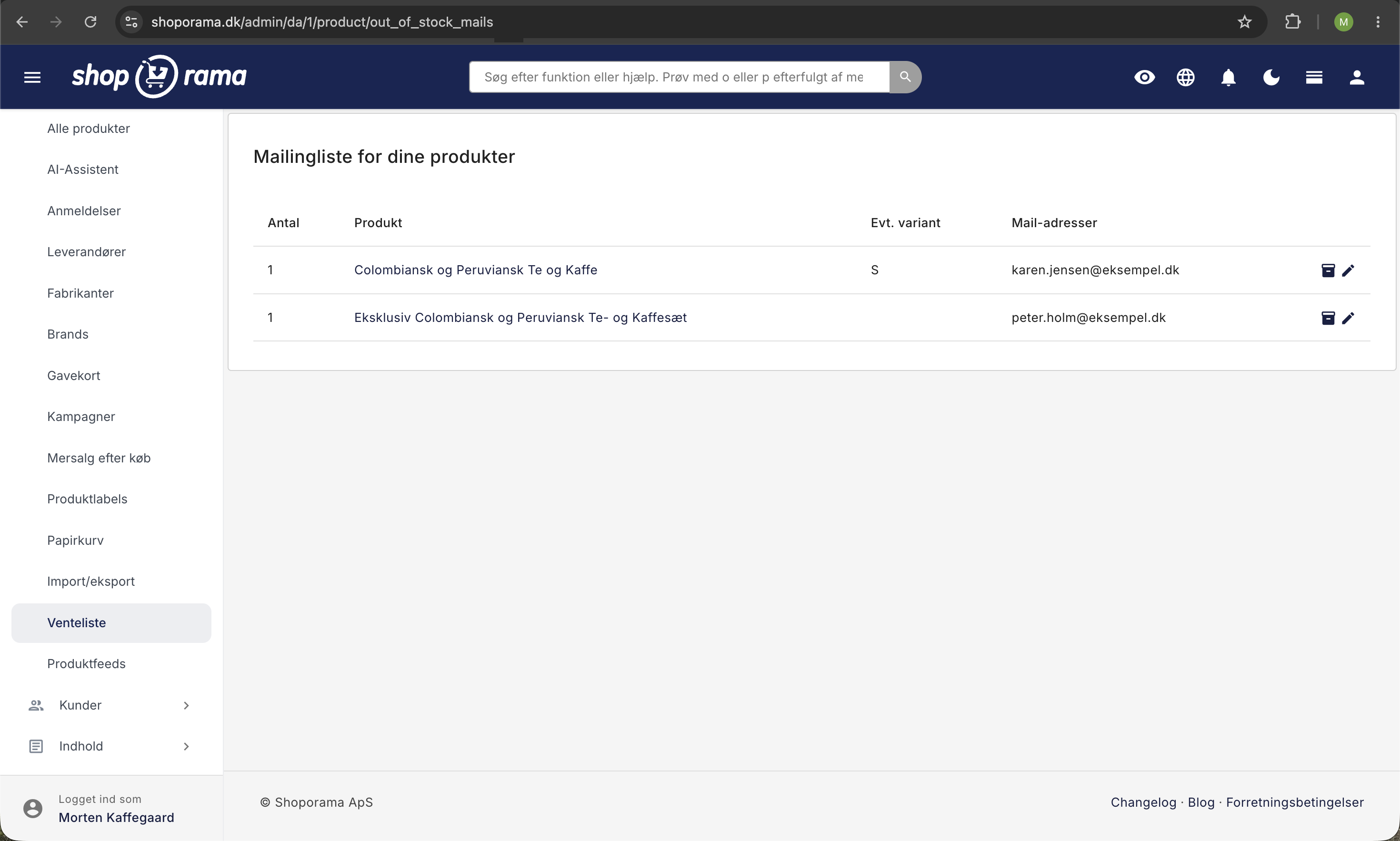
Klik på et produkt for at se hver enkelt tilmelding med mailadresse, variant og tidspunkt. Her finder du tre knapper:
- Send på-lager-mail manuelt: sender mailen til alle på listen med det samme, også selvom varen endnu ikke er på lager.
- Download alle modtagere: henter listen som en CSV-fil med mailadresse, variant og tidspunkt.
- Slet alle modtagere: fjerner alle tilmeldinger på produktet. Det kan ikke fortrydes.
Når mailen er sendt, forsvinder tilmeldingen fra ventelisten.
Ofte stillede spørgsmål
Skal jeg selv huske at sende mailen, når varen er på lager igen?
Nej. Mailen sendes automatisk, så snart varen kommer på lager igen. Det gælder, når du selv lægger varer på lager, når en returvare lægges tilbage på lager, og når lageret opdateres via en integration. Knappen Send på-lager-mail manuelt skal du kun bruge, hvis du vil give kunderne besked, før varen er lagt på lager.
Jeg har kun fået 2 stk. hjem, men der står 10 på ventelisten. Hvem får mailen?
Alle 10 får mailen på samme tid. Der er ingen kø eller reservation, så det er først til mølle. Der findes heller ingen indstilling, der begrænser, hvor mange der får besked ad gangen.
Får kunden en ny mail, hver gang jeg lægger lidt på lager?
Nej, kun én gang. Når mailen er sendt, er tilmeldingen brugt og forsvinder fra ventelisten. Lægger du flere varer på lager senere, får kunden ikke en ny mail.
En kunde har skrevet sig op til str. 38, men jeg lægger str. 40 på lager. Får kunden så besked?
Nej. Når du lægger en variant på lager, får kun de kunder besked, der har tilmeldt sig netop den variant. Kunder, der har tilmeldt sig produktet uden at vælge en variant, får dog besked, uanset hvilken variant der kommer på lager.
Kan jeg se, hvilke varianter kunderne venter mest på?
Ja. Oversigten under Produkter → Venteliste har én linje pr. produkt og variant og viser de mest efterspurgte øverst. Det giver et hurtigt overblik over, hvad der er værd at bestille hjem først.
Kan jeg ændre teksten i formularen eller bestemme, hvornår den bliver vist?
Teksterne i formularen, fx overskriften og knappen, kan du ændre under Design → Tekster. I Delaware, DelawareDK, Montana, og MontanaB2B kan du desuden under Design → Temaindstillinger vælge, hvornår formularen skal vises: aldrig, kun når hele produktet er udsolgt, eller også når en enkelt variant er udsolgt.
Hvorfor vises formularen ikke på et af mine udsolgte produkter?
I Delaware, DelawareDK, Montana, og MontanaB2B vises formularen ikke på produkter, der må sælges uden lager (negativt lager). Kunden kan jo stadig købe varen, så der er ikke noget at vente på. Tjek også under Design → Temaindstillinger, hvornår formularen er sat til at blive vist.
Bliver kunderne tilmeldt mit nyhedsbrev, når de skriver sig på ventelisten?
Kun hvis fluebenet ved nyhedsbrevet er sat, når de skriver sig op. Så bliver de tilmeldt nyhedsbrevet med det samme og ikke først, når varen kommer på lager. Uden flueben bruges mailadressen kun til beskeden om varen.
Jeg kom til at slette listen. Kan jeg få den tilbage?
Nej. Slet alle modtagere kan ikke fortrydes, og du kan heller ikke fjerne en enkelt mailadresse. Hent derfor listen som CSV-fil med Download alle modtagere, før du sletter. Kunderne kan skrive sig op igen via produktsiden, så længe varen er udsolgt.
Hvordan kan jeg se, om mailen er blevet sendt?
Når mailen er sendt, forsvinder tilmeldingen fra ventelisten. Under Webshop → Sendte mails kan du se de enkelte mails. Mangler mailskabelonen i dit tema, bliver der ikke sendt noget, og du får en besked i admin om det. I så fald bliver tilmeldingerne stående på listen.
Har du spørgsmål? Kontakt os på support@shoporama.dk.
Related articles
Export customers who have purchased a specific product
Guide to export a list of customers who have purchased a specific product and send them an email.
Send emails to customers who have purchased a product
Guide to send an email to all customers who have purchased a specific product in your Shoporama online store.
Unsubscribe links in automatic emails
Give your customers the option to unsubscribe from automatic follow-up emails after purchases and product reviews - with a simple link in the email.
Related features
Stock integrations
Stock records, stock locations, order list, stock value and automatic notifications. Avoid overselling with Shoporama inventory management.
Email marketing
Integrate with Klaviyo, Brevo, Mailchimp, Ubivox or Campaign Monitor, or use Shoporama's own newsletter system. Automatic synchronization and event...
Theme Settings in Delaware: Store and Products
An explanation of all fields in Delaware's store and product theme settings: colors, badges, value propositions, filters, categories, product...
Product Profiles and Variants: Set Up Your Product Types
Create product profiles, attributes, and variants in Shoporama with your own prices and inventory, and see how you can customize both color and size.