Set up Klaviyo integration
Guide to setting up Klaviyo integration with your Shoporama online store for automated email flows.
Shoporama has a Klaviyo integration that automatically syncs customer data, orders, and products with Klaviyo for advanced email workflows.
Setup
- Create an account with Klaviyo
- Find your Private API Key in Klaviyo under Account → Settings → API Keys
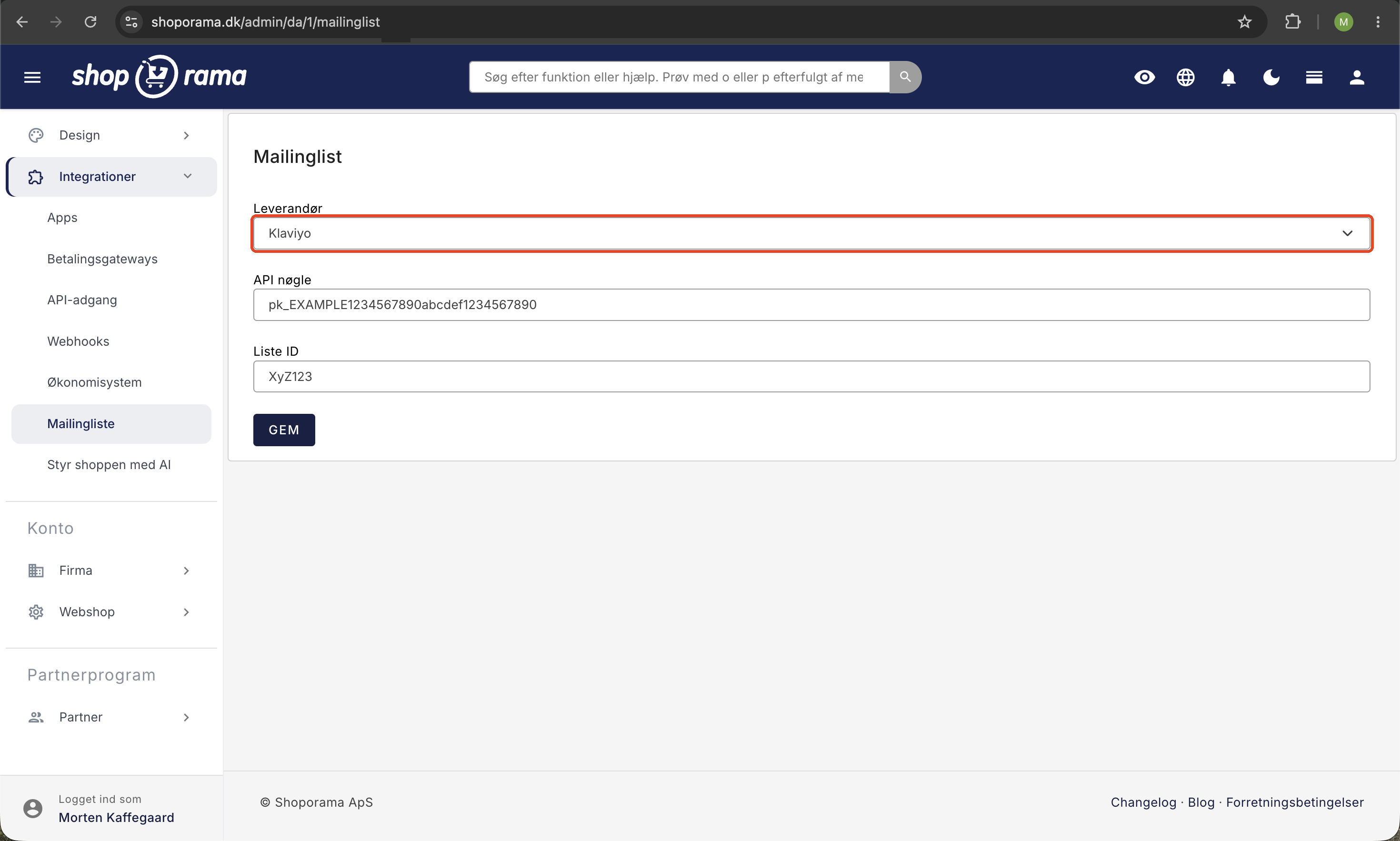
- In Shoporama: Go to Mailing List in the left-hand menu
- Select Klaviyo as the type in the mailing list setup
- Enter your Klaviyo API key
- Click Save
Klaviyo is therefore activated via Shoporama’s mailing list module, not as a standalone integration menu item.
What is synced?
- Customers – new customers are automatically synced to Klaviyo
- Orders – order data is sent to Klaviyo for segmentation and flows
- Products – product data for use in recommendations and emails
What events does Shoporama send to Klaviyo?
Klaviyo builds flows and segments based on events, which are called “metrics” in Klaviyo. Shoporama sends two types: events from the store while the customer is browsing, and events from orders. Each type has its own setting under “Mailing List.”
Store events
Sent when “Automatically insert tracking code into your theme” is enabled:
- Viewed Product: The customer views a product page. Includes the product’s name, price, brand, categories, image, and link.
- Viewed Category: The customer views a category page. Includes the category’s name, ID, image, and link. The homepage does not count.
- Added to Cart: The customer adds an item to the cart.
- Started Checkout: The customer is in the cart or checkout. Includes the items, total amount, and a link back to the cart.
Once the customer has entered their email address during checkout, Klaviyo links the visit to the customer’s profile. This allows the events to be used in flows for customers who are not logged in.
Events from orders
Sent when “Use Events ” is enabled. This requires that you have entered your private key:
- Placed Order: An order has been created.
- Ordered Product: one event for each item in the order.
- Paid: The order has been paid.
- Status: The order’s status changes. The status is included in the name, e.g., Status: Sent.
- Add Label and Remove Label: An order label is added or removed, e.g., Add Label: VIP.
- Added to Cart: This is also sent from here once the customer has provided their email address.
Does your theme use its own Klaviyo code?
Some themes, such as Alaska, have Klaviyo built in. In that case, the automatic tracking code should normally be turned off, and the theme itself only sends “Added to Cart.” “Viewed Product,” “Viewed Category,” and “Started Checkout” are therefore not included. If you need them, please email us at support@shoporama.dk.
Flows You Can Set Up
With the Klaviyo integration, you can set up automated email flows such as:
- Welcome flow – a greeting for new customers
- Abandoned Cart – a reminder for customers who didn’t complete their purchase
- Abandoned browsing – a reminder for customers who viewed products or categories without buying
- Post-purchase – follow-up after a purchase
- Win-back – reactivating inactive customers
Tip
See also Heysender as an alternative email marketing platform with Shoporama integration.
Need help? Contact us at support@shoporama.dk.
Related articles
Set up Heysender integration
Guide to setting up Heysender integration so your transactional emails support DMARC, SPF and have better deliverability.
Brevo integration newsletter signup integration from your webshop
How to connect your Shoporama webshop to Brevo (formerly Sendinblue) so that new newsletter subscriptions automatically land in Brevo. Read what...
HeyLoyalty integration
Guide to setting up HeyLoyalty in Shoporama for email marketing with automatic synchronization of subscribers and order data.
Related features
Email marketing software
Email marketing software is the tool for sending newsletters and automated campaigns. Shoporama has a complete, built-in newsletter system with...
Email marketing
Integrate with Klaviyo, Brevo, Mailchimp, Ubivox or Campaign Monitor, or use Shoporama's own newsletter system. Automatic synchronization and event...
Newsletter system - send professional newsletters directly from Shoporama
Built-in newsletter system with A/B testing, segmentation, product blocks and statistics. Integrates with Brevo, Klaviyo and HeyLoyalty. Included...