Set up Heysender integration
Guide to setting up Heysender integration so your transactional emails support DMARC, SPF and have better deliverability.
To ensure reliable delivery of transactional emails from your online store (order confirmations, shipping notifications, etc.), you need to set up the Heysender integration. This ensures that your emails support DMARC and SPF, which are requirements of Gmail and Yahoo, among others.
Important
Once you’ve enabled Heysender, it cannot be disabled again. Therefore, make sure you have access to your DNS before you begin.
Step 1: Enable Heysender in Shoporama
- Log in to your Shoporama admin
- Go to Account → Webstore → General
- Find the Heysender tab and click on it
- Check the box next to "Use Heysender"
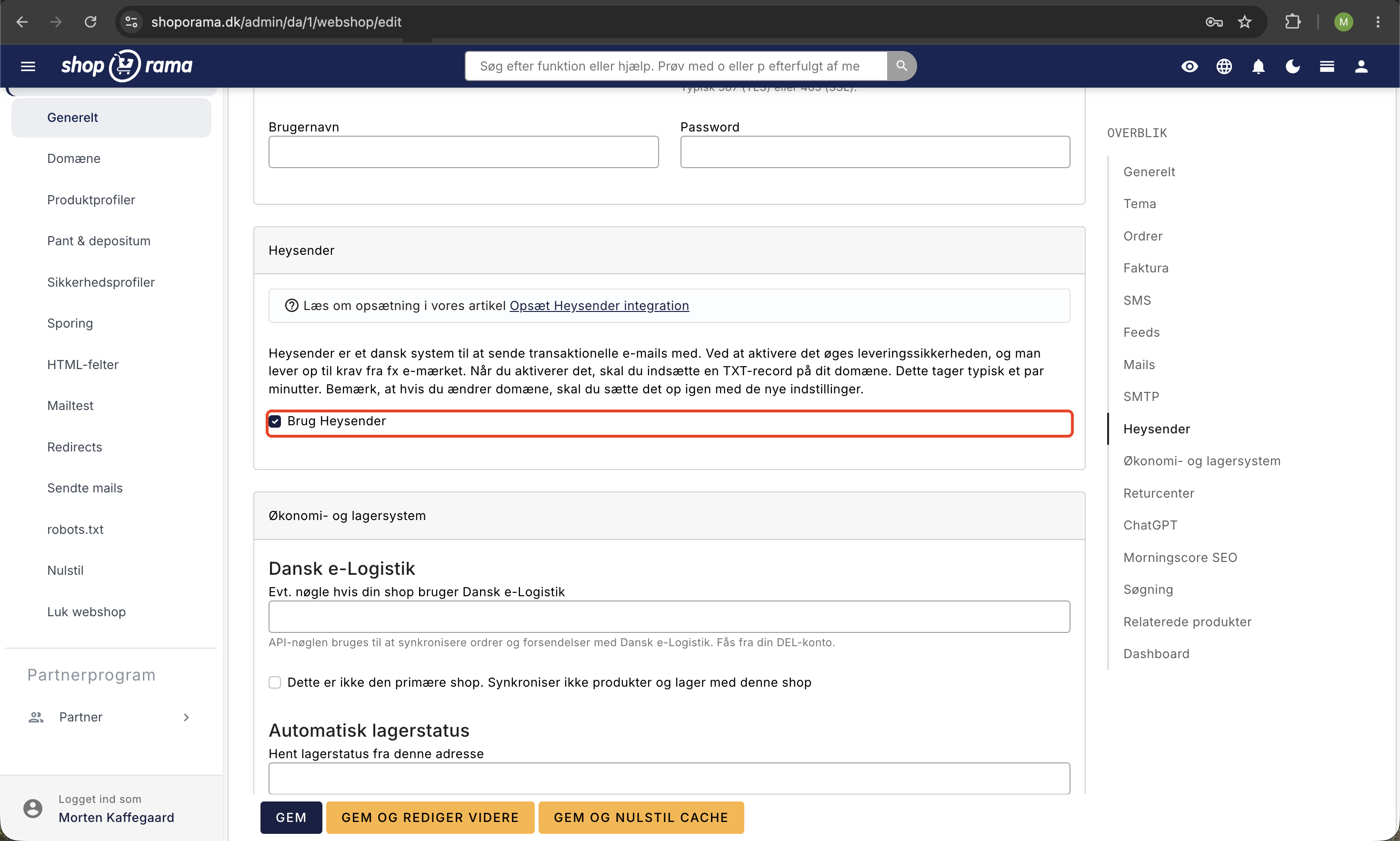
Step 2: Create a TXT record in your DNS
Once you’ve enabled Heysender, a TXT record will be displayed that you need to create in your DNS. The page shows both the name and the value of the record.
Create the TXT record with your DNS provider (e.g., Simply, One.com, Cloudflare, or similar).
Step 3: Add Heysender to your SPF
You must also add Heysender to your SPF record. The exact value is listed on the Heysender page in Shoporama.
Step 4: Save and wait
Once both DNS changes have been made, click Save in Shoporama. It can take between 30 minutes and 24 hours for the DNS changes to take effect.
After that, your transactional emails will be sent via Heysender with correct DMARC and SPF, resulting in significantly better delivery rates.
Need help? Contact us at support@shoporama.dk.
Related articles
Set up Klaviyo integration
Here's how to find the public and private keys in Klaviyo, connect Klaviyo to your Shoporama online store, and select lists for newsletter...
Brevo integration newsletter signup integration from your webshop
How to connect your Shoporama webshop to Brevo (formerly Sendinblue) so that new newsletter subscriptions automatically land in Brevo. Read what...
HeyLoyalty integration
Guide to setting up HeyLoyalty in Shoporama for email marketing with automatic synchronization of subscribers and order data.
Related features
Shipping options
Set up shipping with PostNord, GLS, DAO, DHL and Shipmondo. Parcel shops in checkout, tracking, free shipping and weight-based shipping calculation.
Emails to Your Customers: Sender, Content, and Email Testing
See what emails Shoporama sends to your customers, how to edit the sender and text, how to use Mailtest, and what to do about spam.