How to create redirects on Shoporama
Guide to creating redirects in Shoporama - from simple redirects to regex and CSV import.
A redirect sends visitors from an old URL to a new one. This is important for SEO and for avoiding 404 errors, such as when you’ve switched e-commerce platforms or changed your URL structure.
Shoporama always creates 301 redirects (permanent redirects), which tell search engines that the page has been permanently moved.
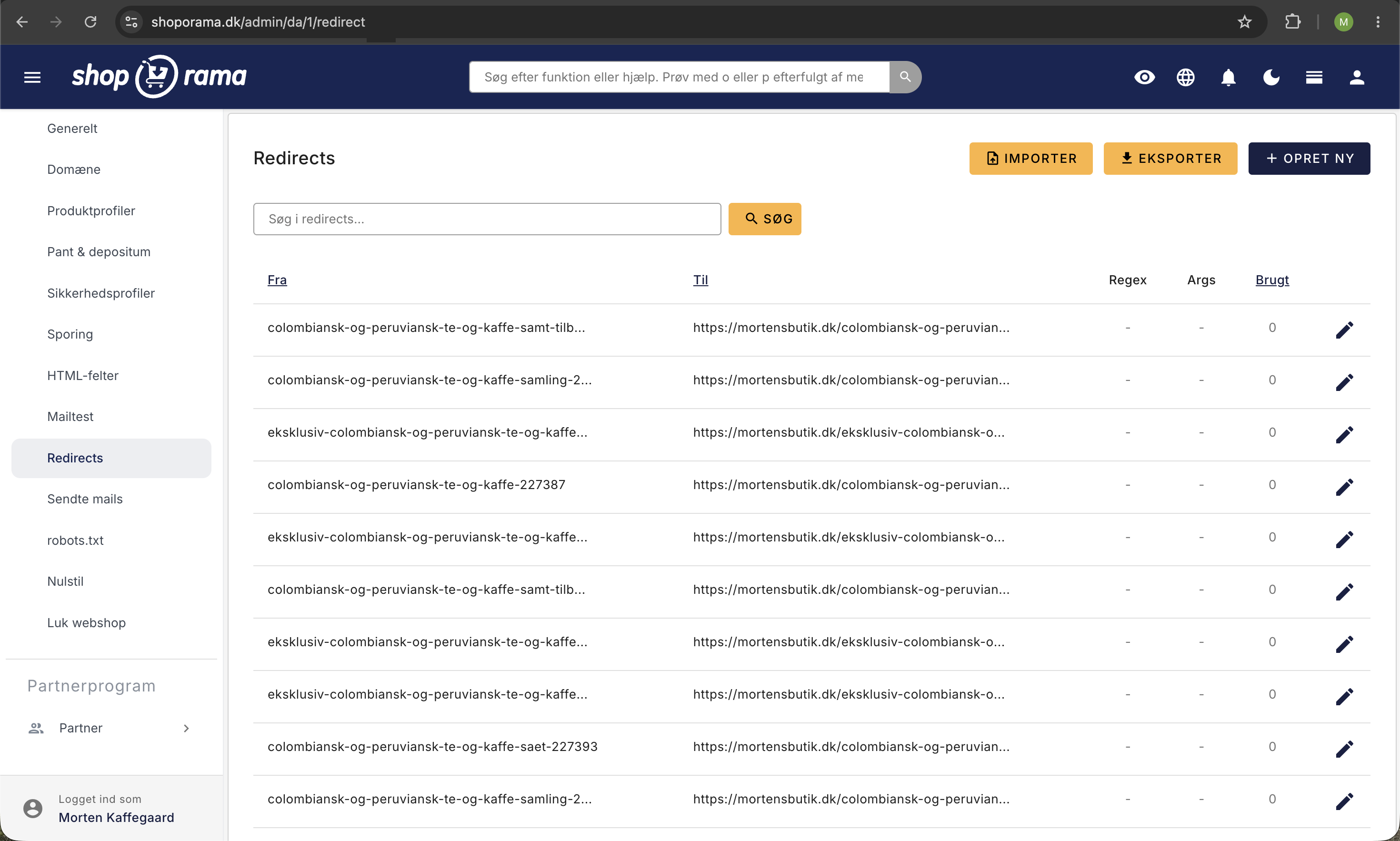
Create a simple redirect
- Go to Webstore → Redirects in the menu
- Click Create New
- Fill in the From field with the old URL without the domain, e.g., blaa-sweater-p4433.html
- Fill in the To field with the new URL. The field starts with your shop’s address, so just type the rest, e.g., blaa-sweater
- Click Save
Note
"To" can be a full URL with https:// or a path within your own store, e.g., /blaa-sweater. If you forget the slash, Shoporama will add it automatically, so blaa-sweater works as /blaa-sweater. If visitors need to be redirected to another domain, you must use the full address. “From” is always the address without the domain.
Include URL parameters
If you want to preserve URL parameters (e.g., ?affiliateid=57333) during the redirect, check the “Include arguments” box before saving.
Without this setting, parameters will be removed, and affiliate tracking or campaign links may be lost.
Redirects with regular expressions (regex)
If you need to redirect many URLs that share a common pattern, you can use regular expressions. Check the "Regular Expression" box when creating the redirect.
Example: You want to redirect all URLs that start with "product-" and end with ".html":
product-.*\.html
Example: Redirect URLs with varying parameters:
blaa-sweater\?affiliateid=.*
This will match blaa-sweater?affiliateid=66789, blaa-sweater?affiliateid=12345, etc.
Example: Use part of the old address in the new one. Whatever is in parentheses in “From” is inserted into “To” where it says $1:
From: ^/shop/(.*)$
To: /$1
This will redirect /shop/blue-sweater to /blue-sweater. The “To” field starts with your shop’s address, so you can add $1 after it or delete it and write /$1. If the pattern has multiple parentheses, use $2, $3, and so on. The forward slash at the beginning of the “From” field is optional, so ^shop/(.*)$ works the same way. This only works when the new URL is contained directly within the old one. If the products have been renamed in the URL, they each need their own redirect.
If an address matches both a regular redirect and a pattern, the regular redirect is used. If it matches multiple patterns, the oldest one is used.
Important
Regular expressions are a complex topic. If you’re not familiar with regex, we recommend that you team up with someone who has experience with it.
Import redirects via CSV
If you have many redirects (e.g., when moving a store), you can import them as a CSV file. Go to Web Store → Redirects, and click Import. Select the file, click Upload, check the preview, and click Import All.
The CSV file must be semicolon-separated and follow this format:
from_url;to_url;is_regex;include_arguments
blaa-sweater-p4433.html;https://www.dinshop.dk/blaa-sweater;0;0
old-category/.*;https://www.dinshop.dk/ny-kategori;1;0
^/shop/(.*)$;/$1;1;0
The first line with the column names is skipped, so feel free to include it. The same applies to empty lines and URLs that already have a redirect.
The import runs in the background, and you’ll receive an email when it’s finished.
Troubleshooting
- The redirect isn’t working. Check to make sure there isn’t already a product, category, or static page with the same URL as the “from” address. Actual pages take priority over redirects. However, a product that’s offline or deleted can still be redirected.
- Circular redirect. A redirect that sends visitors back to the exact address they came from will display an error page instead of sending them in a loop. This typically happens when a pattern also matches its own “To” address when that page doesn’t exist. Make the pattern more precise, or correct the To address. Two redirects pointing to each other will cause a “too many redirects” error in the browser, so avoid them.
- Duplicate address. Each “From” address can only have one redirect. If you want to change the destination, click the pencil icon next to the redirect in the overview, correct the “To” field, and click Save.
- Old images and files. An old URL for an image or file—such as a .jpg, .png, or .pdf—can be redirected as long as the file no longer exists in the store.
Export and Monitor
You can export all your redirects as a CSV file for backup or for an overview. In the "Used" column, you can see how often each redirect is used. Click the number to see when and where visitors came from. The same redirect is counted at most once every five minutes.
Need help? Contact us at support@shoporama.dk.
Related articles
Image name in the URL
Guide to getting the product image name in the URL for better SEO.
Mass editing of products
Guide to bulk editing products in Shoporama - edit prices, inventory, SEO fields and more in a spreadsheet-like interface.
How to create the most common landing pages
Guide to creating landing pages in Shoporama with rules for brands, price ranges, extra fields and more.