Digital fortrydelse: lad kunderne fortryde købet online
Sådan virker den digitale fortrydelsesfunktion i Shoporama. Kunden fortryder købet online i to trin, du får besked, og ordren markeres automatisk.
The digital cancellation feature allows your customers to exercise their right of cancellation directly online. As of June 19, 2026, the Consumer Contracts Act requires online stores that sell to consumers to have such a feature. In Shoporama’s standard themes, it’s built-in and works without any setup: the “Cancel Purchase” link appears at the bottom of every page; the customer cancels in two steps; you receive a notification; and the order is automatically marked so you can keep track of it.
What is digital cancellation?
Cancellation is the customer’s legal declaration that they are canceling their purchase (“I am canceling order #1234”). As a general rule, the consumer has a 14-day right of cancellation starting from the day the item is received. The legal requirement means that cancellation must be possible online via a clear and easily accessible feature, not just via email or a paper form.
What does the law require?
The requirement is set forth in Section 20a of the Consumer Contracts Act and takes effect on June 19, 2026. In short, the cancellation feature must:
- be labeled “Cancel Agreement” or something similarly unambiguous. Shoporama uses “Cancel Purchase.”
- be available throughout the cancellation period, be prominently displayed, and be easy to find.
- allow the customer to provide or confirm their name, which contract the cancellation applies to, and where the receipt should be sent.
- include a button labeled “Confirm Cancellation” that the customer clicks to submit the cancellation.
- Generate a receipt for the customer on a durable medium, such as email, containing the details of the cancellation as well as the date and time.
In addition, the customer must be informed before the purchase that this feature exists and where to find it (Section 8, paragraph 1). The standard themes are designed to meet these requirements, as described below.
Cancellation is not the same as a return
It is important to distinguish between two concepts that are often confused:
- Cancellation is the declaration of intent itself. It states that the customer wishes to cancel. This is done via the digital cancellation feature.
- A return is the practical process of sending the item back. This is handled through the returns center.
A cancellation therefore does not automatically refund or cancel the order. It records the customer’s declaration and notifies you, and then you decide how to proceed. This gives you full control over the sequence of events—for example, waiting to issue a refund until the item has been received.
How the customer finds the feature
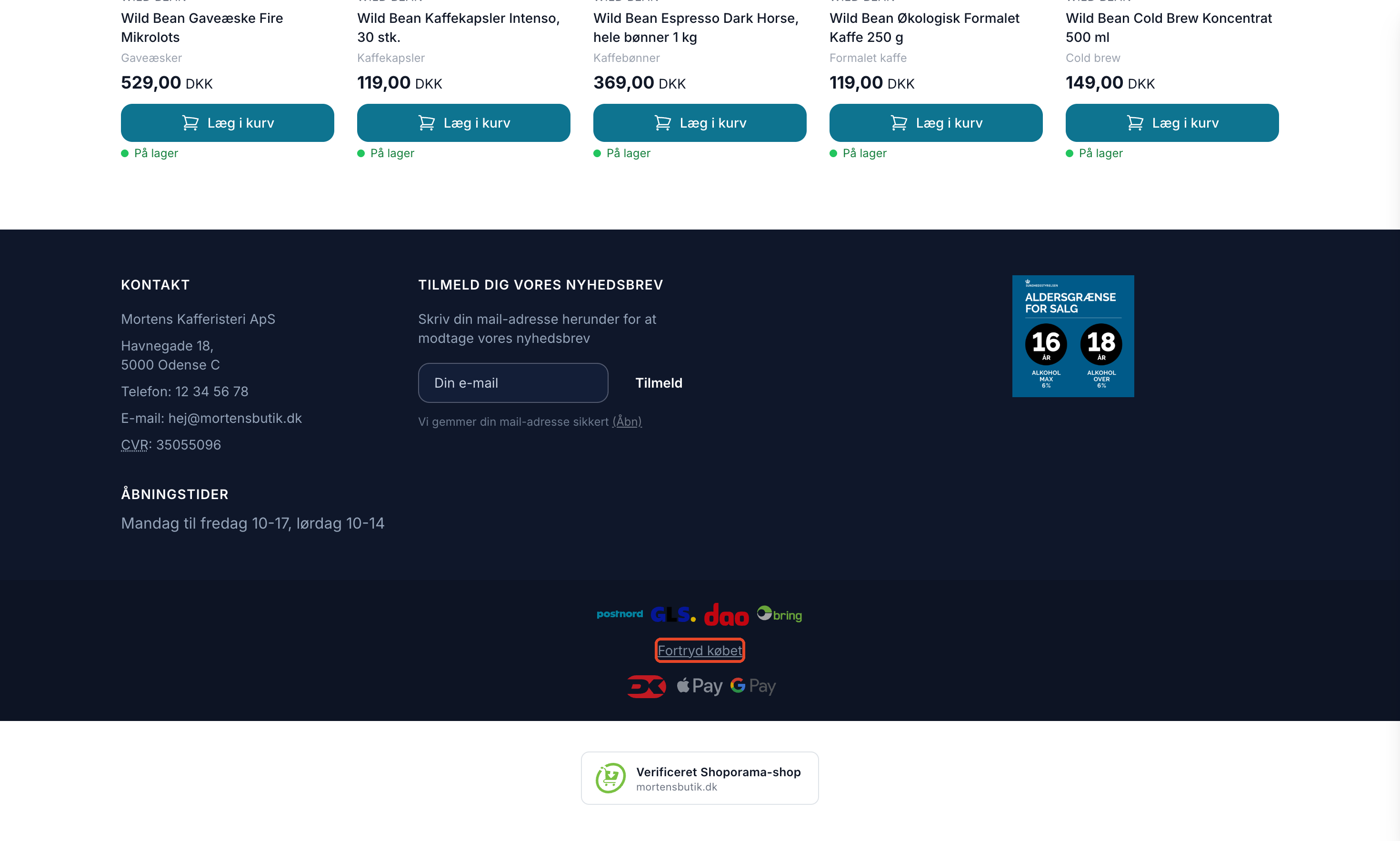
In the default themes Montana, Delaware, DelawareDK, Alaska2, California, and Washington, customers can access the cancellation feature from several locations:
- Footer: The “Cancel Purchase” link is at the bottom of every page. It takes the customer to the /withdrawal page, where they can find their order using the order number and email address. California and Washington now also have the cancellation page.
- Order confirmation: The email includes the line “Do you want to cancel your purchase? You can cancel online here: Cancel Purchase,” as long as the order can still be canceled. The link goes directly to the customer’s order.
- The Order Page and Customer Order Overview: In several themes, there is also a “Cancel Purchase” button on the customer’s order while the cancellation window is open.
- Checkout: Under the terms and conditions, it states: “You can cancel your purchase online via the ‘Cancel Purchase’ link at the bottom of the store or in your order confirmation.” This is how the customer is informed before the purchase that the feature exists and where to find it.
Here’s how the customer experiences it
No login is required, so it also works for customers who have shopped as guests.
The customer finds their order
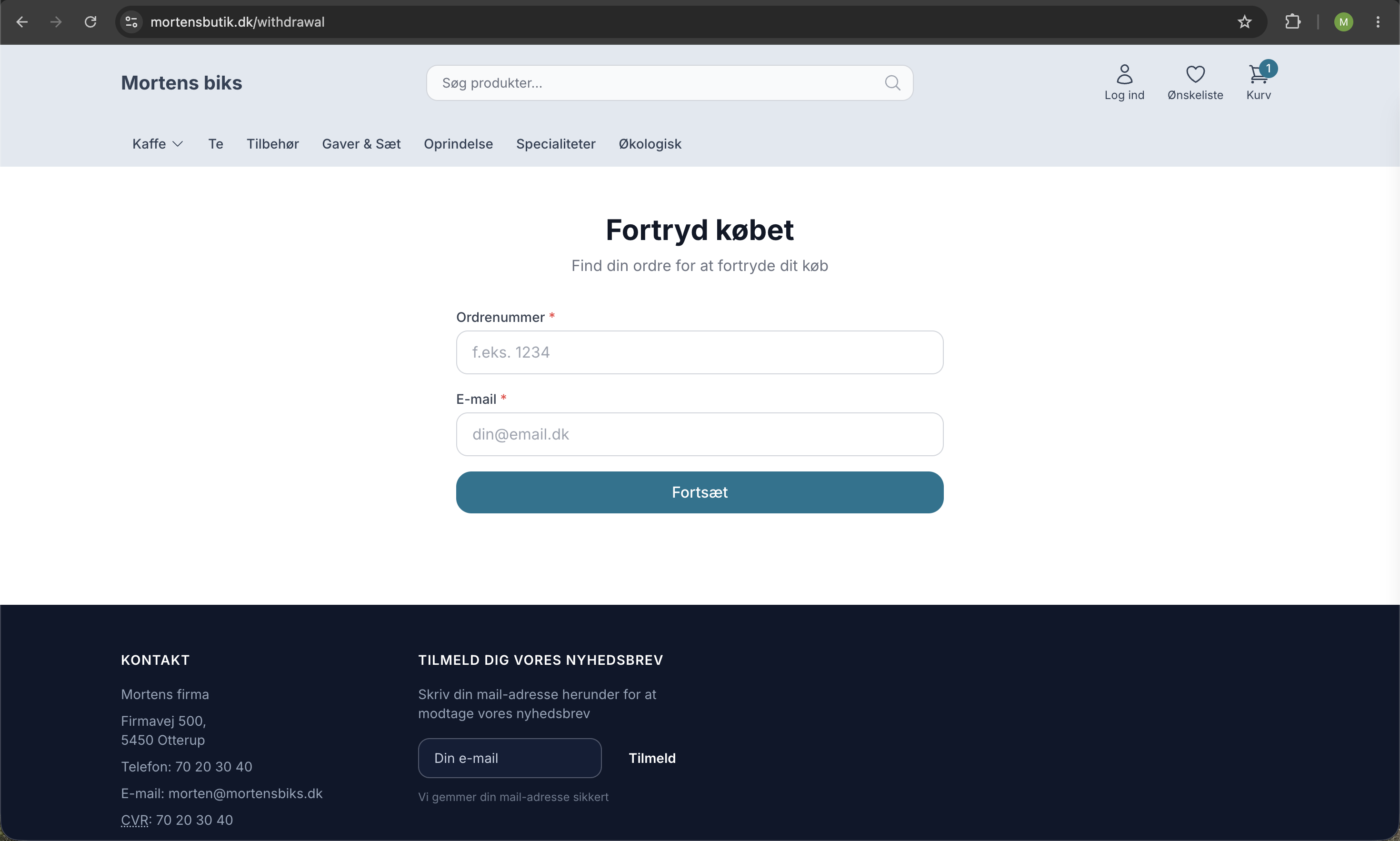
If the customer arrives via the link in the order confirmation, this step is skipped, and the order is displayed immediately.
The customer confirms the information and cancels the order
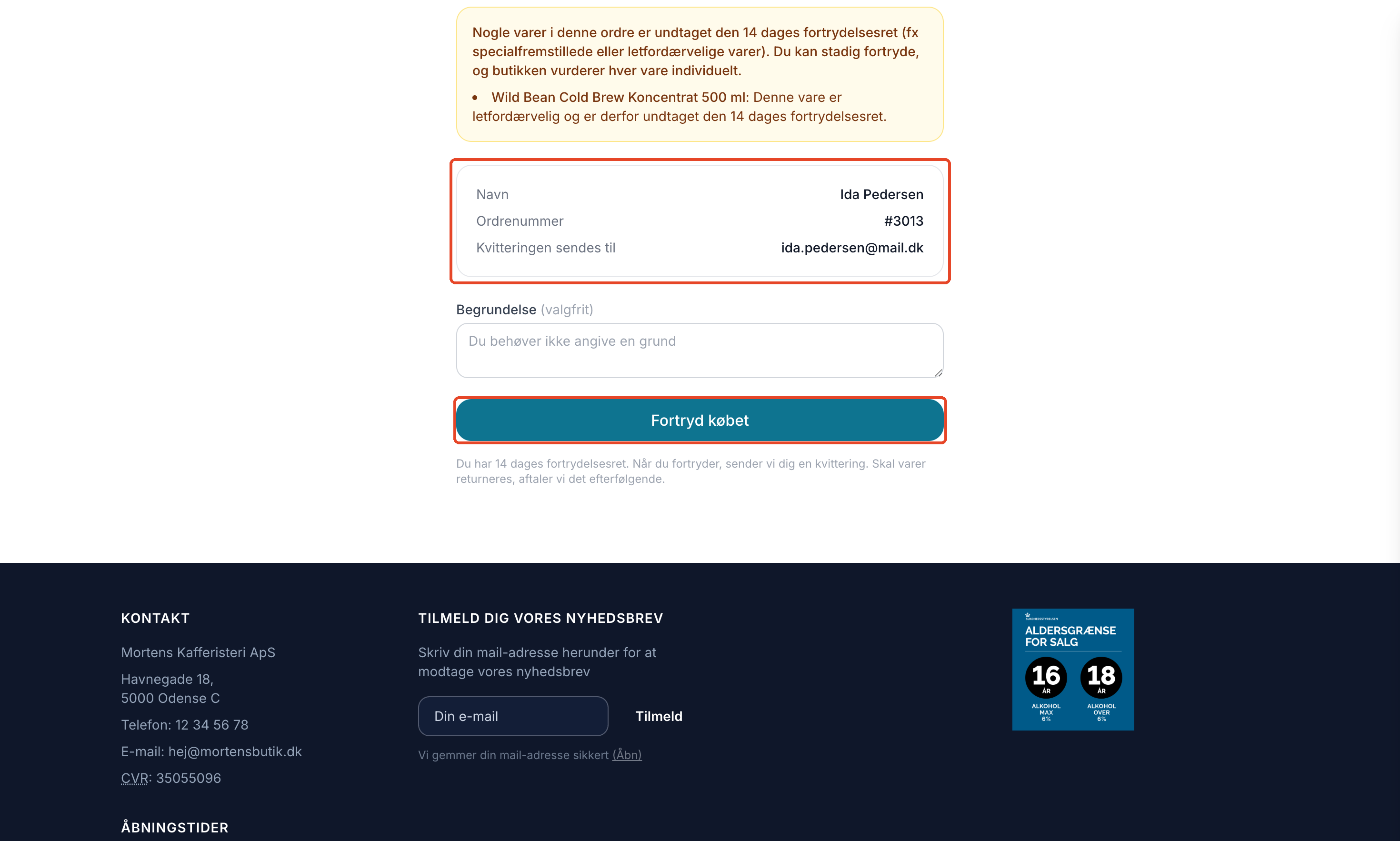
- The order is displayed with the customer’s name, order number, and the email address to which the receipt is sent, along with the items. If any items are excluded from the right to cancel, they are highlighted in a warning.
- The customer can provide a reason. The reason is optional.
- The customer clicks “Cancel Purchase.”
- On the “Confirm Cancellation ” page, the customer reviews the information again and clicks “Confirm Cancellation.”
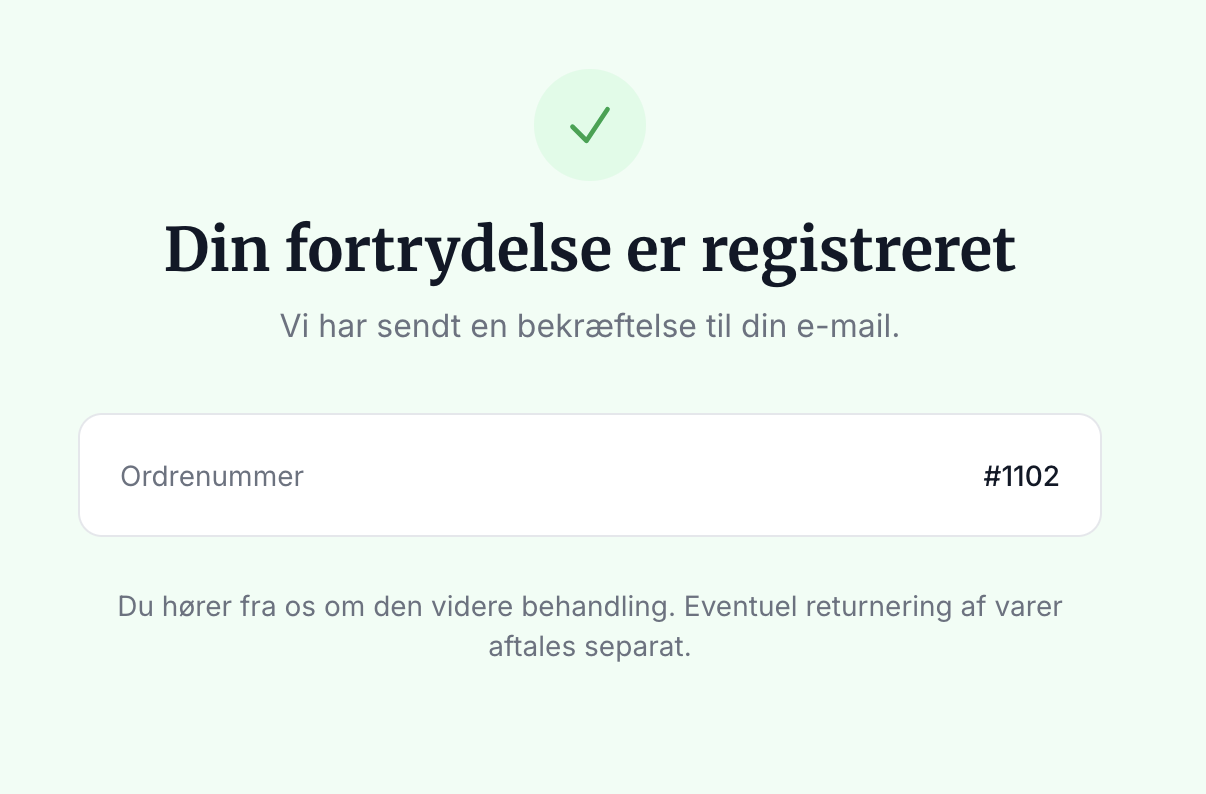
- The customer sees a receipt on the screen and receives a confirmation email with the order number and time.
These two steps ensure that the customer does not cancel by accident and that there is clear documentation of what has happened.
When can an order be canceled?
The online feature is available as long as the cancellation period is still in effect. Shoporama does not know the exact delivery date, so the deadline is calculated as follows:
- Orders that have not yet been shipped can always be canceled.
- Orders that have been shipped or picked up can be canceled within 14 days plus 3 days of shipping time from the time the order was marked as shipped or picked up. If you offer a longer cancellation period, you can extend the 14-day period; see the next section.
- Cancelled and credited orders cannot be cancelled online.
If the customer clicks on an old link after the deadline, the message “The cancellation period has expired” will appear. If the order has already been canceled, the receipt will be displayed instead. Please note that a customer can also cancel in a timely manner through other means, such as email, if delivery has taken longer than expected.
Do you offer a cancellation period longer than 14 days?
Many stores voluntarily offer a longer cancellation period, such as 30, 60, or 90 days. In that case, the digital cancellation option should also remain available throughout the entire period. Go to Design > Theme Settings, find the Checkout section, and enter the number of days in the Cancellation Period (days) field, e.g., 90. Then click Save and continue editing.
Shoporama still adds 3 days for shipping, so with a 90-day period, an order that has been shipped can be canceled online for 93 days from the date of shipment. The text on the cancellation page is automatically updated so that the customer sees, for example, “You have a 90-day right of withdrawal”. If you leave the field blank, the statutory 14 days apply. A number less than 14 will be ignored because the law requires a minimum of 14 days.
This field is available in the standard themes Montana, MontanaB2B, Delaware, DelawareDK, Alaska2, California, and Washington. In the English Delaware theme, it’s called “Withdrawal period (days).” Also, be sure to include the longer period in your terms and conditions so the customer is aware of it before making a purchase.
How to Handle a Cancellation
Every time a customer confirms a cancellation, three things happen automatically:
- The order is labeled “Cancelled,” so you can view and filter it in the order overview.
- A note is added to the order with the customer’s reason (if provided) and IP address. If the order contains items marked as exempt from the right of withdrawal, they are also listed in the note. The note serves as documentation.
- You’ll receive a notification email, and the customer will receive their receipt.
You can find all canceled orders in one place by going to the order list and filtering by the “Canceled” label. On each individual order, you can read the note before deciding what to do next. You handle the financial transaction yourself: for example, you can issue a refund via “Credit Order” or your payment gateway, cancel the order, or forward it to the returns center if the item needs to be returned first.
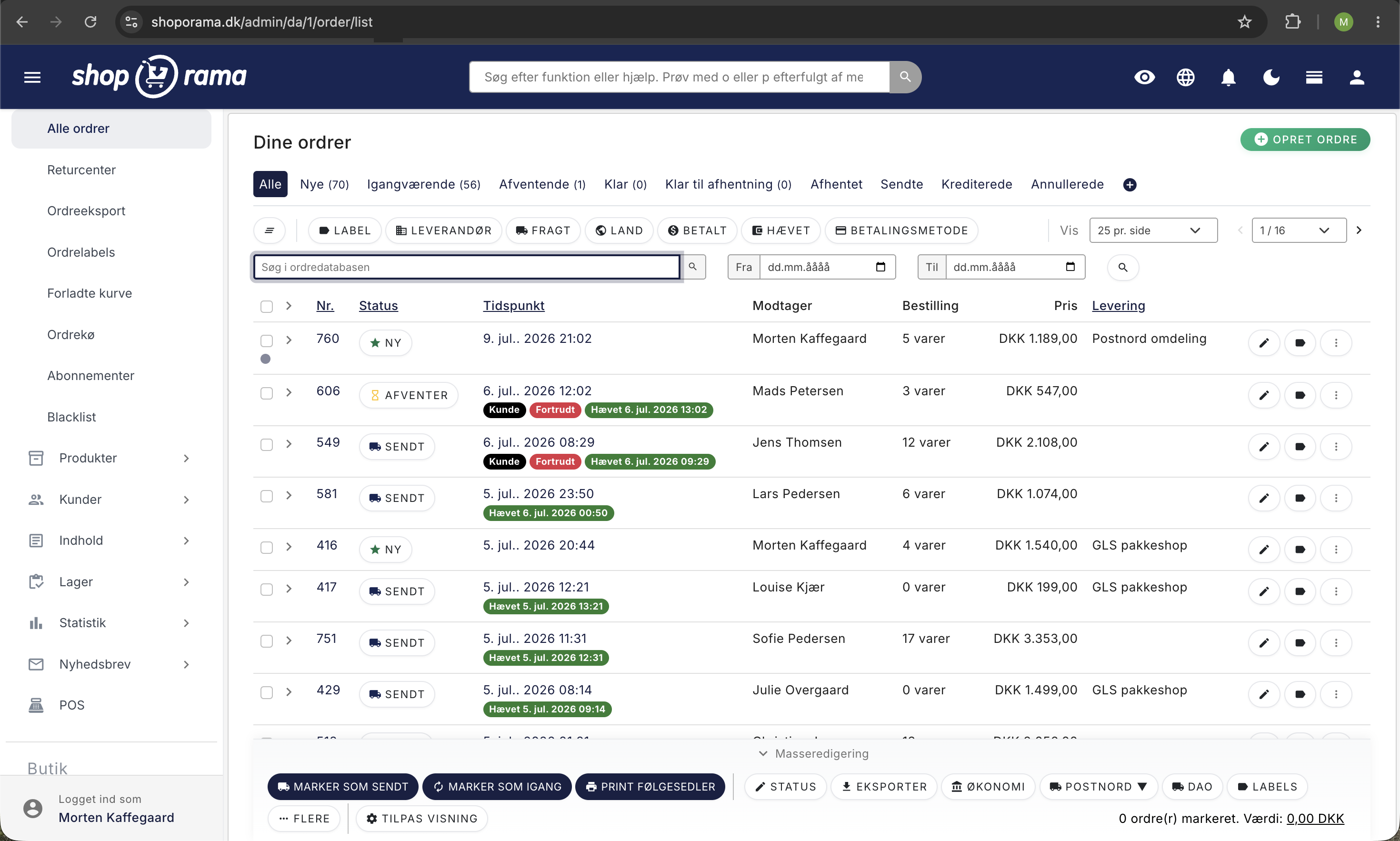
Choose which label you want to use for cancellations
The first time a customer cancels an order, the system automatically creates a red “Canceled” label. If you want to use a different label or rename it, you can manage this yourself. Go to Orders > Order Labels, open the desired label, and check the box next to “Use this label for cancellations.” Only one label can be the cancellation label at a time, so the selection will automatically change if you choose a new one. Read more in Order Labels.
Digital Content and Exceptions
Some items are exempt from the right of withdrawal, such as custom-made items, perishable goods, and digital content that the customer has agreed to receive immediately. You mark these items on the product page, and the standard themes will inform the customer of this on the product page, at checkout, and in the order confirmation. For digital content, the customer must give consent by checking a box at checkout. Learn how in Exclude Products from the Right of Withdrawal.
This exclusion does not prevent the customer from exercising their right to cancel a digital purchase, as the law requires that the customer always be able to exercise this right. The customer will see a warning listing the excluded items, and it is up to you, as the store, to determine whether the cancellation can be refused for those items. If you sell downloadable files and the customer has already downloaded the file, the customer will also see a note stating that the right of withdrawal for that content may have expired.
Can I disable this feature?
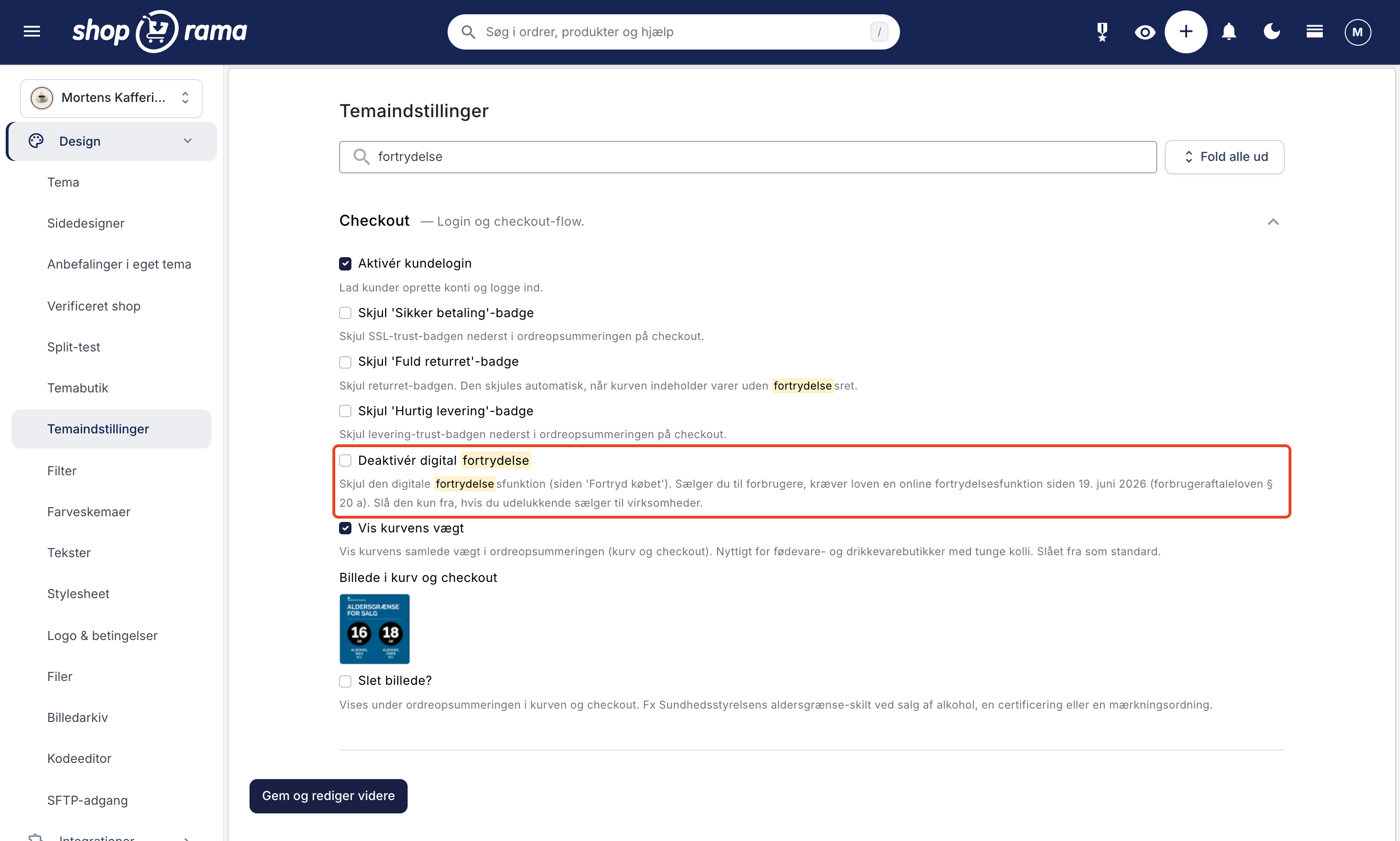
Only if you sell exclusively to businesses. In Montana, MontanaB2B, Delaware, and DelawareDK, the “Disable Digital Cancellation” setting is located under Design > Theme Settings in the Checkout section. The description reads: “Hide the digital cancellation feature (the ‘Cancel Purchase’ page). If you sell to consumers, the law requires an online cancellation feature as of June 19, 2026 (Consumer Contracts Act § 20a). Disable it only if you sell exclusively to businesses."
If you check the box, all “Cancel Purchase” links in the store will be hidden, and the /withdrawal page will display an error page. If you sell to consumers, this feature must be enabled. If you’re unsure what applies to your store, we recommend seeking legal advice.
MontanaB2B is designed for business-to-business sales, where there is no right of withdrawal. Therefore, the theme does not display the footer link. If you also sell to consumers through a store using MontanaB2B, you must ensure that they can easily find this feature, for example, by including a link to /withdrawal in a menu.
Custom themes: what your developer needs to do
This section is for developers. Shoporama cannot modify stores’ custom or modified themes. If you have a custom theme, your developer must add the right of withdrawal feature themselves. Use a standard theme as a reference.
- The "Cancel" page: The /withdrawal page requires the withdrawal.html template in the theme. Without it, the page returns a 404 error. The template receives the $step variable with the values lookup, start, confirm, receipt, and expired. If you copy Montana’s withdrawal.html, be sure to also copy components/alert.html, which displays an error message when an order cannot be found.
- Confirmation Email: The theme must include the email template mails/withdrawal_received.html. If it’s missing, no confirmation email will be sent, and the store will receive a message under “Messages” in the admin panel instructing it to contact the customer manually.
- Footer link: A link with the text “Cancel purchase” to /withdrawal, which is visible on all pages without having to expand anything, including on mobile.
- Checkout: A note in the Terms and Conditions stating that the customer can cancel the order online and indicating where the link is located. Information and consent requirements for exempt items are described in “Exclude Products from the Right of Withdrawal.”
- Order Confirmation: A link to the customer’s own cancellation page, as long as the order can be canceled.
Example of the link in the order confirmation and on the order page:
<{if $order->isWithinWithdrawalPeriod()}>
    Do you want to cancel your purchase? You can cancel online here:
    <a href="<{$order->getWithdrawalUrl()|escape}>">Cancel Purchase</a>
<{/if}>
$order->isWithinWithdrawalPeriod() follows the timeframe described above and returns false if the order has already been canceled or if the store has disabled the feature. If you want to display the deadline on the cancellation page, $order->getWithdrawalDays() returns the number of days: at least 14, or the number the store has set in the theme setting checkout.withdrawal_days. For exempt items, use $order->hasWithdrawalExemptProducts() and $order->getWithdrawalExemptProducts(). If you want to handle order cancellations in another system, you can use the order_withdrawn webhook event.
Frequently Asked Questions
Do I need to do anything myself to enable the cancellation feature?
If you’re using one of the default themes—Montana, Delaware, DelawareDK, Alaska2, California, or Washington—the feature is built-in and enabled, and the footer link is already there. If you have a custom or modified theme, your developer will need to add it. As a store owner, you’re responsible for complying with the regulations, so if you’re unsure about your specific situation, you should seek legal advice.
Is the money automatically refunded when a customer cancels an order?
No. A cancellation is merely the customer’s declaration. The order is labeled “Canceled,” and you’ll receive a notification, but you decide and process the refund yourself—for example, via “Credit Order,” your payment gateway, or the returns center. This gives you control over when and how the amount is refunded.
How do I know when a customer has canceled an order?
You’ll automatically receive a notification email every time a customer confirms a cancellation. If you want a complete overview, filter the order list by the “Canceled” label. On each individual order, you can read the note with the customer’s reason, if any.
What happens if the customer cancels before we’ve shipped the order?
An order that hasn’t been shipped can always be canceled online. The order will be labeled “Canceled,” and you’ll receive an email, but the status won’t change automatically. Therefore, check for the “Canceled” label before packing, and cancel the order if it’s not supposed to be shipped.
Can the customer cancel a single item instead of the entire order?
The system records a cancellation for the entire order. If the customer only wants to cancel part of the purchase, they can specify this in the “Reason” field, which you can view in the order notes. You should then issue a credit only for the items in question.
A customer receives the message “The cancellation period has expired.” How is the cancellation period calculated?
For shipped or picked-up orders, the feature is available for 14 days plus 3 days of shipping time from the time the order was marked as shipped or picked up. If you’ve entered a “Cancellation Period (days)” in the theme settings, that number of days will be used instead of 14. Orders that haven’t been shipped can always be canceled, while canceled and credited orders cannot. If delivery has been delayed, the customer may still have the right to cancel, e.g., via email, so please evaluate each inquiry on a case-by-case basis.
We offer a 90-day right to cancel. Can customers cancel online throughout the entire period?
Yes. Enter 90 in the “Cancellation Period (days) ” field under Design > Theme Settings in the Checkout section. Then the “Cancel Purchase” link in emails, on the order page, and on the cancellation page will remain active for 90 days plus 3 days of shipping time from the date of shipment, and the cancellation page will display “You have a 90-day right to cancel.”
Does the customer need to log in to cancel an order?
No. The customer clicks the link in the order confirmation or uses the footer link and enters the order number and email address. That’s why it also works for guest customers. The order number and email address must match the order; otherwise, the customer will receive a message stating that the order could not be found.
Why do some customers have to enter a few characters when they look up their order?
If the customer has nothing in their cart and is not logged in, the order page may display a small “Please confirm” verification prompt where the customer must enter a few characters. This is the store’s standard spam protection measure. The link in the order confirmation goes directly to the order without that verification step.
How do I document a cancellation if a customer files a complaint?
Each cancellation is saved as a note on the order, including the customer’s reason (if provided) and IP address, and the order is labeled “Cancelled.” The customer also receives a confirmation email with the order number and time, which serves as proof on a durable medium. You can find these orders by filtering the order list by the “Canceled” label.
I sell to both businesses and consumers. Can I disable this feature?
No, not if you also sell to consumers. The “Disable Digital Cancellation” setting is only for stores that sell exclusively to businesses. If you have both B2B and B2C in the same store, leave the feature enabled.
See also
Related articles
Return center
Learn how to set up and use Shoporama's Return Center so your customers can easily request returns and you can handle them efficiently from...
Handle returns
Guide to Shoporama's returns center - handle returns, create credit notes, and manage customer return requests.
Exclude products from the right of withdrawal (e.g., custom-made items, perishable goods, digital content)
Here's how to label items that are legally exempt from the 14-day right of withdrawal, such as custom-made and perishable items, tickets for a...
Credit notes and refunds
Complete guide to credit notes and refunds in Shoporama, including partial refunds, full credit notes and transfer to accounting systems.
GLS QR Returns: Set up return labels and send them automatically
Guide to GLS QR Returns in Shoporama: Choose the format for return labels (PDF, QR, or both), automatically send the label to the customer, send a...
Related features
Digital fortrydelse
Let customers cancel their online purchases in two steps. Shoporama’s digital cancellation feature complies with the new EU legal requirement...
Digital fortrydelsesret: nyt lovkrav til webshops i 2026
Fra 19. juni 2026 skal danske webshops tilbyde digital fortrydelse online. Se hvad forbrugeraftaleloven kræver, og hvordan Shoporama opfylder...
Right of withdrawal
The right of withdrawal is the consumer's right to cancel a purchase remotely, typically within 14 days. Get an overview of the rules and the new...
Nu kan dine kunder fortryde købet online
Fra 19. juni 2026 skal webshops tilbyde digital fortrydelse. Se den nye fortrydelsesfunktion i Shoporama, hvor kunderne fortryder købet online i to...
Markér varer der er undtaget fortrydelsesretten
New feature: Mark custom-made, perishable, and sealed hygiene products as exempt from the 14-day right of withdrawal. The customer is notified, and...
Now your customers can exchange instead of return
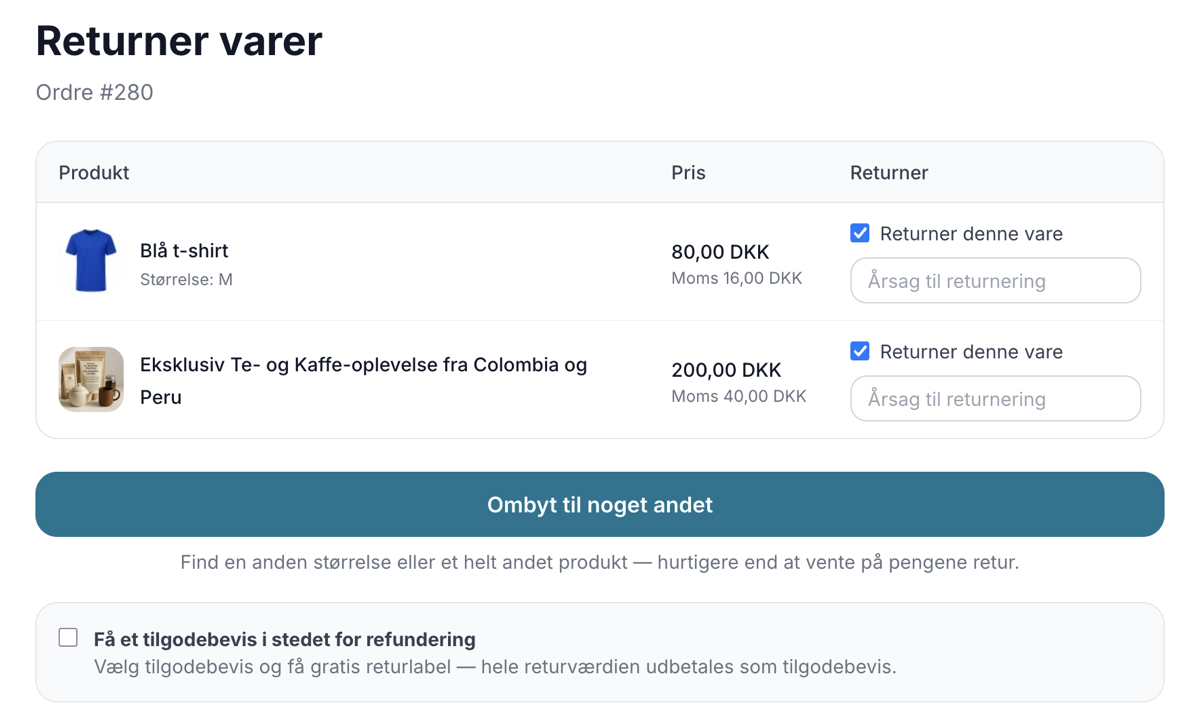
Let customers exchange for a different size or a completely different product directly in the return center. Keep revenue, save time and let the...
Company Information, Logo, and Terms and Conditions
Here's how to fill in your company information and CVR number, upload your logo and favicon, and write the terms and conditions that will appear at...
Point of Sale, Email, and Integrations in Delaware
All fields in Delaware's theme settings for the checkout, emails, terms of service, integrations, and error pages explained with tags, examples,...
Theme Settings in Montana: An Explanation of All Fields
All groups and fields in Montana's theme settings explained with screenshots: colors, top bar, USPs, product page, checkout, and integrations.