Offline conversions for Google Ads and Microsoft Ads
Send your Shoporama orders as offline conversions to Google Ads and Microsoft Ads. Get full attribution of sales to clicks via a secure CSV feed.
When a customer clicks on a Google or Microsoft ad and later makes a purchase in your Shoporama online store, you can have that sale reported back to the ad platform as an offline conversion. This gives you accurate ROAS, effective bidding strategies, and full attribution—even when the purchase occurs days after the click.
What are offline conversions?
Offline conversions are sales that the ad platform cannot track in real time within the browser, but which you report back yourself. Shoporama stores the unique click ID from the ad (gclid for Google and msclkid for Microsoft) on the order, and then delivers a CSV file that Google Ads and Microsoft Ads automatically retrieve every day.
Here’s how the process works
- The customer clicks on an ad. The URL contains a click ID that is added as a query parameter.
- Shoporama stores the click ID in the customer’s session as long as the browser is open.
- When the customer completes a purchase, the click ID is linked to the order itself.
- Shoporama publishes a CSV feed containing paid orders from the past 90 days.
- Google Ads and Microsoft Ads automatically retrieve the file and match conversions to the original clicks.
Setup in Shoporama
You’ll find the settings under “Webshop” and then “Tracking” in the admin panel. Check the box for Google Ads, Microsoft Ads, or both, depending on which platforms you advertise on.
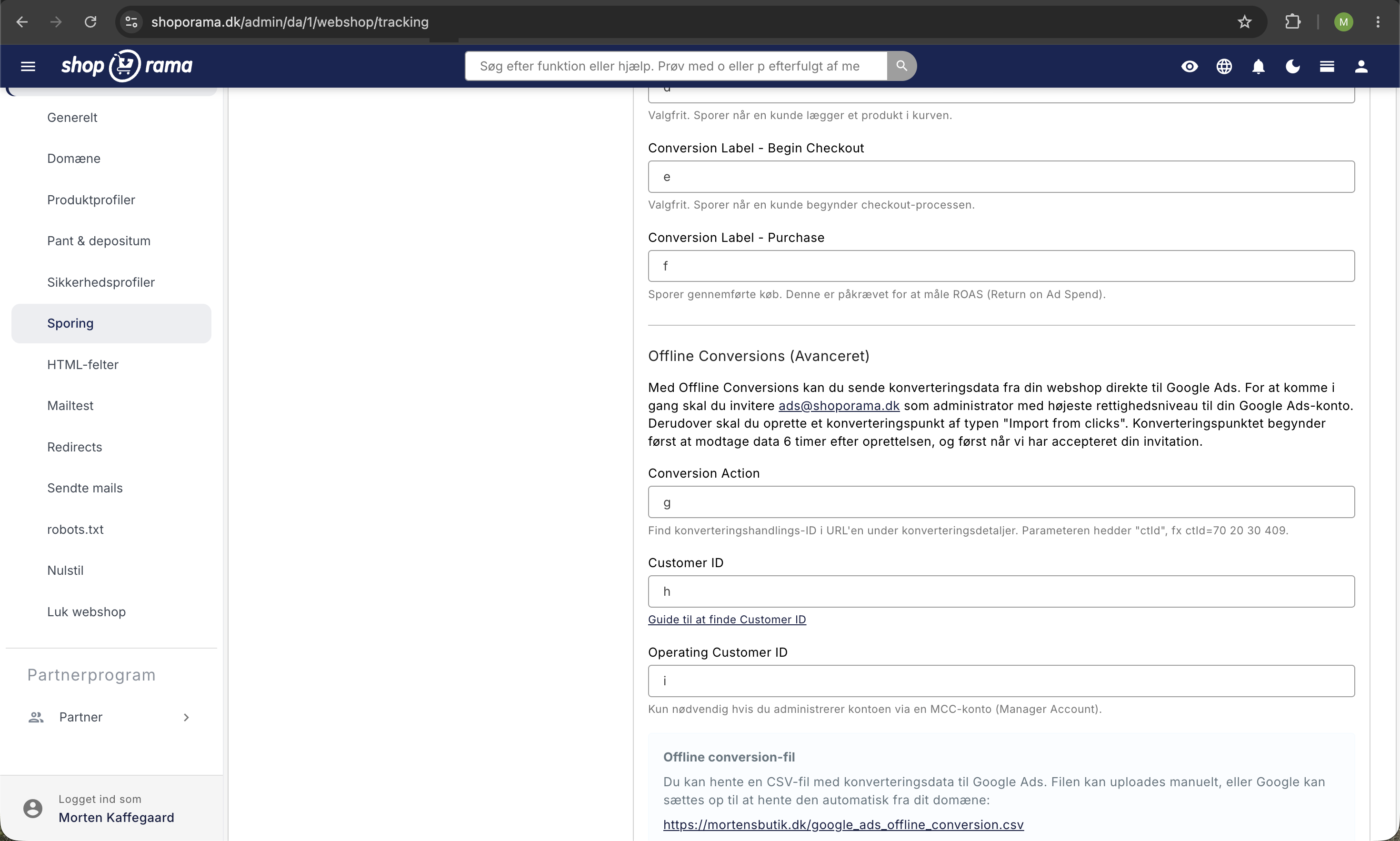
Google Ads
- Enable Google Ads under Tracking.
- Invite ads@shoporama.dk as an administrator in your Google Ads account so we can help with setup if you have any questions.
- Create a conversion point of the type “Import from Click” in Google Ads.
- Shoporama will provide you with a URL, a username, and a password for the automated data file.
- Set up automatic data retrieval (Scheduled uploads) in Google Ads using this information.
Microsoft Ads
- Enable Microsoft Ads under Tracking.
- Shoporama will provide you with a URL, username, and password for the feed.
- Set up automatic import of offline conversions in Microsoft Ads using this information.
CSV File Contents
The file contains all paid orders from the last 90 days that have a stored click ID. Orders without a click ID are skipped, so the file contains only the rows that the ad platform can match.
The two feeds have slightly different columns because Google and Microsoft require different fields.
Google Ads feed (8 columns)
The file is provided with the following headers:
Google Click ID, Conversion Name, Conversion Time, Conversion Value, Conversion Currency, Ad User Data, Ad Personalization, Order ID- Google Click ID is the gclid from the original ad click. Shoporama automatically cleans the click ID of any extra query parameters so that Google can match it.
- Conversion Name is always set to “Purchase.” Make sure the name matches the conversion point you’ve created in Google Ads.
- Conversion Time is the time the order was placed, including the time zone, e.g., 2026-05-01 14:32:18+0200. The time zone ensures accurate matching even across daylight saving time.
- Conversion Value is the total order amount, including shipping and tax. This provides the most accurate picture of actual revenue per ad.
- Conversion Currency is the store’s currency as an ISO code, e.g., DKK, EUR, or SEK.
- Ad User Data is always set to Granted and tells Google that the customer has consented to the use of data for ad tracking. This field is required by Google for proper EU compliance.
- Ad Personalization is also set to Granted and indicates consent for personalized ads. This is also a requirement from Google to ensure conversions are correctly attributed in the EU.
- "Order ID " is Shoporama’s own order number, so you can easily trace back to the individual order in the admin panel and cross-reference between Google Ads and your own accounting system.
Microsoft Ads Feed (5 columns)
Microsoft Ads requires fewer fields. The file is provided with the following header:
Microsoft Click ID, Conversion Name, Conversion Time, Conversion Value, Conversion Currency- Microsoft Click ID is the msclkid from the ad click.
- Conversion Name is always set to “Purchase” and must match your conversion goal in Microsoft Ads.
- Conversion Time is the time the order was created in ISO 8601 format with the time zone.
- Conversion Value is the total order amount, including shipping and tax.
- Conversion Currency is the store’s currency as an ISO code.
Note: Shoporama always sends “Granted” for both Ad User Data and Ad Personalization in the Google feed. If you want your customers to be able to opt out of this, you must manage consent yourself via Consent Mode v2 in your tracking setup so that the signals are sent correctly directly from the browser.
Security
Both CSV feeds are protected with HTTP Basic Authentication. Usernames and passwords are automatically generated for each store and displayed in the tracking settings. Only requests with the correct login credentials can access the files, so your orders are never publicly accessible.
REST API
The click IDs (gclid and msclkid) are also available via Shoporama’s REST API at the order endpoint if you want to build your own integration or export to other systems.
Frequently Asked Questions
Why does Microsoft only have 5 fields when Google has 8?
Google requires Ad User Data, Ad Personalization, and Order ID to comply with EU consent regulations and to make it easy to cross-reference orders. Microsoft Ads does not have the same requirements, so the feed is intentionally more streamlined. Both feeds meet the official specifications of their respective platforms.
How long does it take for my conversions to appear in Google Ads?
Google typically retrieves the file once a day, so it can take up to 24 hours from when the order is created until the conversion is visible in Google Ads. The file always contains paid orders from the past 90 days, so Google can match delayed clicks that convert later.
What happens if the customer hasn’t consented to personalized ads?
The default setup sends “Granted” for both Ad User Data and Ad Personalization. If you want to respect the customer’s choice, you must use Consent Mode v2 in your tracking solution so that the signals are already sent correctly from the browser before the click ID is stored.
Do shipping and sales tax count toward the conversion value?
Yes. We send the total order value, including shipping and sales tax. This provides the most accurate picture of revenue per ad click and matches the amount listed on your invoice.
What should I do if a conversion doesn’t match in Google Ads?
First, check if the order has a stored click ID. You can view this on the order itself in the admin panel or via the REST API. If the click ID is missing, the customer likely didn’t click through a tracked ad, or the cookie was cleared before the purchase. Also, make sure the conversion event in Google Ads is exactly named “Purchase.”
Can I use offline conversions with GA4?
Yes. Offline conversions go directly to Google Ads and do not affect GA4 reports. GA4 tracks browser-based behavior, while this CSV feed provides actual sales data to the Ads platform. The two systems complement each other without duplicating conversions, as long as you don’t import GA4 conversions into Google Ads at the same time.
Where can I view the specific order behind a conversion?
In the Google Ads feed, the Order ID column contains your own Shoporama order number. Look it up in the admin panel under Orders to view the customer, amount, and products. The Microsoft feed does not include the Order ID, so you’ll need to cross-reference the date and amount if you need to find the order.
How far back does the CSV file go?
The file contains paid orders from the last 90 days. This is sufficient for Google and Microsoft to continuously match conversions, including for clicks that convert later. If you need a longer history for internal reporting, you can retrieve data via the REST API.
Should I use offline conversions or server-side tracking?
Feel free to use both. Offline conversions are the most reliable way to report sales to Google Ads and Microsoft Ads because they’re based on actual orders in your database. Server-side tracking is used for other platforms, such as the Meta Conversions API, where CSV import isn’t available.
Do you have any questions? Email support@shoporama.dk and we’ll be happy to help.
Related articles
Google Ads conversion tracking
How to set up Google Ads conversion tracking in Shoporama. Target Add to Cart, Begin Checkout and Purchase with Conversion ID and labels, as well...
Google Analytics 4 (GA4) on your Shoporama online store
How to set up Google Analytics 4 on your Shoporama online store. Built-in GA4 integration with e-commerce events, server-side tracking and Consent...
Cookie consent and Consent Mode v2
How to set up Shoporama's free cookie consent app: categories, automatic blocking, consent revocation, and Google Consent Mode v2.
Server-side tracking in Shoporama
A Complete Guide to Server-Side Tracking in Shoporama. Better data quality, fewer ad-blocker losses, product IDs that match your feed, and...
Shoporama Tracking Engine: Server-side tracking for all major platforms
Shoporama's tracking engine (developed with 1260 A/S) sends data from your webshop directly to Facebook, Google Ads, GA4, Pinterest, Snapchat,...