Mine ordremails kommer ikke frem
Sådan finder og løser du problemet, når ordremails fra Shoporama ikke kommer frem eller lander i spam. Den hyppigste årsag er DMARC efter flytning til Microsoft 365 eller Google Workspace.
Are you missing orders in your inbox? Is the customer left without an order confirmation, and are you unable to find the notification about the new order yourself? This is a serious problem, because every order email that doesn’t get delivered can cost you a customer and a sale. The most common cause right now is a technical setting called DMARC, which is particularly problematic when your domain has been migrated to Microsoft 365 or Google Workspace. This guide will walk you through the process step by step to find and fix the problem.
We’ll start with the classic scenario: a customer has just made a purchase in your online store, but neither you nor the customer has received the order confirmation. Sometimes the email ends up in spam; other times, it’s gone entirely. Follow the guide below in the order it’s presented.
In short: If your order emails have recently started ending up in spam or disappearing, and you’ve also switched to Microsoft 365 or Google Workspace, the solution is almost always to activate Heysender so we can sign the emails with DKIM for your own domain.
1. Check who was supposed to receive the email
Before you get into the technical details, confirm that the notification was actually supposed to be sent to you. Order notifications are sent to the email address you selected under Account, Webshop, in the “Recipient of order notifications” field. If the field is empty or points to an old address, you won’t receive any messages, even though the customer will get their order confirmation.
Read the brief guide in “Which user receives system emails? ” to locate and correct the field.
2. Check whether the email was actually sent
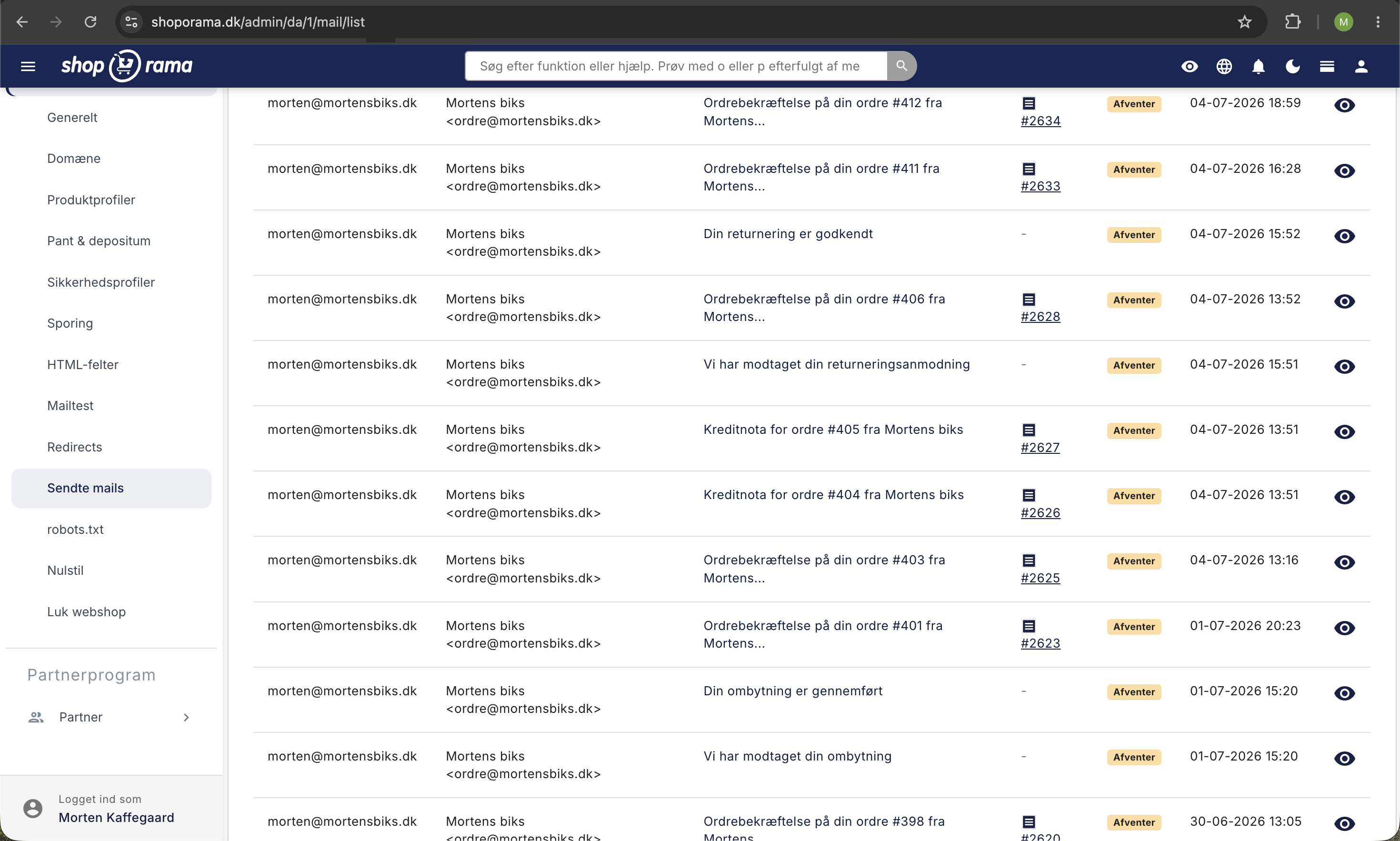
Shoporama logs all emails sent from your store. Before checking DNS and spam filters, look in the log to see if the email was actually sent. This will save you from chasing a problem that doesn’t exist.
- Go to Account, Web Store, Sent Emails.
- Search for the order number or the customer’s email address.
- Check to see if there’s an order confirmation and a notification sent to you.
You can find the full guide in “See Which Emails Shoporama Has Sent.” If the email is NOT in the log, then it was not sent from Shoporama, and you should check the order itself (was it canceled? Stuck in a payment flow?). If the email is in the log but hasn’t been received, proceed to the next step.
3. The most common cause: DMARC alignment after migrating to Microsoft 365 or Google Workspace
If the email was sent from Shoporama but isn’t arriving (or is ending up in spam), the most common cause right now is a mismatch between your domain’s email policies and the way Shoporama sends emails. This typically affects stores that have recently migrated their email to Microsoft 365 or Google Workspace, because those platforms often have a strict DMARC policy set up from the start.
You may not be familiar with these terms, so here’s a very brief explanation in plain language:
- SPF is a list of which servers are authorized to send emails on behalf of your domain. If Shoporama’s sender isn’t on the list, the email may be rejected.
- DKIM is a digital signature on the email itself. The recipient’s server verifies that the signature matches your domain, so no one can impersonate you.
- DMARC is the rule that determines what the recipient should do if SPF and DKIM don’t match. If it’s set to p=reject, the email is discarded immediately.
Shoporama sends emails through a large, reputable email service provider called Ubivox. This works fine in most cases, but if your own domain has a strict DMARC policy, the recipient’s server requires that the email’s signature match your specific domain. This is called DMARC alignment, and you can only achieve it if we can sign the emails with DKIM for your domain. That’s exactly what our Heysender integration does.
4. Verify your DMARC record
You can check your domain’s DMARC record using a free online tool. It takes 30 seconds.
- Go to dmarcian.com/dmarc-inspector.
- Enter your domain (e.g., dinwebshop.dk) and click Inspect.
- Look for the line that starts with v=DMARC1.
If it says p=reject or p=quarantine, you have a strict policy. This is good for security, but it also means that all your order emails must be correctly signed for your domain. If they aren’t, they’ll be rejected or sent to spam.
If it says adkim=s (strict alignment), the requirement is even stricter: the signature must exactly match your domain, not a subdomain.
5. The Solution: Enable Heysender
Heysender is Shoporama’s integration that allows us to sign your order emails with DKIM for your own domain. Once it’s active and DNS is set up, your order emails will comply with DMARC alignment and be accepted by Microsoft 365, Google Workspace, Gmail, Yahoo, and all other major providers.
You can find the full setup guide in Set Up Heysender Integration. You’ll need access to your domain’s DNS zone, so have your login credentials ready from your domain provider (such as Simply, One.com, Cloudflare, or GratisDNS).
Note: Once Heysender is enabled, it cannot be disabled again. Therefore, make sure your DNS is set up correctly before checking the box.
6. Other possible causes if it’s not DMARC
If the DMARC record is lenient (e.g., p=none) or doesn’t exist at all, the problem may lie elsewhere. Check the points below.
- Incorrect or missing SPF record: If you’ve switched to a new email provider, your SPF record may have been overwritten, so Shoporama’s sender is no longer listed. An online tool such as dmarcian, MXToolbox, or Mail-Tester can show you the SPF record.
- Your domain is on a blocklist: If your domain has sent spam in the past (or others have misused it), it may have ended up on a blocklist at the recipient’s end. Check your domain on MXToolbox Blacklists.
- The recipient’s spam filter is too strict: Ask the customer to check their spam, junk, and unsolicited mail folders. Also ask them to mark the email as “not spam” so the filter learns to recognize it.
- Typo in the email address: Look up the order in the admin panel and check the address the customer entered. This is surprisingly often the reason.
7. Why This Matters to Your Business
A missing order confirmation isn’t just a minor technical glitch. The customer is left wondering whether the purchase went through and will usually contact you with an annoyed or concerned email. Sometimes the same order appears twice because the customer tries again, which creates double the work for the accounting department. In the worst-case scenario, negative experiences are shared on Trustpilot, and you lose future business. Ensuring that order emails are delivered reliably is therefore one of the most cost-effective safeguards you can put in place for your online store.
Frequently Asked Questions
Why did the problem suddenly start when it was working before?
The most common explanation is that your domain was recently migrated to Microsoft 365 or Google Workspace. As part of the setup, many accounts are assigned a strict DMARC policy, and that’s what’s suddenly blocking your order emails. The other possibility is that major email providers (Gmail, Yahoo, Outlook) are continuously tightening their requirements for senders.
Should I do anything if my DMARC is set to p=none?
With p=none, emails are usually delivered even if DMARC fails, and you don’t need to take any immediate action. However, we still recommend Heysender because more and more providers are using DMARC as a signal for their spam filters. This strengthens your email reputation.
Can I check myself whether a specific order email was delivered?
You can check the email log to see if the email was sent from Shoporama. We can’t see whether it was actually delivered to the customer’s inbox. If you have Heysender enabled, Heysender will also send a bounce notification, so you can see if the recipient rejected the email.
I’m not tech-savvy. Can I set up Heysender myself?
The setup in Shoporama itself is easy. The technical part involves adding two TXT records with your domain provider. Many domain providers have good guides for this, and if you get stuck, you can forward the values to your domain provider’s support team or email us at support@shoporama.dk—we’d be happy to help.
Will I lose orders while I’m waiting for the DNS changes to take effect?
It can take anywhere from 30 minutes to 24 hours for DNS changes to take effect everywhere. During that time, some emails may still be rejected. You can check your Sent Mail folder regularly and resend order confirmations from the order page yourself if a customer reports a missing email in the meantime.
We also send newsletters. Does this affect them as well?
Heysender handles transactional emails from Shoporama (orders, shipments, password resets). Newsletters sent via Klaviyo, Brevo, HeyLoyalty, or MailChimp have their own DKIM setup, which you’ll need to configure with that provider. The principle is the same: your domain must be able to be signed by the sender.
My customer says the email is in their spam folder. Does Heysender resolve this as well?
Yes, in most cases. Spam filters check SPF, DKIM, and DMARC before determining whether an email is trustworthy. When Heysender provides your emails with the correct DKIM signature for your domain, they go from “unauthentic” to “reliable” and end up in the main inbox for the vast majority of recipients.
What should I do if I don’t have access to DNS myself?
Contact the person who set up the domain (typically your web designer, your IT provider, or your own IT department). Send them the two TXT records shown by Shoporama and ask them to add them to the DNS zone. Once that’s done, simply click Save in the Heysender settings in Shoporama.
Can an unhappy customer affect our Trustpilot reputation if order emails fail to deliver?
Unfortunately, yes. Missing order confirmations are one of the most common complaints on Trustpilot because customers feel uncertain about their purchase. Ensuring that these emails are delivered reliably is a simple way to avoid negative reviews and poor customer experiences.
Do you need help figuring out where the problem lies in your store? Email support@shoporama.dk and include your domain and an order number, and we’ll look into it together.
Related articles
Set up Heysender integration
Guide to setting up Heysender integration so your transactional emails support DMARC, SPF and have better deliverability.
See which emails Shoporama has sent
Guide to view a log of all emails Shoporama has sent from your online store.
Which user receives system emails?
Guide to view and change which user receives system emails from Shoporama.
Related features
DKIM
DKIM is an email signature that proves the email is genuine. Learn how DKIM works, why it's important for your eCommerce emails and how to set it up.
DMARC
DMARC protects your domain from email spoofing and phishing. Read about DMARC, SPF and DKIM and why it's important for webshops.
SMTP
SMTP is the protocol for sending emails. Read about SMTP servers, mail delivery and how it is used in webshops.
SPF - Sender Policy Framework
SPF prevents email spoofing and improves your deliverability rate. Learn about SPF records, DNS setup and the interaction with DKIM and DMARC.
Emails to Your Customers: Sender, Content, and Email Testing
See what emails Shoporama sends to your customers, how to edit the sender and text, how to use Mailtest, and what to do about spam.