Emergency situation

In case of emergencies or breakdowns, you can send an SMS to our emergency hotline

On-call phone (SMS only)

+45 29 70 15 95

Send an SMS with the following information:

  • Your name and webshop
  • Description of the problem

Notes: This service is only for critical situations where your webshop is down or has serious problems. For regular support, please use our normal support channels.

Included in all packages

Product feeds for all platforms | Shoporama

Ready-made feeds for Google Shopping, Pricerunner, and Partner Ads. You can also build your own custom feeds in XML, JSON, or CSV.

Read more about it

Product feeds for all platforms

Pre-built feeds for Google Shopping, Pricerunner, Partner Ads, Kelkoo, and TradeTracker. Or build your own custom feeds in XML, JSON, or CSV.

Pre-built feeds for the major platforms

Product feeds are your gateway to selling on price comparison and affiliate platforms. Shoporama offers ready-made feeds for the most popular platforms, which are automatically generated and kept up to date:

  • Google Shopping — a fully compatible feed with product data, prices, images, and availability. Also supports multi-language and multi-country feeds
  • Pricerunner — price comparison with automatic product matching
  • Partner Ads — affiliate marketing with support for color and size per variant
  • Kelkoo — European price comparison
  • TradeTracker — affiliate network
  • Priceshape — price monitoring and competitor analysis
  • Klaviyo — product feed for email marketing with personalized recommendations

Build your own custom feeds

Do you need a feed in a specific format that isn’t covered by the pre-built feeds? With the custom feed tool, you can build exactly the feed you need—without writing any code.
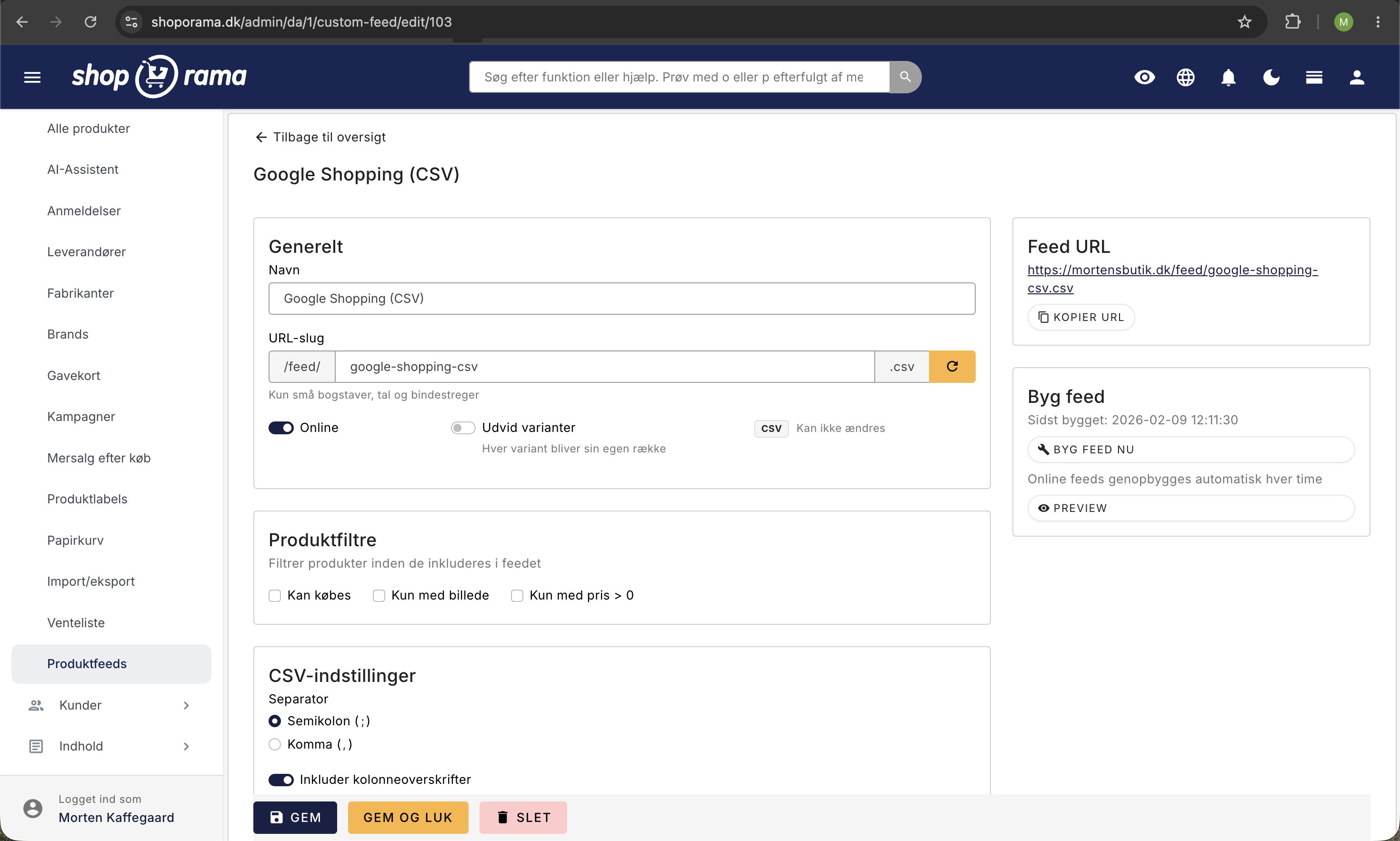
Opsætning af custom feed i Shoporama: navn, URL-slug, feed-URL med kopier-knap, produktfiltre, og CSV-indstillinger med separatorvalg
The editing page for a custom product feed, where you set the name, URL slug, product filters, and CSV settings. The feed URL on the right is the address you provide to the price portal, and the feed is automatically refreshed every hour.

You choose:

  • Format — XML, JSON, or CSV
  • Fields — choose exactly which product data to include (name, price, EAN, description, images, categories, brands, custom fields, etc.)
  • Filters — select which products to include based on categories, landing pages, or product labels, and filter by whether the item is available for purchase, has an image, or has a price
  • Variants — choose whether variants should be expanded into separate rows
  • XML Structure — customize the root element, item element, and CDATA settings, or select RSS 2.0 for Google Merchant Center
  • CSV settings — select the delimiter and whether headers should be included

Built automatically in the background

Your feeds are automatically generated in the background every hour and delivered as a single, complete file. This makes them fast to download, even for stores with thousands of products.

Protect your feeds

Custom feeds can be protected with a secret URL or with a username and password, so that only those you grant access to can download the feed. This gives you control over who has access to your product data—for example, if the feed contains your cost prices.

Read our guides: Build Your Own Feeds, Google Shopping Feed, Priceshape Feed, Partner Ads Feed, and Multi-Page Landing Page Feeds.

Try it for free - no strings attached

Start your free trial today and see for yourself how this feature can boost your online store. No credit card required.

See all features

Support articles

Read our guides and get started

Build your own feeds

Guide to building your own product feeds in CSV, XML or JSON format with Shoporama's custom feed feature.

Implement Pricerunner tracking

Guide to implementing Pricerunner conversion tracking on your Shoporama online shop with proper Smarty code.

Opsæt Kelkoo-produktfeed i Shoporama

Guide til Kelkoo-produktfeedet i Shoporama: aktivering, feed-adresse, styring af Kelkoo-kategori, og beskyttelse med...

Opsæt Pricerunner-produktfeed i Shoporama

Guide til at aktivere og tilpasse Pricerunner-produktfeedet i Shoporama, så Pricerunner kan hente dine varer.

Partner Ads setup step by step

Detailed guide to setting up Partner Ads in Shoporama: feed, tracking, program type, country, API key and auto cancel...

Feed-nøgler: Beskyt dine produktfeeds med en hemmelig nøgle

Sådan slår du feed-nøgler til i Shoporama og beskytter dine produktfeeds, så kun Google, Pricerunner, og andre...

Opsæt TradeTracker-feed i Shoporama

Sådan aktiverer du TradeTracker-feedet i Shoporama, så dit affiliate-netværk kan hente dine produkter.

Priceshape feed

Guide to setting up a Priceshape feed on your Shoporama online store via an XML file and a landing page.

Split your feeds into multiple pages

Here's how to split a custom XML feed from a landing page into multiple pages. The parameter is determined by your...

Set Up a Google Shopping Feed

Guide to Setting Up a Google Shopping Feed in Shoporama: categories, custom labels, product IDs, and catalog...

Set up Partner Ads in Shoporama: getting started

Introduction to Partner Ads in Shoporama. Understand what it is, what you get out of it, and get started quickly with...

Include color and size in Partner Ads feed

Guide to adding color, size and gender to your Partner Ads feed in Shoporama via product profiles and extra fields.

Product IDs and Catalog Match: How to Ensure Your Ads Match Your Product Feed

An explanation of which product ID Shoporama’s tracking sends, why it always matches the Google Shopping feed, what...