Loyalty programme
Complete guide to the Shoporama loyalty program - setting up the points system, earning, redemption and customer communication.
Shoporama's loyalty program lets your customers earn points when they shop in your online store. Points can later be used as payment on new orders.
Here’s how it works
Customers who create a profile in your online store can earn points for every purchase. You manage the rules in the admin panel under Customers → Loyalty Program:
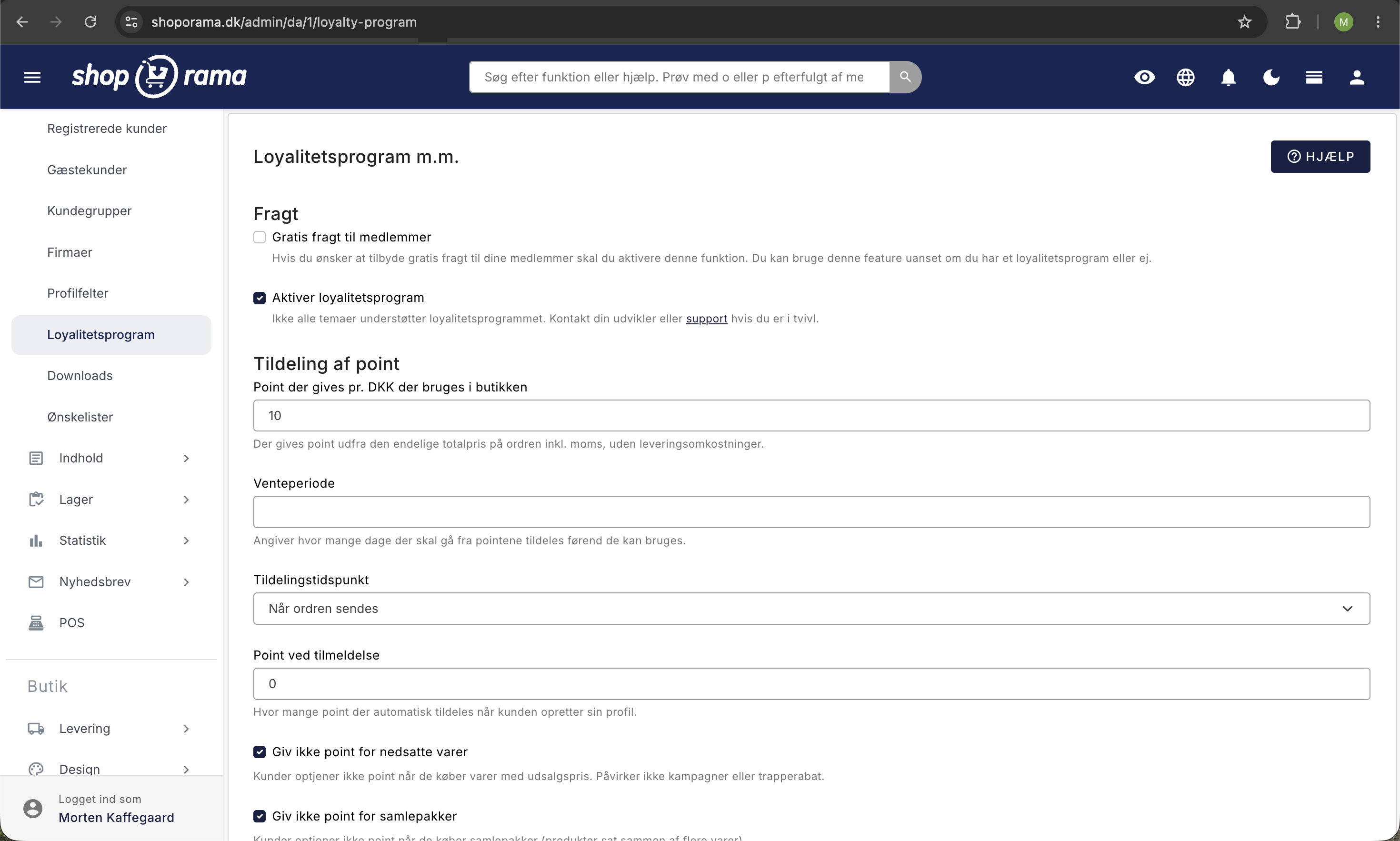
| Setting | Description |
|---|---|
| Free Shipping for Members | All customers with a profile receive free shipping. This applies regardless of whether you have a loyalty program or not. |
| Points Awarded per DKK | How many points the customer earns per krone. A whole number between 1 and 1,000. |
| Waiting Period | Number of days from when points are awarded until they can be used. Set to 0 if the customer should be able to use them immediately. |
| Award Time | Whether points are awarded when the order is approved or only when it is shipped. |
| Points upon sign-up | Points the customer automatically receives when their profile is created. |
| Do not award points for discounted items | Items with a sale price do not earn points. This does not affect promotions or tiered discounts. |
| Do not award points for bundle deals | Bundles do not earn points. |
| Number of points equivalent to 1 DKK | The conversion rate applies when the customer pays. If you enter 100, the customer must use 100 points to receive a 1 DKK discount. |
| Minimum cart value in points before payment with points is allowed | The cart value converted to points must be at least this amount before the customer can pay with points. With a conversion rate of 100 points per DKK, 5,000 corresponds to a cart value of 50 DKK. The limit applies to the cart, not the customer’s balance. |
| Maximum amount in DKK that can be purchased | Maximum discount that points can provide on a single order. Leave the field blank if you do not want to set a limit. |
| Point Expiration | Number of days the customer can keep their points. A blank field means points never expire. If you change the number, it applies only to points earned going forward. |
| Allow points to be used on discounted items | Whether points can be used on items with a sale price. |
| Do not allow points to be used on bundle deals | Prevents payment with points when the cart contains bundle deals. |
| Do not allow points to be used toward shipping | The points discount cannot exceed the value of the items, so the customer always pays for shipping in Danish kroner. The minimum limit above continues to apply to the entire cart, including shipping, and this setting has no effect if you offer free shipping to members. |
| Categories | Restrict the use of points to items in specific categories. If no categories are selected, points apply storewide. |
| Exclude products from points | Selected items do not earn points upon purchase, and points cannot be used to pay for them. |
| Send an email before points expire | Number of days before expiration when the customer automatically receives a reminder via email. |
Points are calculated based on the total order amount, including tax, excluding shipping and deposit. The customer receives their points once the order is completed.
How to Set a Specific Bonus Percentage
The two most important fields are linked. “Points awarded per DKK” determines how many points the customer receives, and “Number of points corresponding to 1 DKK” determines the value of a single point. It is the ratio between these two numbers that determines the actual size of the bonus the customer receives. Neither field alone indicates the bonus amount.
Bonus as a percentage = (points awarded per DKK ÷ number of points equal to 1 DKK) × 100
The easiest formula: set “Number of points corresponding to 1 DKK” to 100, and set “Points awarded per DKK” to the percentage you want.
| Desired bonus | Points awarded per DKK | Number of points equivalent to 1 DKK | The customer spends 500 DKK. |
|---|---|---|---|
| 1% | 1 | 100 | 500 points = 5.00 kr. |
| 2% | 2 | 100 | 1,000 points = 10.00 DKK |
| 3% | 3 | 100 | 1,500 points = 15.00 DKK |
| 5% | 5 | 100 | 2,500 points = 25.00 DKK |
| 2.5% | 25 | 1,000 | 12,500 points = 12.50 DKK |
If you want to calculate a percentage with decimals, simply multiply both numbers by 10. 2.5% becomes 25 and 1,000, and 1.5% becomes 15 and 1,000.
Stick to round conversion numbers. Choose 100 or 1,000 as the conversion rate. Odd numbers like 3.333 result in an imprecise percentage and yield discount amounts with fractions of an øre, which can cause small discrepancies between the cart total and the invoice.
Will you adjust the rates later? The conversion rate is first applied when the customer pays with their points. If you change it, you’ll simultaneously change the value of all the points customers already have. If the bonus needs to be adjusted, it’s therefore best to change the “Points awarded per DKK” and leave the conversion rate as is.
Are you switching from another loyalty program? Other systems often use small point values, such as 3 points per 100 DKK, where 1 point is worth 1 DKK. This corresponds to a 3% bonus, and you can offer the same here using 3 and 100. The point values will be higher because at least 1 point is awarded per krone, but the value to the customer remains exactly the same.
Exclude products from the loyalty program
You can exclude specific products from earning and redeeming points. This is useful for products with very low margins, gift cards, or other products that should not be included in the loyalty program.
- Open the product you want to exclude.
- Under the product settings, you’ll find the “Exclude from loyalty program” field.
- Check the box and save the product.
Excluded products do not earn points upon purchase, and customers cannot use points to pay for them.
Theme Customization (for developers)
Your theme must include code to display points and accept point payments. The default themes (Delaware, DelawareDK, etc.) include this functionality out of the box. If you’re building your own theme, you can use the following:
Display the user’s points:
<{if $webshop->hasLoyaltyProgram()}>
  Your points: <{$customer->getActivePoints()|number_format:0:",":"."}>
<{/if}>
Check if the user has active points:
<{if $customer && $customer->getActivePoints()}>
  You have <{$customer->getActivePoints()|number_format:0:",":"."}> points.
<{/if}>
Input field for point payment (in basket.html):
<input type="number"
  name="use_points"
  placeholder="How many points would you like to use?"
  value="<{$use_points}>"
  min="0"
  max="<{$customer->getPointsAvailable()}>"
/>
Show earning rules:
You earn <{$webshop->getLoyaltyProgramBasePoints()|number_format:0:",":"."}>
points for every 1 <{$webshop->getCurrency()}> you spend.

When you pay with points,
<{$webshop->getLoyaltyProgramBaseCost()|number_format:0:",":"."}>
points are equivalent to 1 <{$webshop->getCurrency()}>.
Show points earned on this order:
You’ll earn <{$earns|number_format:0:",":"."}> points on this order.Points History Page
Add the file user-points.html to your theme, where the user can view their points:
<table>
  <tr>
    <th>Date</th>
    <th>Order</th>
    <th>Status</th>
    <th>Points</th>
    <th>Expires</th>
    <th>Valid until</th>
  </tr>
  <{foreach $my_points as $point}>
  <tr>
    <td><{$point->getTime()|date_format:"%d.%m.%Y"}></td>
    <td>
      <{if $order = $point->getOrder()}>
        <a href="<{$order->getPublicUrl()|escape}>">
          <{$order->getWebshopOrderId()|escape}>
        </a>
      <{/if}>
    </td>
    <td>
      <{if $point->getStatus() == "approved"}>Approved
      <{elseif $point->getStatus() == "pending"}>Pending
      <{elseif $point->getStatus() == "revoked"}>Revoked
      <{elseif $point->getStatus() == "expired"}>Expired
      <{else}><{$point->getStatus()|escape}>
      <{/if}>
    </td>
    <td><{$point->getPoints()|number_format:0:",":"."}></td>
    <td><{$point->getExpires()|date_format:"%d.%m.%Y"}></td>
    <td><{$point->getPendingUntil()|date_format:"%d.%m.%Y"}></td>
  </tr>
  <{/foreach}>
</table>
Frequently Asked Questions
How do I offer a 3% bonus?
Set "Points awarded per DKK" to 3 and " Number of points corresponding to 1 DKK " to 100. A purchase of 100 DKK will then earn 300 points, which are worth exactly 3.00 DKK. The bonus is always the ratio of the two numbers, not one of them.
Can I award less than 1 point per krone?
No, the field must be a whole number of at least 1. But that’s not a limit on how small a bonus you can offer. Instead, increase the conversion rate: 1 point per krone and 200 points per krone discount correspond to a 0.5% bonus.
What happens to customers’ points if I change the rates?
The points customers have already earned will remain at the amount they were awarded. The conversion rate, however, is only applied at the time of payment, so if you increase it, the existing points will be worth less. If you want to adjust the bonus without reducing the value of earned points, change the “Points awarded per DKK” setting and leave the conversion rate as is.
Do customers earn points on shipping costs?
No. Points are calculated based on the order total including tax, but excluding shipping and deposits. If you’ve excluded products from the loyalty program or opted out of points on discounted items and bundle deals, those lines will also be excluded.
What happens to points when a customer returns an item?
The points earned on the credited items are deducted. Points the customer used to pay for items are credited back as the items the customer keeps no longer qualify for the discount. In the case of a full return, the customer receives all their used points back.
Does the customer need to create a profile to earn points?
Yes. Only customers with a profile earn points and can use them to pay. Guest purchases without logging in do not earn points.
Why can’t my customer use their points?
Check the fields under “Using Points.” The cart total may be too low compared to the minimum cart value in points; the cart may contain discounted items or bundle deals that you’ve opted out of; the items may be outside the selected categories; or the discount code on the order may be set to disallow points.
Does the loyalty program work with my theme?
Not all themes display points. The default themes support it, while an older or custom-built theme may be missing the code. See the section on theme customization above, or contact support if you have any questions.
Do you have questions? Contact us at support@shoporama.dk.
Can customers use their points toward shipping?
Yes, generally speaking. The point discount is deducted from the total order amount, so a customer with enough points may end up paying 0 kr. for an order where you still incur shipping costs. If you’d rather have the shipping paid in kroner, select “Do not allow points to be used toward shipping.” Then, the discount can be no more than the value of the items. For example: goods costing 100 kr. and shipping costing 25 kr. result in an order total of 25.00 kr. instead of 0.00 kr.
What happens to the points customers have already earned?
Nothing. This setting only changes how many points can be used on a single order; it doesn’t affect how many points the customer has. The balance, expiration dates, and point accrual remain completely unaffected, and the customer can use the rest of their points on their next purchase.
I already offer free shipping to members. Should I enable this setting?
No, that’s not necessary. If you offer free shipping to members, the shipping cost is already 0 kr. for customers who can use points, so there’s no shipping fee to apply points toward. This setting won’t cause any harm—it simply has no effect.
What does the customer see when she suddenly can use fewer points?
The shopping cart says, “You can use X points on this order.” That number will be lower because shipping is no longer included. If she enters a higher number, it will be rejected, and the discount won’t be applied. There’s no specific explanation as to why, so consider mentioning this in your terms and conditions if you have many members who use points.
Can a customer lose free shipping by using points?
Yes, and this remains unchanged regardless of the new setting. When the store has a free shipping threshold, it’s calculated based on the cart’s value after the points discount. If the customer uses enough points to fall below the threshold, shipping will be charged. This is worth keeping in mind if you set the threshold close to your average order value.
How do points interact with a discount code or a promotion?
Discount codes and promotional discounts are applied before calculating how many points the customer can use. The larger the discount she has already received, the fewer points she can apply on top of it. In addition, you can specify for each individual discount code that it cannot be combined with points at all.
Related articles
Free shipping over a certain amount
How to set up free shipping above a certain amount in Shoporama. The amount limit is set per country under Store, Shipping, Countries, and applies...
Create a discount code
Complete guide to creating and managing discount codes in Shoporama - percentage discount, fixed amount, free shipping, restrictions and more.
Related features
Loyalty program - reward your customers with points
Increase repurchases with Shoporama's points system. Customers earn points on purchases and use them as discounts. Signup bonus, expiration and...
CLV (Customer Lifetime Value)
CLV is the total value a customer generates over the entire relationship. Learn how to calculate CLV, why it's important and how to increase it in...
Shoporama vs DanDomain
Compare Shoporama and DanDomain on price, speed, AI features and integrations. See which Danish webshop platform is best for your business.
Shoporama vs WooCommerce
Compare Shoporama and WooCommerce: price, security, speed, GDPR and maintenance. Find the best online shopping platform for your business.