Set noindex on a page, product or category
Here's how to set "noindex" for products, categories, static pages, landing pages, and blog posts in Shoporama so they don't appear in Google search results.
"Noindex" tells search engines that a page should not be indexed or displayed in search results. Shoporama uses the “noindex, follow” variant so that Google does not display the page but still follows the links on it. Shoporama automatically applies “noindex” to pages such as checkout and search pages, and you can enable it yourself for products, categories, static pages, landing pages, and blog posts.
Products
- Go to Products → All Products, and click Edit next to the product.
- Expand the SEO tab. You can also click SEO in the menu on the right.
- Under the Indexing section, toggle the “Hide from search engines (‘noindex, follow’)” switch on.
- Click Save.
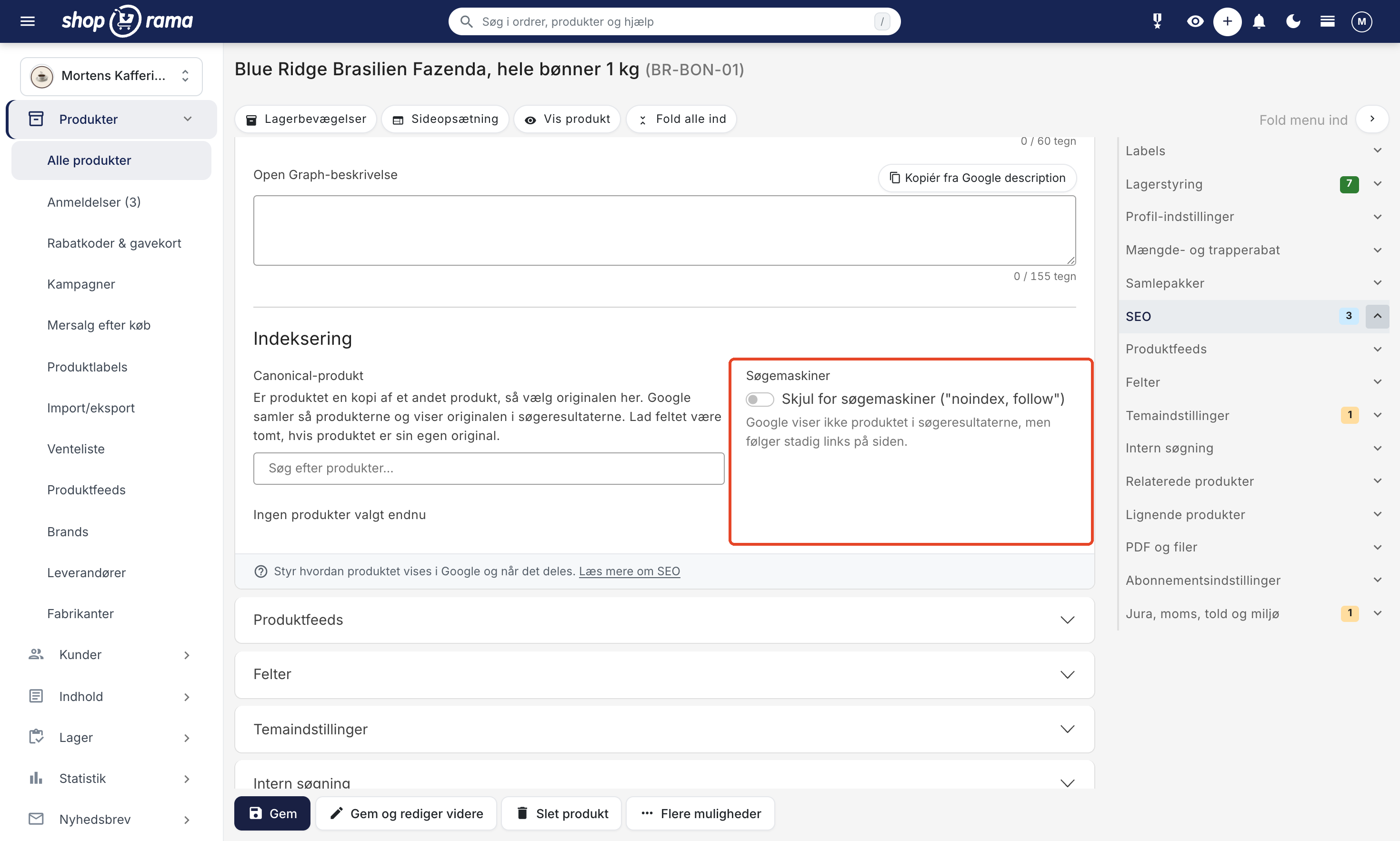
This setting was previously located in the Fields tab, but has now been moved to the SEO tab along with Google title, Google description, and canonical. When "noindex" is enabled, the Keyword Analysis in the same tab will show no score. Instead, it states that the product is hidden from search engines and that you can turn this off under "Indexing" if you want the product to appear in Google.
If you need to hide multiple products at once, select them in the product overview and choose Bulk Edit. Under Visibility and Search, select Add or Remove next to “Hide from search engines.” Read more in Bulk Editing Products.
Categories
- Go to Content → Categories and edit the category.
- Find the "Search Engine Fields" tab. It’s located below the "General," "Theme Settings" (if your theme has fields for categories), and "Images" tabs, and you can also jump to it via the menu on the right-hand side.
- Turn on the “Enable ‘noindex, follow’” toggle at the bottom of the tab.
- Click Save.
Static Pages, Landing Pages, and Blog Posts
The procedure is the same as for categories. Go to Content → Static Pages, Landing Pages, or Blog, and edit the page. Turn on “Enable ‘noindex, follow’” in the “Search Engine Fields” tab, and click Save.
What happens when "noindex" is enabled?
- Sitemap: Shoporama excludes the page from the store’s sitemap.xml, regardless of which theme you use.
- Meta tag: The theme adds a “noindex, follow” meta tag to the page. Montana, MontanaB2B, Delaware, DelawareDK, Alaska2, and California do this. Washington does not.
- The store: The page is still visible to your customers. A product continues to appear in categories, in the store’s own search, and in your product feeds. To remove a product from a feed, use “Show in feeds” in the Product Feeds card.
- Google: The page will not disappear from search results until Google has recrawled it and detected the meta tag.
When should you use `noindex`?
- Duplicate content: pages with the same or nearly the same content as other pages. For products, you can also select a canonical product so that Google displays the original.
- Temporary pages: campaign pages that will be removed soon.
- Internal pages: pages intended solely for internal use.
- Thin content: pages with very little unique content.
Automatic noindex
Shoporama automatically sets "noindex" on:
- The shopping cart and checkout pages
- Search results pages
- Category pages where the customer has selected an option in a filter
- The entire store, as long as it is in demo mode or closed
Montana, MontanaB2B, Delaware, and DelawareDK also automatically set "noindex" on pages that do not belong in Google, such as the customer account pages and the page for canceling a purchase.
Tip
Use "noindex" with caution. If you remove a page from Google, you’ll also lose any traffic it might generate. Instead, consider setting up a redirect for pages that are being removed entirely.
For developers: `noindex` in your own theme
Shoporama sets the $noindex variable when a page needs to be hidden, both when the store owner has enabled noindex and on automatically generated pages. If you’re building your own theme, it should output the meta tag in the page’s head:
<{if $noindex}>
    <meta name="robots" content="noindex, follow">
<{/if}>
Sitemap.xml is handled by Shoporama and does not require any action from the theme.
Frequently Asked Questions
I can’t find the noindex setting on my product anymore. Where is it?
The old "Fields" tab has been split up, and "noindex" is now located in the "SEO" tab under the "Indexing" section. The setting is called "Hide from search engines" ("noindex, follow"). Your old settings have been preserved, so products that were already hidden still have this setting enabled.
Why doesn’t the keyword analysis show a score for my product?
Either you haven’t entered a primary keyword, or the product is hidden from search engines. A score doesn’t make sense for a page that Google isn’t allowed to display, so the analysis instead indicates that the product is hidden. If you want the product to appear in Google, turn off the toggle under “Indexing” and save.
Will the product disappear from my online store when I set "noindex"?
No. “Noindex” only affects search engines. Customers can still find the product in your categories and in the store’s own search function, and it can be purchased as usual. If you want to completely remove the product from the store, you must take it offline in the “General” tab.
Will the product also be removed from Google Shopping?
No, “noindex” only applies to regular search results. The product will still be included in your product feeds. If you want to remove it from Google Shopping, Partner Ads, or PriceRunner, click “Hide” next to the feed under “Show in feeds” in the “Product Feeds” tab.
Can I hide 200 discontinued items at once?
Yes. Select the items in the product overview, open Bulk Edit, and select Add under “Hide from search engines ” in the Visibility and Search section. You can disable this again in the same way using Remove.
What is the difference between noindex, canonical, and robots.txt?
Noindex tells Google not to display the page in search results. Canonical indicates that the page is a duplicate and that Google should display the original instead. Robots.txt controls which pages search engines are allowed to crawl. Don’t block a page in robots.txt if you want to exclude it from Google using noindex, because then Google won’t be able to see the meta tag. Read more in robots.txt: Control what search engines can crawl.
I’ve enabled noindex, but the page is still showing up in Google. What should I do?
Wait. Google won’t remove the page until it has visited it again, and that can take anywhere from a few days to several weeks. Make sure you’ve saved the changes and that your theme is outputting the meta tag. If you’re using Washington or a custom-built theme, it might not do so automatically.
See also: Edit Product, SEO in Shoporama, and The Ultimate Guide to Redirects.
Need help? Contact us at support@shoporama.dk.
Related articles
Image name in the URL
Guide to getting the product image name in the URL for better SEO.
Mass editing of products
Guide to bulk editing products in Shoporama - edit prices, inventory, SEO fields and more in a spreadsheet-like interface.
How to create redirects on Shoporama
Guide to creating redirects in Shoporama - from simple redirects to regex and CSV import.
Related features
Canonical URL
A canonical URL tells search engines which version of a page is the official one. Learn what it is, when to use it and how it works in your online...
SEO in Shoporama - get visible in Google
Shoporama has built-in SEO features: fast speed, full control over titles and meta descriptions, dynamic tags, automatic 301 redirects, XML...
SEO suggestions - Shoporama shows you exactly what you can improve
Shoporama analyzes your online store and provides concrete SEO suggestions. Missing title tags, meta descriptions, GTIN and more.
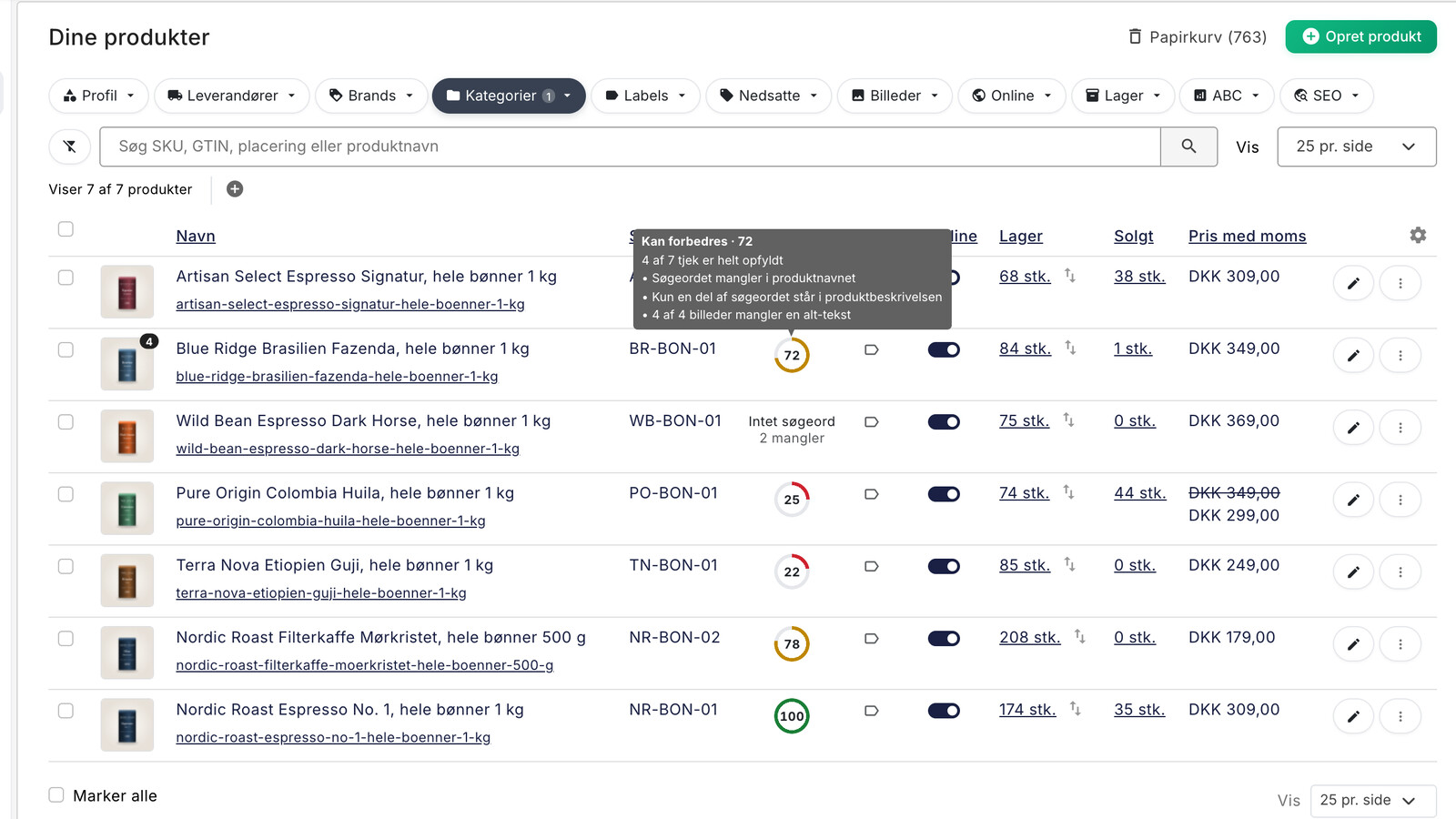
SEO på produktsider: Sådan finder og retter du de svage produkter
Se SEO-status på alle dine produkter, find dem med svag score eller uden søgeord, og ret title, beskrivelse, og alt-tekst med få klik i Shoporama.