Stepper discount on products
Here's how to set up volume discounts so customers get a better unit price when they buy multiple units of the same product. This is set up for each product under the "Volume and Tiered Discounts" tab.
A volume discount gives customers a better unit price the more items of the same product they buy. You set the tiers and the price per unit for each tier yourself, for example, 90 kr. for 3 units, 80 kr. for 5 units, and 70 kr. for 10 units.
Important: Volume discounts do not have their own menu item under Marketing. They are set per product under the “Quantity and Volume Discounts” tab on the product’s edit page.
How to set up a volume discount
- Go to Products in the left-hand menu and click Edit on the product you want to apply a tiered discount to
- Find the “Quantity and Tiered Discounts ” tab and expand it
- Under "Tiered Discount," fill in the "Apply discount at the following quantities " field with the quantities at which the price should change, separated by commas (e.g. , 3,5,10)
- Click Save. A price field will now appear for each quantity
- Enter the price per unit for each tier, and click Save again
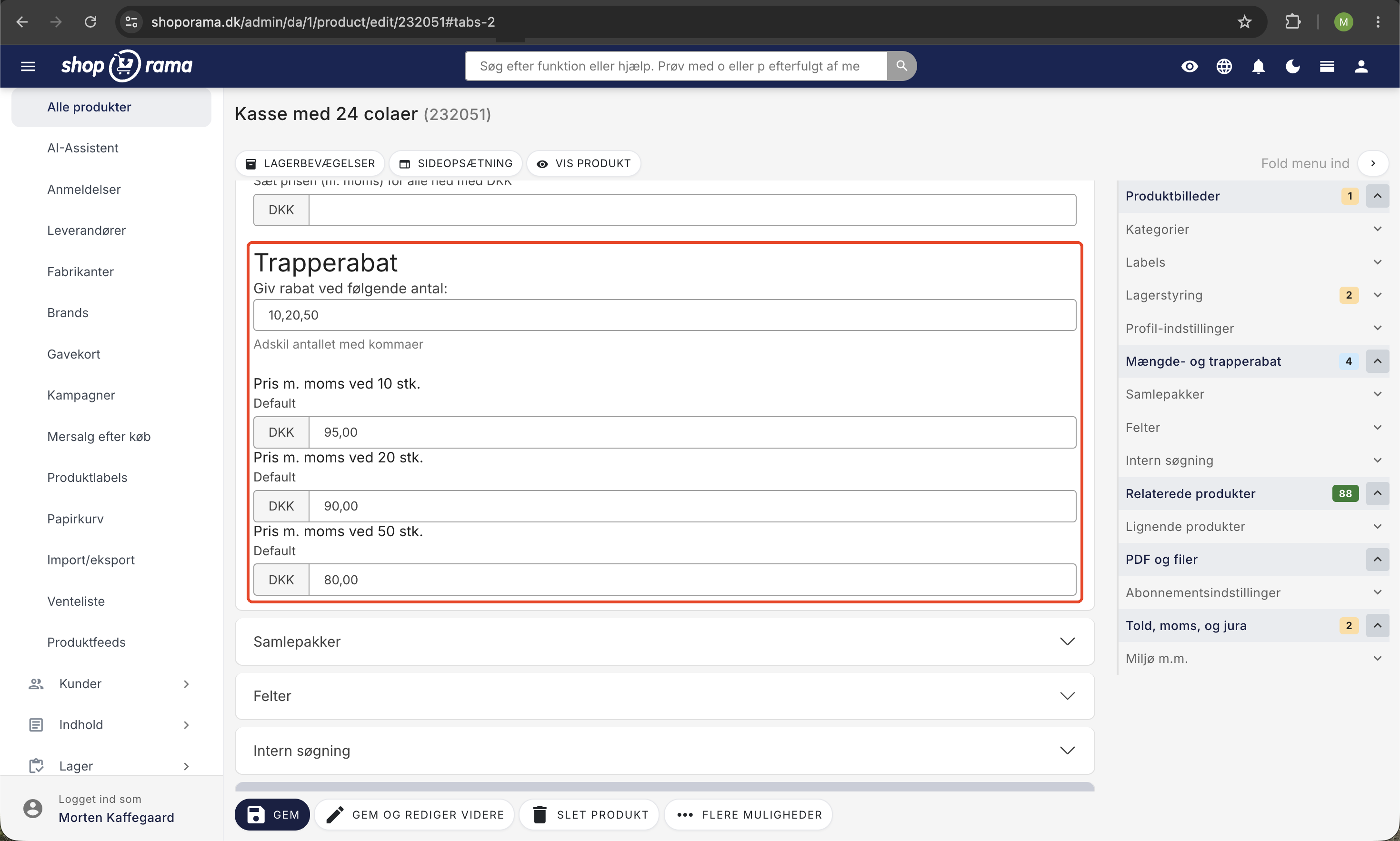
Here’s how the calculation works: The tiered discount applies to all items as soon as the quantity in the cart reaches a tier. If the customer buys 5 items in the example below, all 5 items cost 80 kr.
Specific example
A product costs 100 kr. You set tiered discounts at 3 and 5 units with prices of 90 kr. and 80 kr.:
- If the customer buys 1–2 items, they pay 100 kr. per item.
- If the customer buys 3–4 items, they pay 90 kr. per item (10% savings)
- If the customer buys 5 units or more, they pay 80 kr. per unit (20% savings)
VAT and Price Display
The tiered prices follow the pricing display used by your online store. If the prices in your store include VAT, enter the tiered prices including VAT. If they exclude VAT, enter them excluding VAT. The label above each price field indicates which display applies.
Tiered discounts on products with variants
If a product has variants (e.g., size or color) with their own prices, a price field will appear for each variant at each tier. This means you can set different tiered prices for each variant.
Display in the store
Shoporama’s built-in themes display a small price table on the product page showing the quantity and price for each tier, so the customer can see the benefit of buying more. If your store uses a custom-developed theme, the theme itself must support this display. Contact your theme developer if the table does not appear.
Differences Between Discount Types
- Tiered discount: new unit prices for specific quantities of the same product (e.g., 3, 5, and 10 units)
- Volume discount: a single fixed discount per unit when the cart contains more than a given number of the same product
- Discount code: a discount applied when the customer enters a code at checkout
- Promotions: time-limited offers across products, categories, or the entire store
If a product has both a volume discount and a tiered discount, the tiered price applies as soon as the customer reaches a tier. Learn more about volume discounts.
Frequently Asked Questions
Does the tiered price apply to all items or only those above the tier?
All items. If the customer reaches a tier, all items in the cart will be charged the new price. In the example above, 5 items would cost 5 × 80 kr. = 400 kr.
What happens if a product has both a volume discount and a tiered discount?
The tiered pricing takes precedence. As soon as the quantity reaches a price tier, the tiered price is applied instead of the volume discount.
Should I enter tiered prices with or without tax?
It depends on your shop’s price display. The label above each price field shows whether the amount includes or excludes VAT, so there’s no confusion.
Can I set different tiered prices per variant?
Yes. If the variants have their own prices, a price field will appear for each variant at each tier; for example, size XL can have a different tiered price than size S.
How do I remove the tiered discount?
Clear the “Apply discount at the following quantity ” field for the product and click Save. Existing orders will not be affected; only new orders going forward will be affected.
Need help? Contact us at support@shoporama.dk.
Related articles
Campaigns
Learn how to create promotions in Shoporama that automatically give your customers a discount. Choose from five promotion types: fixed price,...
GPSR fields on products
Guide to implement GPSR fields (manufacturer and safety profile) on products according to EU regulations.
Create volume discounts on products
How to automatically give customers a discount when they buy more of the same product. The quantity discount is set up per product in the Quantity...
Related features
Volume discounts and staircase discounts - reward for bulk purchases
Set up volume and stepped discounts directly on your products. Reward bulk purchases, increase average order and boost customer loyalty.
Volume discount
Volume discounts offer a lower price for larger purchases. Read about volume discounts, price steps and how to increase order value in your online...