Create volume discounts on products
How to automatically give customers a discount when they buy more of the same product. The quantity discount is set up per product in the Quantity and staircase discount tab.
Volume discounts reward customers when they add multiple units of the same product to their cart. In Shoporama, you set up volume discounts directly on each individual product: you specify how many units are required and how much the price should be reduced per unit.
Important: Volume discounts do not have their own menu item under Marketing. They are set per product under the “Volume and Tiered Discounts” tab on the product’s edit page.
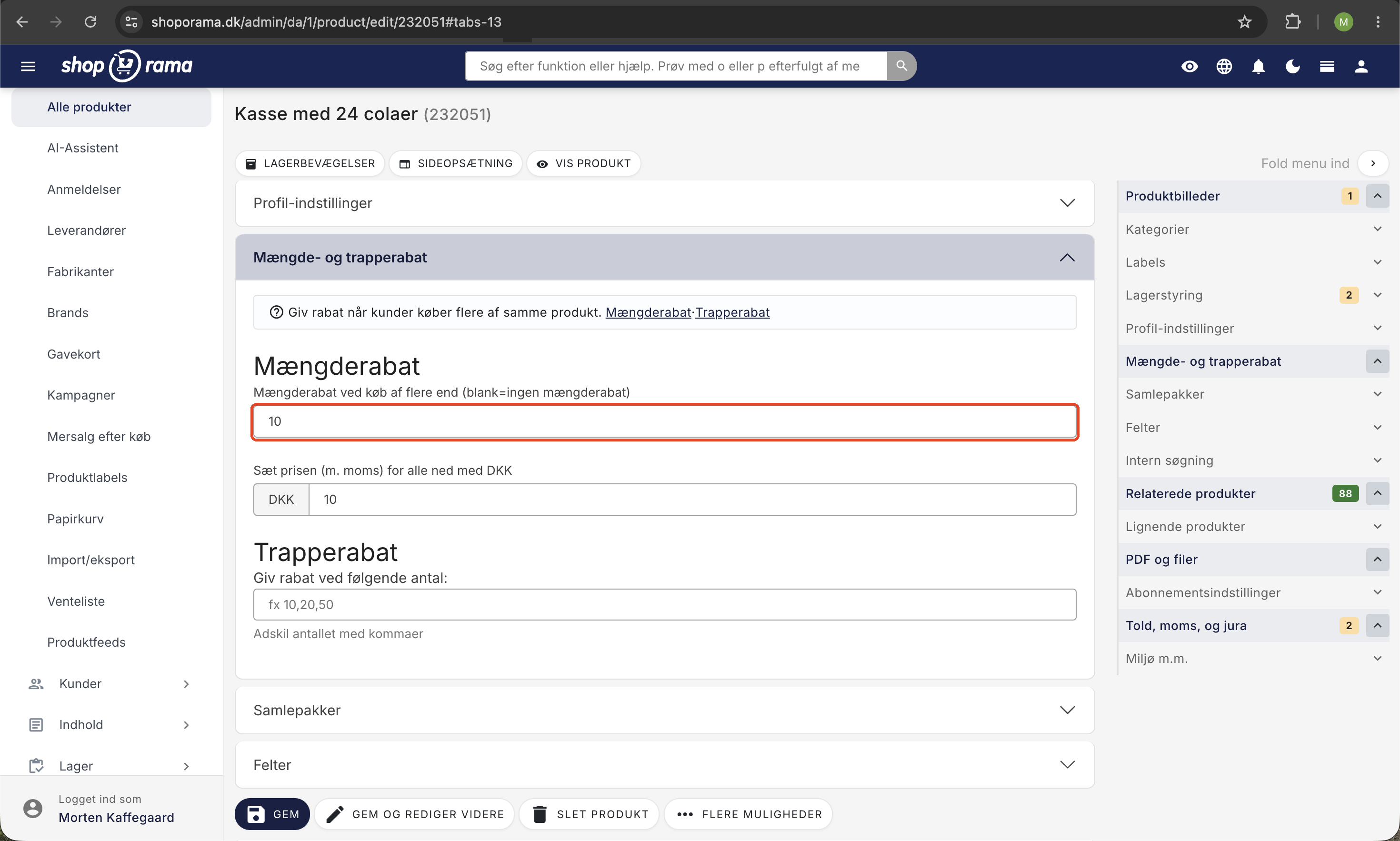
How to Set Up a Volume Discount
- Go to Products in the left-hand menu and click Edit on the product for which you want to offer a volume discount
- Find the “Quantity and Tiered Discounts ” tab and expand it
- Fill in the “Volume Discount for Purchases of More Than” field with the number at which the discount should apply (e.g., 10)
- Enter the amount by which the price per item should be reduced in the “Reduce price for all ” field
- Click Save
Here’s how the calculation works: If you set the threshold to 10 and the discount to 20 kr., the customer receives a 20 kr. discount per item as soon as there are more than 10 items of the product in the cart. The discount applies to all items, not just those above the threshold.
Concrete example
A product costs 100 kr. You set a volume discount for purchases of more than 10 items, and the price is reduced by 20 kr.:
- If the customer buys 5 items, they pay 100 kr. per item ( for a total of 500 kr . )
- If the customer buys 10 items, they pay 100 kr. per item (total 1,000 kr.); the threshold has not yet been reached
- If the customer buys 11 items, they pay 80 kr. per item for all 11 items (total of 880 kr.)
VAT and Price Display
The amount you enter follows the pricing format used by your online store. If the prices in your store include VAT, enter the discount including VAT. If they are exclusive of VAT, enter the amount exclusive of VAT. The label above the field changes automatically so you can see which display applies.
Combine with volume discounts
On the same tab, you’ll also find tiered discounts, where you can set different prices for specific quantities (e.g., 90 kr. for 5 items, 80 kr. for 10 items, and 70 kr. for 50 items). When the customer reaches a quantity tier, the tiered price is applied instead of the volume discount. Learn more about tiered discounts.
Differences Between Discount Types
- Quantity discount: a fixed reduction per item when the cart contains more than a given number of the same product
- Tiered discount: different prices at specific quantities (e.g., 5, 10, 50 items)
- Discount code: a discount applied when the customer enters a code at checkout
- Promotions: time-limited offers across products, categories, or the entire store
Set up volume discounts using AI
If you need to set up volume discounts for many products, you can ask an AI assistant to handle it for you. The AI can update a single product or hundreds at a time based on your rules, such as a specific category, brand, or price range. This saves you from having to click into each individual product.
Always ask the AI to show you an overview of which products it will change before you approve. This way, you’ll avoid a rule that’s too broad affecting more products than you intended.
Examples of prompts you can copy:
Apply a 10% volume discount for 3 or more items and a 15% discount for 5 or more items to all products in the “T-shirts” category.Show me which products already have a volume discount and what rate they’re set at.Remove volume discounts on all discontinued products (those marked as “discontinued”).Read more about how you can manage your store with an AI assistant in the blog post “Now You Can Manage Your Entire Online Store via Chat.”
Volume discounts on products with variants
If your product has variants (e.g., size or color) with their own prices, the volume discount itself applies across all variants. If you want different prices for specific quantities per variant, use the tiered pricing options below, where you can specify a price per variant for each quantity tier.
Volume discounts also apply at the POS
Volume and tiered discounts aren’t calculated only in the online store. If you’re selling from a physical checkout counter using Shoporama’s POS, the same discount applies when a customer buys enough of an item. The same applies at a self-service terminal. The price at the checkout is therefore the same as what the customer would pay online.
Frequently Asked Questions
I’m looking for “Discounts” under “Marketing,” but I can’t find it. Where is it?
Volume discounts don’t have their own menu item. You set them on a per-product basis: go to Products, click Edit on a product, and scroll down to the Volume and Tiered Discounts tab. Under Marketing, you’ll find discount codes, promotions, and newsletters instead.
Can I set volume discounts for multiple products at once?
The “Volume Discount when purchasing more than” and “Lower the price for all by” fields are located on the individual product page and are not included in CSV bulk editing. If you need to update many products at once, the fastest way is to use the AI Assistant (see the section above) or the REST API, where the `bulk_discount` field can be updated for existing products. If you import new products via JSON, these fields can be filled in from the start.
Does the quantity discount apply across different products in the cart?
No. The discount is calculated based on the number of the same product in the cart. If you want to offer a discount on the total cart amount or a combination of products, use promotions or discount codes instead.
Can the customer use a discount code in addition to the volume discount?
Yes, generally speaking. The “Allow on discounted items” setting for discount codes only applies to items with a sale price, and the quantity discount does not count as a discounted item. If the item also has a sale price, you must enable “Allow on discounted items” if you want the discount code to apply to it.
How does the customer see the volume discount in the store?
The discount is calculated automatically in the cart as soon as the quantity requirement is met. The themes do not display a separate hint about the volume discount on the product page, so if you want to make customers aware of it, you can include this information in the product description. If you want customers to see the price for each quantity tier directly on the product page, use a tiered discount instead, which the built-in themes display as a small price table.
How does the discount appear in the accounting system and on the invoice?
The discounted price is the actual sales price on the order line. There is no separate discount line. On the invoice and in the order overview, you’ll see the line price after the volume discount, and the sales tax is calculated based on the reduced amount. This makes bookkeeping and reconciliation straightforward.
Can I set up volume discounts only for B2B customers or specific customer groups?
The volume discount on the product applies to all customers. If you want to offer special discounts to B2B customers or selected customers, you can instead create discount codes that you share only with them. Contact us at support@shoporama.dk if you need help setting this up.
Can the discount be copied from one product to another?
When you copy a product in the admin panel, the volume discount fields are carried over to the copy. If many products need the same discount, a JSON import is the fastest way—simply fill in `bulk_discount_over` and `bulk_discount` with identical values on the relevant lines.
Where can I find statistics on how many customers are actually using the volume discount?
There isn’t a dedicated report. You can filter orders for the product you’ve applied the discount to and look at the order lines, where you’ll see the quantity and line price after the discount. This gives you a quick overview of whether volume sales are increasing after you enabled the discount.
How do I turn off the volume discount again?
Clear the “Volume Discount when purchasing more than” and “Reduce the price for all by” fields for the product, then click Save. The discount is now disabled. Existing orders are not affected; only new orders going forward will be affected.
Does the volume discount also apply when I sell through the POS?
Yes. The POS and self-service POS use the same pricing engine as the online store, so volume and tiered discounts are calculated the same way, regardless of where the customer shops.
Need help? Contact us at support@shoporama.dk.
Related articles
Stepper discount on products
Here's how to set up volume discounts so customers get a better unit price when they buy multiple units of the same product. This is set up for...
Create a discount code
Complete guide to creating and managing discount codes in Shoporama - percentage discount, fixed amount, free shipping, restrictions and more.
Campaigns
Learn how to create promotions in Shoporama that automatically give your customers a discount. Choose from five promotion types: fixed price,...
Bundles (Bundles)
Learn how to create bundles in Shoporama so you can sell multiple products as one package with automatic inventory tracking.
Related features
Volume discount
Volume discounts offer a lower price for larger purchases. Read about volume discounts, price steps and how to increase order value in your online...
Volume discounts and staircase discounts - reward for bulk purchases
Set up volume and stepped discounts directly on your products. Reward bulk purchases, increase average order and boost customer loyalty.
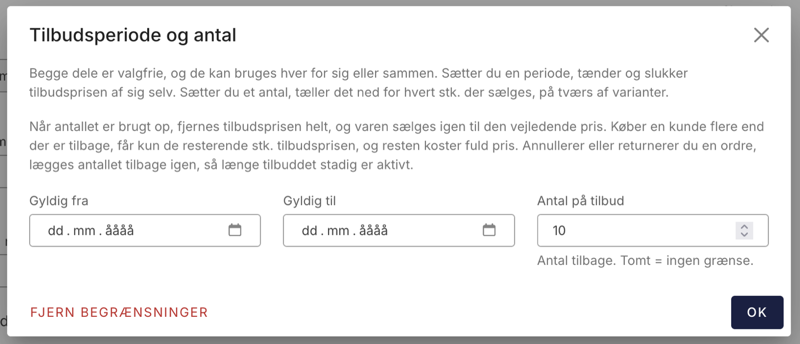
Now your offer can also stop at a certain number
Set a limit on the number of items sold at the sale price. When that number reaches zero, Shoporama automatically ends the sale. That's how the...