Loyalty programme
Complete guide to the Shoporama loyalty program - setting up the points system, earning, redemption and customer communication.
Shoporama's loyalty program lets your customers earn points when they shop in your online store. Points can later be used as payment on new orders.
Here’s how it works
Customers who create a profile in your online store can earn points for every purchase. You manage the rules in the admin panel under Customers → Loyalty Program:
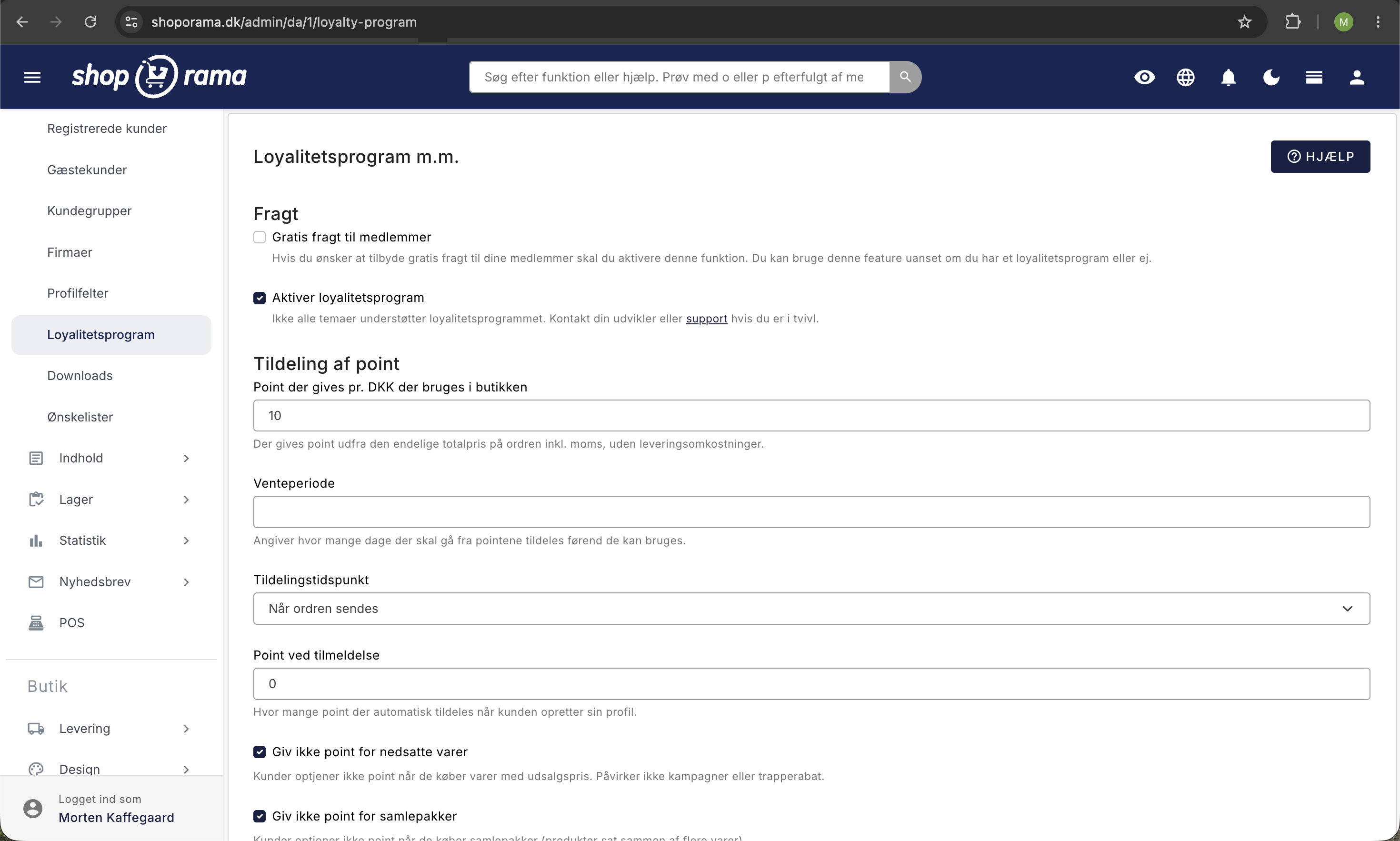
| Setting | Description |
|---|---|
| Free Shipping for Members | All customers with a profile receive free shipping. This applies regardless of whether you have a loyalty program or not. |
| Points Awarded per DKK | How many points the customer earns per krone. A whole number between 1 and 1,000. |
| Waiting period | Number of days from when points are awarded until they can be used. Set to 0 if the customer should be able to use them immediately. |
| Award Time | Whether points are awarded when the order is approved or only when it is shipped. |
| Points upon registration | Points the customer automatically receives when they create a profile in the online store, including at checkout. Customers in a customer group receive them only if the group is selected under Customer Groups. |
| Do not award points for discounted items | Items with a sale price do not earn points. This does not affect promotions or tiered discounts. |
| Do not award points for bundle deals | Bundles do not earn points. |
| Number of points equivalent to 1 DKK | The conversion rate applies when the customer pays. If you enter 100, the customer must use 100 points to receive a 1 DKK discount. |
| Minimum cart value in points before payment with points is allowed | The cart value converted to points must be at least this amount before the customer can pay with points. With a conversion rate of 100 points per DKK, 5,000 corresponds to a cart total of 50 DKK. The limit applies to the cart, not the customer’s balance. |
| Maximum amount in DKK that can be purchased | Maximum discount that points can provide on a single order. Leave the field blank if there should be no limit. |
| Point Expiration | Number of days the customer can keep their points. A blank field means points never expire. If you change the number, it applies only to points earned going forward. |
| Allow points to be used on discounted items | Whether points can be used on items with a sale price. |
| Do not allow points to be used on bundle deals | Prevents payment with points when the cart contains bundle deals. |
| Do not allow points to be used toward shipping | The points discount cannot exceed the value of the items, so the customer always pays for shipping in kroner. The minimum limit above continues to apply to the entire cart, including shipping, and this setting has no effect if you offer free shipping to members. |
| Categories | Restrict the use of points to items in specific categories. If no categories are selected, points apply storewide. |
| Exclude products from points | Selected items do not earn points upon purchase, and points cannot be used to pay for them. |
| Customer Groups That Can Earn and Use Points | By default, customers in a customer group are not enrolled in the loyalty program. Check the boxes next to the groups you want to include. This also applies to points earned upon sign-up. Only displayed once you have created customer groups. |
| Send an email before points expire | Number of days before expiration when the customer automatically receives a reminder via email. |
Points are calculated based on the total order amount, including tax, excluding shipping and deposits. The customer receives their points once the order is completed.
How to Set a Specific Bonus Percentage
The two most important fields are linked. “Points awarded per DKK” determines how many points the customer receives, and “Number of points corresponding to 1 DKK” determines the value of a single point. It is the ratio between these two numbers that determines the actual size of the bonus the customer receives. Neither field alone indicates the bonus amount.
Bonus as a percentage = (points awarded per DKK ÷ number of points corresponding to 1 DKK) × 100
The easiest method: set “Number of points corresponding to 1 DKK” to 100, and set “Points awarded per DKK” to the percentage you want.
| Desired bonus | Points awarded per DKK | Number of points equivalent to 1 DKK | The customer spends 500 DKK. |
|---|---|---|---|
| 1% | 1 | 100 | 500 points = 5.00 DKK |
| 2% | 2 | 100 | 1,000 points = 10.00 DKK |
| 3% | 3 | 100 | 1,500 points = 15.00 DKK |
| 5% | 5 | 100 | 2,500 points = 25.00 DKK |
| 2.5% | 25 | 1,000 | 12,500 points = 12.50 DKK |
If you want to calculate a percentage with decimals, simply multiply both numbers by 10. 2.5% becomes 25 and 1,000, and 1.5% becomes 15 and 1,000.
Stick to round conversion numbers. Choose 100 or 1,000 as the conversion rate. Odd numbers like 3.333 result in an imprecise percentage and yield discount amounts with fractions of an øre, which can cause small discrepancies between the cart total and the invoice.
Will you adjust the rates later? The conversion rate is first applied when the customer pays with their points. If you change it, you’ll simultaneously change the value of all the points customers already have. If the bonus needs to be adjusted, it’s therefore best to change the number of points awarded per DKK and leave the conversion rate as is.
Are you switching from another loyalty program? Other systems often use small point values, such as 3 points per 100 DKK, where 1 point is worth 1 DKK. This corresponds to a 3% bonus, and you can offer the same here using 3 and 100. The point values will be higher because at least 1 point is awarded per krone, but the value to the customer remains exactly the same.
Exclude products from the loyalty program
You can exclude specific products from earning and redeeming points. This is useful for products with very low margins, gift cards, or other products that should not be included in the loyalty program.
- Open the product you want to exclude.
- Under the product settings, you’ll find the “Exclude from loyalty program” field.
- Check the box and save the product.
Excluded products do not earn points when purchased, and customers cannot use points to pay for them.
Customer Groups and the Loyalty Program
If you place customers in a customer group, Shoporama classifies them as business customers. Therefore, by default, they are not part of the loyalty program: they do not earn points, they do not receive points upon sign-up, they cannot pay with points, and points are not refunded when they return items. This applies to customers who belong to a group themselves. Customers without a group and business users who only inherit the company’s group are not affected.
If you have enabled “Default Group for New Customers” for one of your groups under Customers → Customer Groups, new customers who create an account in the online store will automatically be placed in that group. The rule above therefore also applies to them.
If you use the groups for individual customers—for example, a customer club, your default group, or a group per store—you can include them in the loyalty program:
- Go to Customers → Loyalty Program.
- Under Customer Groups, check the boxes next to the groups whose customers should be able to earn and redeem points.
- Click Save.
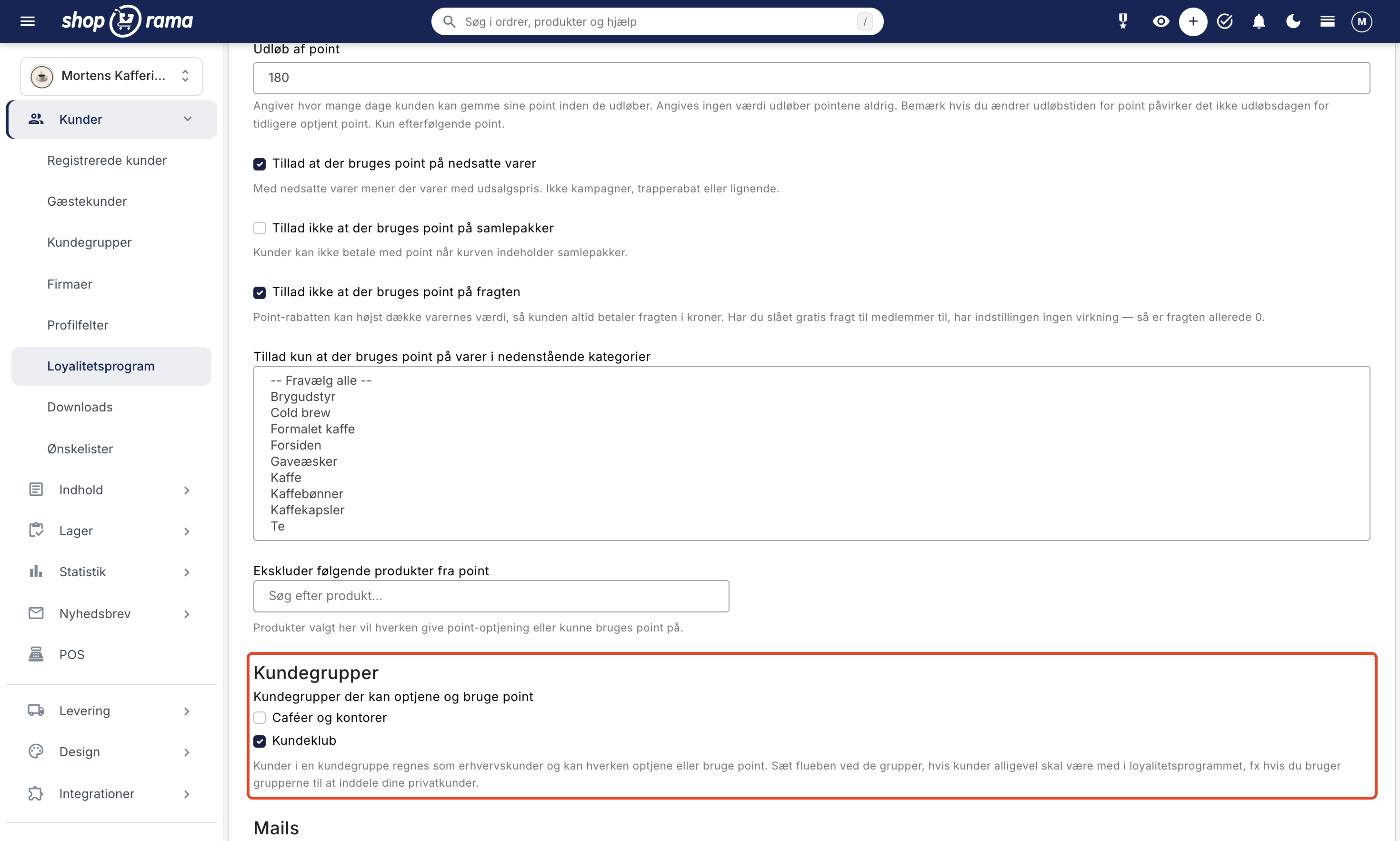
Customers in the selected groups are now treated exactly like customers without a group. If they already have points—for example, from a previous system—they can use them right away. However, orders they placed before you checked the box will not earn points retroactively. The same applies to sign-up points: customers who were added to the group when they created their account before you checked the box will not receive them afterward. If you still want to give them points, open the customer’s profile, click View Points, and use Assign Points.
The “Customer Groups” section appears only after you’ve created at least one customer group. If you don’t check any group, everything remains the same for your business customers, and they remain outside the loyalty program. If you use a default group for your private customers, you must check that box; otherwise, new customers will not be able to earn points upon sign-up, earn points, or pay with points.
Send a newsletter to the customer club
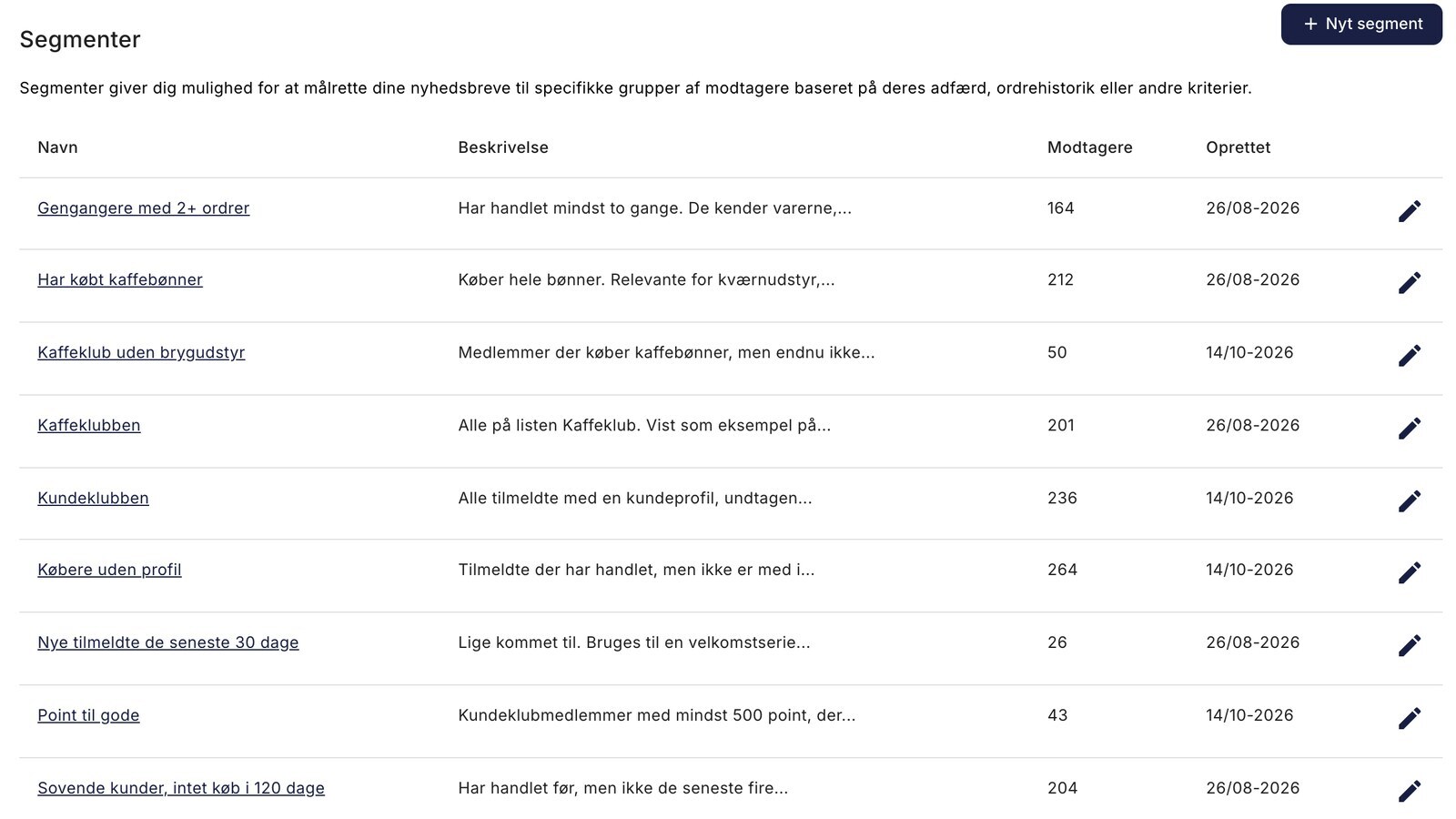
If you use Shoporama’s newsletter module, you can send a newsletter that goes only to members of your customer club, or only to those who have points to redeem. Go to Newsletter → Segments and click New Segment. There is already one rule listed: Number of Orders. Change it to one of the rules below in the drop-down menu, and use Add Rule only if you want to include additional rules:
- Has a customer profile: Select “Yes” to target registered users who have a customer profile in your online store. Points are tied to the profile, so in practice, these are your customer club members. If you have business customers in customer groups that aren’t part of the loyalty program, they’ll be included as well. Therefore, add the rule “Customer Group” set to “Is not in” with those groups.
- Customer Group: If you’ve grouped your club members into a customer group, select “Is in” and the group.
- Point Balance: Targets registered members who have a certain number of active points, e.g., 500 or more. The rule is only displayed when the loyalty program is enabled.
An example: A segment you call “Points to Use,” with the rules “Point Balance >= 500” and “Days Since Last Order >= 60,” and “All rules must match (AND),” finds members who have points to use but haven’t made a purchase in the last two months. Send them a campaign featuring a few selected products and a reminder that the points can be used as payment. The rule “Days since last order” only targets members with at least one order; if you also want to include members who only received points upon sign-up, you’ll need to use “Point Balance” alone.
"Point Balance " counts the same active points that the customer can use themselves. Points in the pending period, revoked points, and expired points are not included. Customers in a customer group that is not selected under “Customer Groups ” above are not part of the loyalty program and will therefore never appear in “Point Balance.”
This segment is different from the email under “Send an email to your customers before their points expire.” That email is sent automatically to each customer a certain number of days before the points expire. Instead, you use a segment with “Point Balance” for a regular campaign that you create and send yourself, such as one featuring products.
A segment selects only from among active subscribers to your newsletter and never signs anyone up. Members who have not opted in to the newsletter will therefore not receive the email. The customer profile and subscription are linked via the email address. Read more in the article “Customer Groups and Segmentation.”
Theme Customization (for developers)
Your theme must include code to display points and accept point payments. The default themes (Delaware, DelawareDK, etc.) include this functionality by default. If you’re building your own theme, you can use the following:
Display the user’s points:
<{if $webshop->hasLoyaltyProgram()}>
  Your points: <{$customer->getActivePoints()|number_format:0:",":"."}>
<{/if}>
Check if the user has active points:
<{if $customer && $customer->getActivePoints()}>
  You have <{$customer->getActivePoints()|number_format:0:",":"."}> points.
<{/if}>
Input field for point payment (in basket.html):
<input type="number"
  name="use_points"
  placeholder="How many points would you like to use?"
  value="<{$use_points}>"
  min="0"
  max="<{$customer->getPointsAvailable()}>"
/>
Show earning rules:
You earn <{$webshop->getLoyaltyProgramBasePoints()|number_format:0:",":"."}>
points for every 1 <{$webshop->getCurrency()}> you spend.

When you pay with points,
<{$webshop->getLoyaltyProgramBaseCost()|number_format:0:",":"."}>
points are equivalent to 1 <{$webshop->getCurrency()}>.
Show points earned on this order:
You’ll earn <{$earns|number_format:0:",":"."}> points on this order.
Points History Page
Add the file user-points.html to your theme, where the user can view their points:
<table>
  <tr>
    <th>Date</th>
    <th>Order</th>
    <th>Status</th>
    <th>Points</th>
    <th>Expires</th>
    <th>Valid until</th>
  </tr>
  <{foreach $my_points as $point}>
  <tr>
    <td><{$point->getTime()|date_format:"%d.%m.%Y"}></td>
    <td>
      <{if $order = $point->getOrder()}>
        <a href="<{$order->getPublicUrl()|escape}>">
          <{$order->getWebshopOrderId()|escape}>
        </a>
      <{/if}>
    </td>
    <td>
      <{if $point->getStatus() == "approved"}>Approved
      <{elseif $point->getStatus() == "pending"}>Pending
      <{elseif $point->getStatus() == "revoked"}>Revoked
      <{elseif $point->getStatus() == "expired"}>Expired
      <{else}><{$point->getStatus()|escape}>
      <{/if}>
    </td>
    <td><{$point->getPoints()|number_format:0:",":"."}></td>
    <td><{$point->getExpires()|date_format:"%d.%m.%Y"}></td>
    <td><{$point->getPendingUntil()|date_format:"%d.%m.%Y"}></td>
  </tr>
  <{/foreach}>
</table>
Frequently Asked Questions
How do I offer a 3% bonus?
Set "Points awarded per DKK" to 3 and " Number of points corresponding to 1 DKK " to 100. A purchase of 100 DKK will then earn 300 points, which is worth exactly 3.00 DKK. The bonus is always the ratio of the two numbers, not one of them.
Can I award less than 1 point per krone?
No, the field must be a whole number of at least 1. But that’s not a limit on how small a bonus you can offer. Instead, increase the conversion rate: 1 point per krone and 200 points per krone discount correspond to a 0.5% bonus.
What happens to customers’ points if I change the rates?
The points customers have already earned will remain at the amount they were awarded. The conversion rate, however, is only applied at the time of payment, so if you increase it, the existing points will be worth less. If you want to adjust the bonus without reducing the value of earned points, change the “Points awarded per DKK” setting and leave the conversion rate as is.
Do customers earn points on shipping costs?
No. Points are calculated based on the order total including tax, but excluding shipping and deposits. If you’ve excluded products from the loyalty program or opted out of points on discounted items and bundle deals, those lines are also excluded.
What happens to points when a customer returns an item?
The points earned on the credited items are deducted. Points the customer used to pay for items are credited back as the items the customer keeps no longer qualify for the discount. In the case of a full return, the customer receives all their used points back.
Does the customer need to create a profile to earn points?
Yes. Only customers with a profile earn points and can pay with them. Guest purchases without logging in do not earn points.
Why can’t my customer use their points?
Check the fields under “Using Points.” The cart total may be too low compared to the minimum cart value in points; the cart may contain discounted items or bundle deals that you’ve opted out of; the items may fall outside the selected categories; or the discount code on the order may be set to disallow points. If the customer is in a customer group, that group must also be selected under “Customer Groups.” Otherwise, the customer cannot pay with points in the cart, even if they have points in their account.
My business customers still shouldn’t earn points. Do I need to do anything?
No. As long as you do not check a box for any group under “Customer Groups,” the customers in your groups will remain outside the loyalty program, just as they are today. You can also select only some of the groups—for example, your customer club—and leave your B2B groups out.
Why didn’t my new customer receive any points upon sign-up?
If you have a default group for new customers, the customer is placed in that group when the account is created. If the group isn’t selected under Customer Groups, the customer won’t receive any points upon sign-up, even if your theme may have indicated that points are awarded for creating an account. Check the box next to the group, and if necessary, award the missing points via “View Points” and “Assign Points” on the customer’s profile.
Does the loyalty program work with my theme?
Not all themes display points. The default themes support this feature, while an older or custom-built theme may be missing the necessary code. See the section on theme customization above, or contact support if you have any questions.
Can the customer use their points toward shipping?
Yes, generally speaking. The point discount is deducted from the total order amount, so a customer with enough points may end up paying 0 DKK for an order where you still incur shipping costs. If you’d rather have the shipping paid in kroner, select “Do not allow points to be used toward shipping.” Then, the discount can’t exceed the value of the items. For example: goods totaling 100 kr. and shipping of 25 kr. result in an order total of 25.00 kr. instead of 0.00 kr.
What happens to the points customers have already earned?
Nothing. This setting only changes how many points can be used on a single order, not how many points the customer has. The balance, expiration dates, and earning rates remain completely unaffected, and the customer can use the rest of their points on their next purchase.
I already offer free shipping to members. Do I need to enable this setting?
No, that’s not necessary. If you offer free shipping to members, the shipping cost is already 0 kr. for customers who can use points, so there’s no shipping fee to spend points on. The setting does no harm—it just has no effect.
What does the customer see when she suddenly can use fewer points?
The shopping cart displays “You can use X points on this order.” That number will be lower because shipping is no longer included in the calculation. If she enters a higher number, it will be rejected, and the discount won’t be applied. There’s no specific explanation as to why, so consider mentioning this in your terms and conditions if you have many members who use points.
Can a customer lose free shipping by using points?
Yes, and this remains unchanged regardless of the new setting. When the store has a free shipping threshold, the cart total is calculated after the points discount is applied. If the customer uses enough points to fall below the threshold, shipping will be charged. This is worth keeping in mind if you set the threshold close to your average order value.
How do points interact with a discount code or a promotion?
Discount codes and promotional discounts are applied before calculating how many points the customer can use. The larger the discount she has already received, the fewer points she can apply on top of it. In addition, you can specify for each individual discount code that it cannot be combined with points at all.
Do you have any questions? Contact us at support@shoporama.dk.
Related articles
Free shipping over a certain amount
Here's how to set up free shipping for orders over a certain amount in Shoporama. The threshold is set per country under Shipping → Countries or...
Create a discount code
Complete guide to creating and managing discount codes in Shoporama - percentage discount, fixed amount, free shipping, restrictions and more.
Kundegrupper og B2B-priser: giv forskellige kunder forskellige priser
Customer groups and segmentation
How to create customer groups and segments in Shoporama for targeted marketing and newsletters.
Related features
Loyalty program - reward your customers with points
Increase repurchases with Shoporama's points system. Customers earn points on purchases and use them as discounts. Signup bonus, expiration and...
Customer Club Newsletter: Sell More to Returning Customers
Send the newsletter only to the customer club, a specific customer group, or members with points to redeem. Five segments to drive additional sales...
CLV (Customer Lifetime Value)
CLV is the total value a customer generates over the entire relationship. Learn how to calculate CLV, why it's important and how to increase it in...
Shoporama vs DanDomain
Compare Shoporama and DanDomain on price, speed, AI features and integrations. See which Danish webshop platform is best for your business.
Shoporama vs WooCommerce
Compare Shoporama and WooCommerce: price, security, speed, GDPR and maintenance. Find the best online shopping platform for your business.