Now Claude can change your theme, and you'll see it before your customers do
Ask Claude to add a "Only 3 left" message to the last few items, a countdown to Black Week, or a Christmas theme that you can turn off again in January. Claude will build it using a copy of your theme; you’ll see it in a preview that customers won’t see, and it’ll go live as soon as you publish it.
You can now ask Claude to modify your theme itself. For example, write that you want "Only 3 left" to appear on items that are almost sold out. Claude will create a copy of your theme and implement the change in the copy. You’ll receive a link to a preview where you can click around the store with the new theme, while your customers still see the old one. When you’re satisfied, just click “Go Live,” and you’re done.
Until now, Claude could only edit the theme’s files directly within a separate theme that was already live. Now the work takes place in a copy, complete with a preview, versions of each file, and a check that catches errors before they’re saved. You don’t need to know how to code. Claude writes the code, and Shoporama handles the copy, the preview, and the safety net. It works in the Claude app on your phone and computer, as well as on claude.ai.
Here’s how it went in our test store
We tested it in our test store, which sells coffee and has a Montana theme. We asked for two labels on the product image: “Only 3 left” on items with low stock and a red “Save X%” on items that are on sale. And we wanted to see it before it went live.
Claude copied “Montana” to a new theme, “Montana-v2,” located the file containing the product image tags, and added the two new ones. The Terra Nova Ethiopia Guji coffee had 3 in stock and was marked down from 249 to 199 DKK, so we opened it in the preview. It got both “Only 3 left” and “Save 20%” on the product page and in the categories.
It didn’t go entirely smoothly. Claude’s first version of the discount tag used a feature that Shoporama doesn’t allow in themes. The file was rejected with an error and a line number, and nothing was saved. Claude fixed it, and we simply reloaded the preview.
Three things that make sense during a busy week
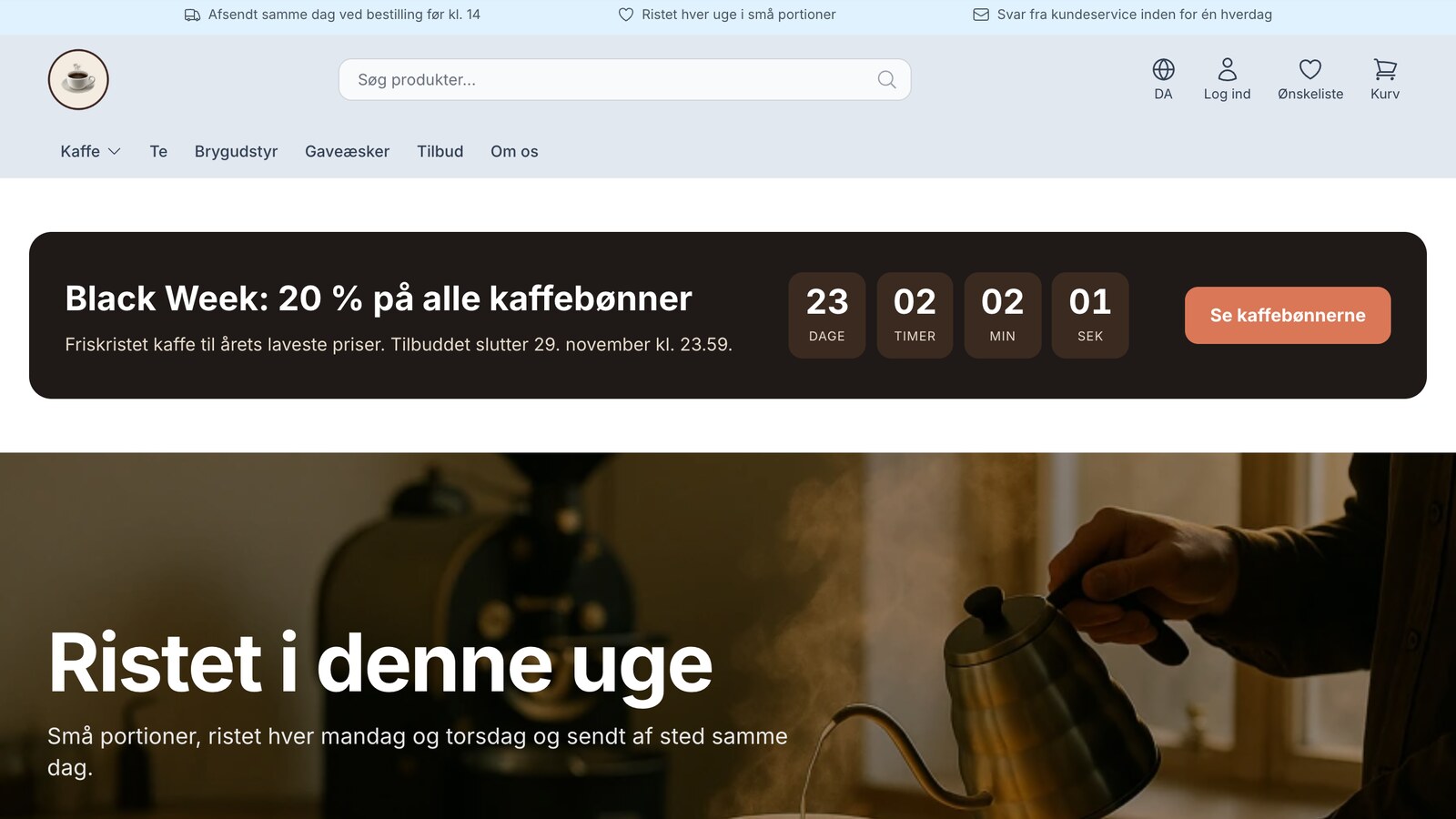
A countdown to Black Week, built in the evening
It’s Sunday evening, and Black Week starts in a few days. You ask Claude for a module for the page builder with a countdown at the top of the homepage—and customers shouldn’t see it yet. Claude builds the “Campaign Countdown” module in the copy, with fields for a headline, text, end date, button text, and link, and places it at the top of a draft of the homepage. Claude can’t publish the draft online until the theme with the module is active, so a half-finished banner won’t be visible to customers.
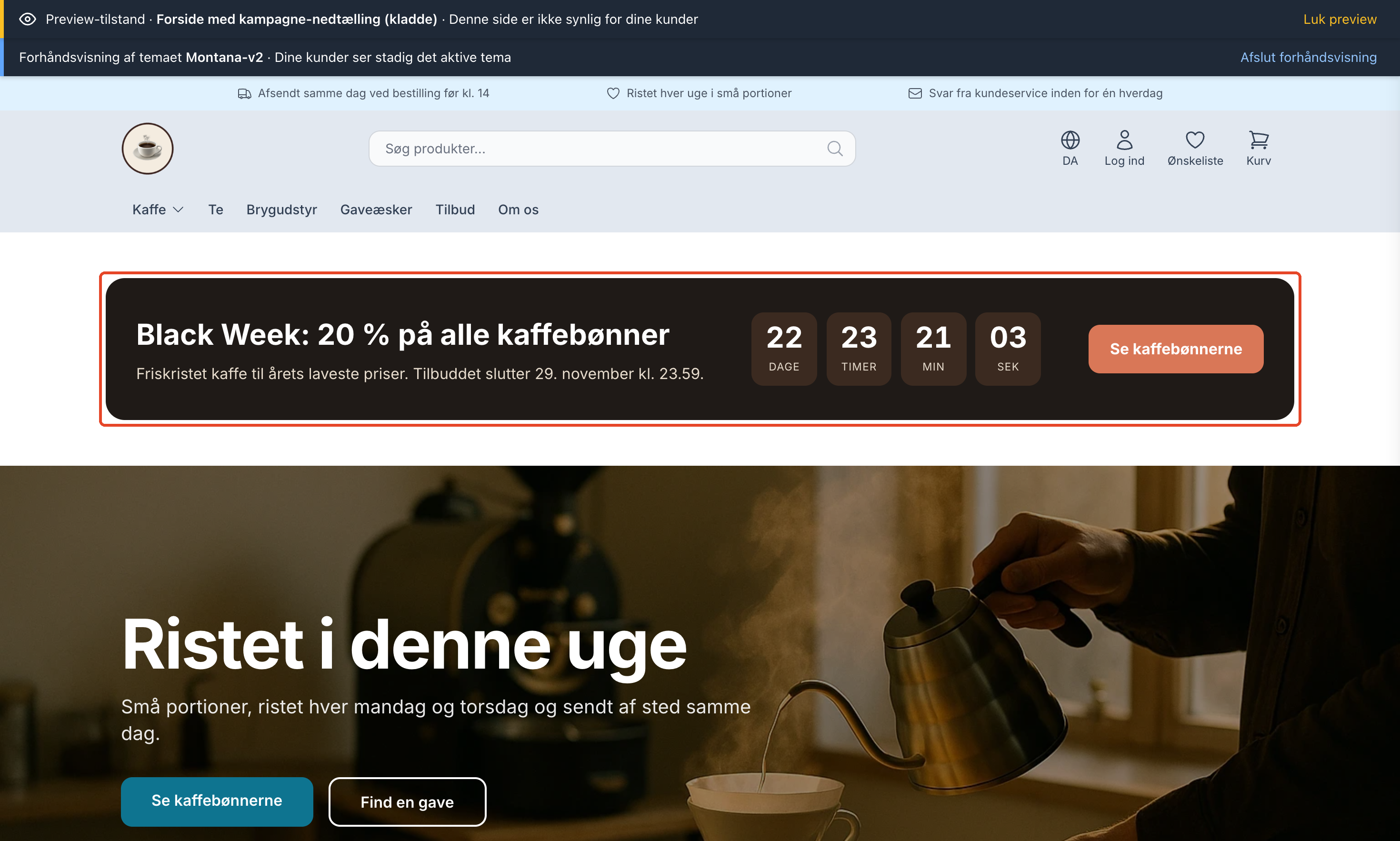
The next morning, you open the link on your phone and show it to the colleague who writes the copy. Once you’ve agreed on the text, you click “Go Live.” When the promotion ends, the banner hides automatically, and next time you’ll just edit the text and date in the page designer.
“Only 3 left” on the last bags
There are just a handful of bags left of the seasonal coffee, and they need to be sold now. “Only 3 left” on the image tells the customer exactly that. The label is based on the stock level, so it updates automatically and disappears when you restock. In our example, it appears when there are 1–5 in stock and only on products without variants, but you set the threshold yourself.
The discount on the image itself
When an item is on sale, the old price is crossed out next to the new one, and the customer has to calculate the discount themselves. With “Save 20%” on the image, the discount is shown as a number. In our example, the label only appears when the discount is at least 5%, so an item that’s been marked down by just a few kroner won’t get a “Save 1%” label.
Live with one message, and back with another
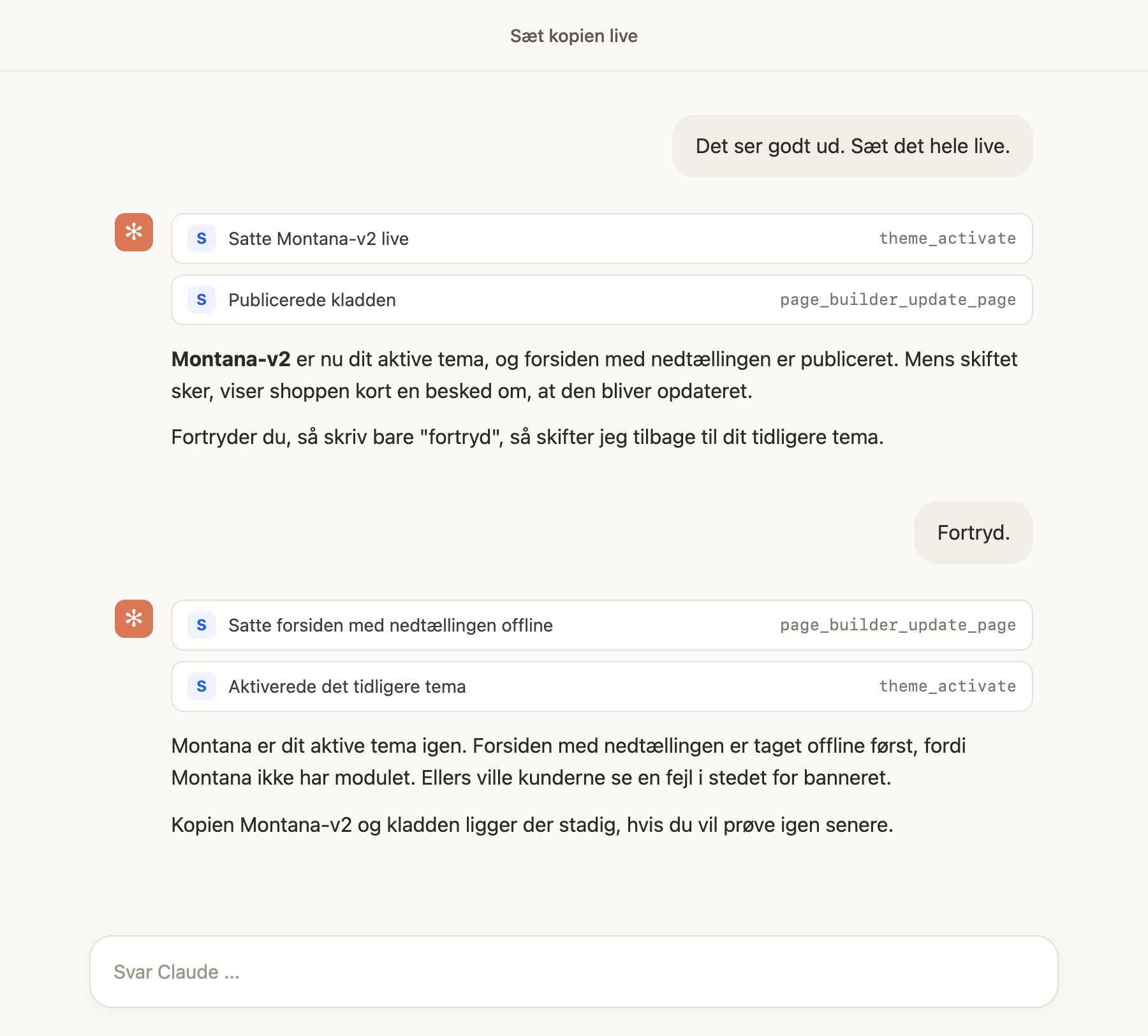
Since everything looked right, we wrote, “It looks good. Go live with everything.” Claude went live with the copy and published the draft with the countdown. While the switch is happening, the store briefly displays the message “We’re updating your store. This usually takes about a minute.” Afterward, we wrote “Cancel.” Claude first took the homepage with the countdown offline and then activated the old theme.
The order matters. Montana doesn’t have that module, so if the homepage had still been online, customers would have seen an error message instead of the banner. You don’t have to keep track of that yourself. Before Claude switches themes, it runs a test, tells you which pages use modules that the other theme doesn’t have, and offers to take them offline first. If you switch themes yourself in the admin panel, Design → Theme displays a yellow box listing those pages as long as that’s the case.
A few things we’ve tried
A Christmas theme you turn off in January. Claude created a new copy, Montana Christmas, with red buttons, a green ribbon, light snowfall, and the text “Order by December 20 at the latest, so your package arrives before Christmas.” The colors are layered on top of your color scheme, so the theme settings remain unchanged, and the snow won’t appear for visitors who have “reduce motion” turned on. Go live on December 1, and click “Cancel” in January.
A countdown next to the “Buy” button. Montana already displays “Order by 2:00 PM” next to the “Buy” button. We requested a countdown instead, so it now says “We ship today · Order by 1 hr 23 min” under “Add to Cart” with the expected delivery date right below it. The countdown uses the shipping times from your theme settings, and the delivery date skips weekends. It does not account for holidays. After the deadline and on days when there are no shipments, it shows when the next shipment will be.
More modules for the page builder. The Black Week countdown is one module. We’ve also built a collapsible FAQ section, a side-by-side comparison of up to four products, and a brewing guide with numbered steps and the ingredients you’ll need. Each module is placed in a draft, and afterward, you can edit the text and products yourself in the page designer. You can find instructions on how to do this in “Build Modules for the Page Designer with Claude.”
What if something goes wrong?
- It happens in a copy. The theme that customers see remains untouched. The copy is located under Design → Theme among your own themes, with a “Preview” button.
- The preview is not for customers. The link is valid for 7 days and displays the copy in the browser that opens it, including in the cart and checkout. You can send it to a colleague. It does not grant access to the admin panel.
- Errors are prevented. Templates are checked before they are saved, and program code cannot be included in a theme at all.
- Each file has versions. When Claude, the code editor, or the API modifies or deletes a file in the theme, the old version is saved. The most recent 20 versions of each file can be restored by Claude or using the “Previous Versions” button under Design → Code Editor.
- You can undo the change. Type “undo,” and Claude will restore the theme you had before. Pages containing a module from the copy must be taken offline first, and Claude will offer to do this for you.
- Extra Security. If you’ve enabled Extra Security, Claude will still save the files to a copy immediately, since your customers won’t see the copy. You must approve changes to the files in your active theme in the admin panel, and the same applies to switching to or deleting a theme. The copy itself is also created immediately.
- This is recorded in the log. The change appears in the Activity Log as “Theme changed,” along with the themes you switched from and to, and whether it was done via Claude.
What You Need to Know
- This requires the Pro pricing plan. The feature is included in the price, but a copy is a separate theme, and custom themes are part of the Pro plan. Claude cannot create copies on the Flex plan.
- It requires the latest theme platform, Smarty 4. All of Shoporama’s standard themes run on it. If you have an older, custom-built theme, you can check this under Webshop → General in the Smarty version field.
- The theme settings are shared. Theme settings, the logo, and the stylesheet apply to both the copy and the live theme. That’s why Claude doesn’t change them while you’re working in a copy.
- The copy is your own. A copy of a standard theme will not receive updates that Shoporama later makes to the standard theme.
- Not all themes can be copied. You can copy your own themes and Shoporama’s default themes, but not themes from the Theme Store. Modules for the page designer can be built in a copy of any of the default themes.
- Emails cannot be previewed. The preview shows the store, not the emails it sends.
Read more
The step-by-step guide is available in “Edit Your Theme with Claude.” If you haven’t connected Claude to your shop yet, find Shoporama in Claude’s connector library and click “Connect.” The entire setup process is described in “Manage Your Shop with AI.”
Related articles
Edit your theme with Claude: Test changes on a copy before they go live
Ask Claude to make a copy of your theme and implement the change—for example, adding a "In Stock" label to your products. You'll see the result in...
Build modules for the page designer with Claude
Ask Claude to build new modules for the page builder, such as a campaign countdown, an FAQ, or a comparison table. The module is built in a copy of...
Manage Your Store with AI: Get Started with Claude and MCP
Connect your Shoporama store to Claude using the connector library or via MCP, and have it create orders, discount codes, and storefronts. Learn...
Extra security: Approve changes from Claude
With Extra Security, Claude won't make any changes that send emails, transfer money, or can't be undone until you've approved them. Here's how to...
Code Editor: Edit theme files directly in the admin panel
The code editor lets you edit your theme's HTML, CSS, and JavaScript files directly in the admin panel. See what you can edit, how to save your...
Activity Log: See who has done what in the admin panel
The activity log shows who has refunded, exported, deleted, imported, or changed access permissions in the administration system, and when. See...
Page designer
Lær hvordan du bruger Sidedesigner i Shoporama til at opbygge sidelayouts med blokke som hero-sektioner, produktlister, bannere og meget mere, helt...
Customize which tools Claude can use in your shop
More from the blog
Order Check flags incorrect ZIP codes and potential credit card fraud before you submit your order
An incorrect ZIP code can result in a fee from the shipping company, and a string of nearly identical orders placed in quick succession could...
06. november 2026
New Free App Sends Online Store Orders to Business Central
If you use Microsoft Dynamics 365 Business Central, Shoporama can now transfer orders from your online store as sales invoices or sales orders....
31. oktober 2026
New free Billy app replaces the built-in integration
Shoporama has a new, free app for Billy, now called Shine Accounting. It replaces the built-in Billy integration: customer information is reused,...
31. oktober 2026