B2B sales in Shoporama
How to sell to businesses (B2B) and public institutions (B2G) in Shoporama with CVR, EAN and differentiated VAT.
Shoporama fully supports B2B sales. You can sell to individuals, businesses, and public institutions from the same online store, and you can run a closed, login-based reseller store with customer-specific prices. This article provides an overview. Each feature has its own in-depth guide, which you’ll find as you go.
A Login-Based Reseller Store
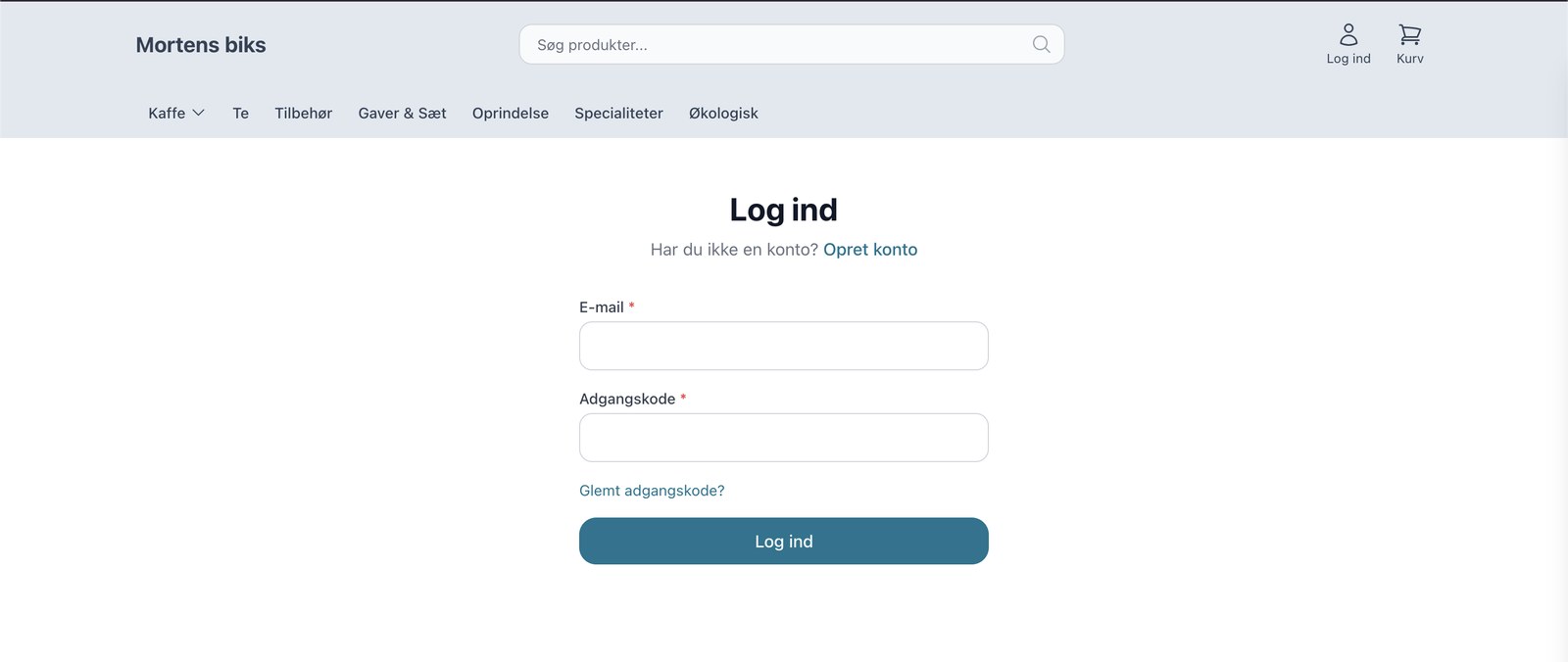
With the B2B theme, you can set up a login-based store. Visitors are directed to a login page, and only authorized customers can view the product selection and prices. This is ideal when you want your prices to be visible only to resellers. Prices are displayed exclusive of tax, as business customers expect, and a tax toggle lets customers switch between prices exclusive of and inclusive of tax with a single click.
Customer Groups with Their Own Prices
Divide your customers into customer groups and assign each group its own prices: a general discount, fixed special prices per product, volume discounts with tiered pricing, and control over which brands the group can view and purchase. A logged-in customer automatically sees their own prices. Read the full guide in Customer Groups and B2B Pricing.
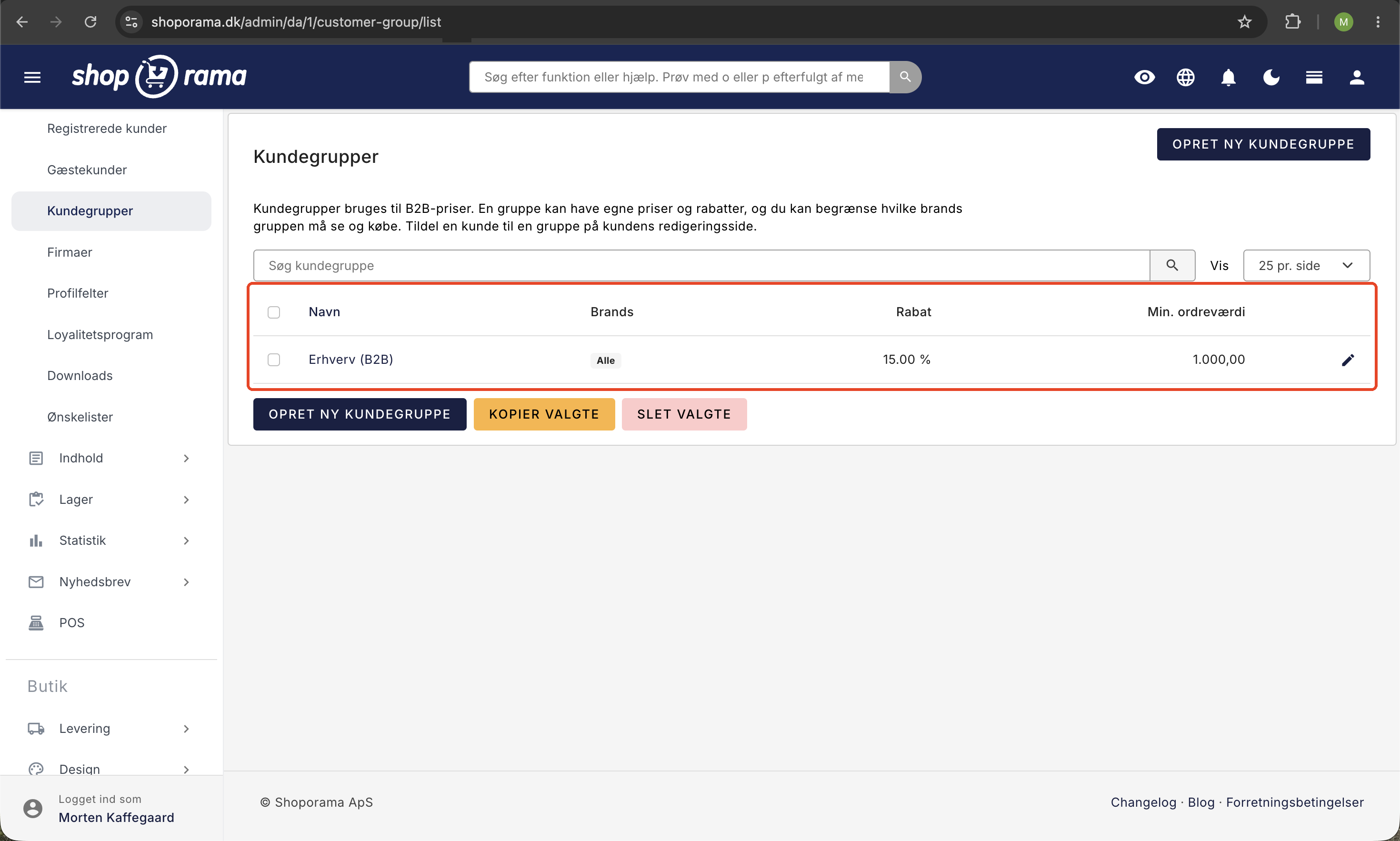
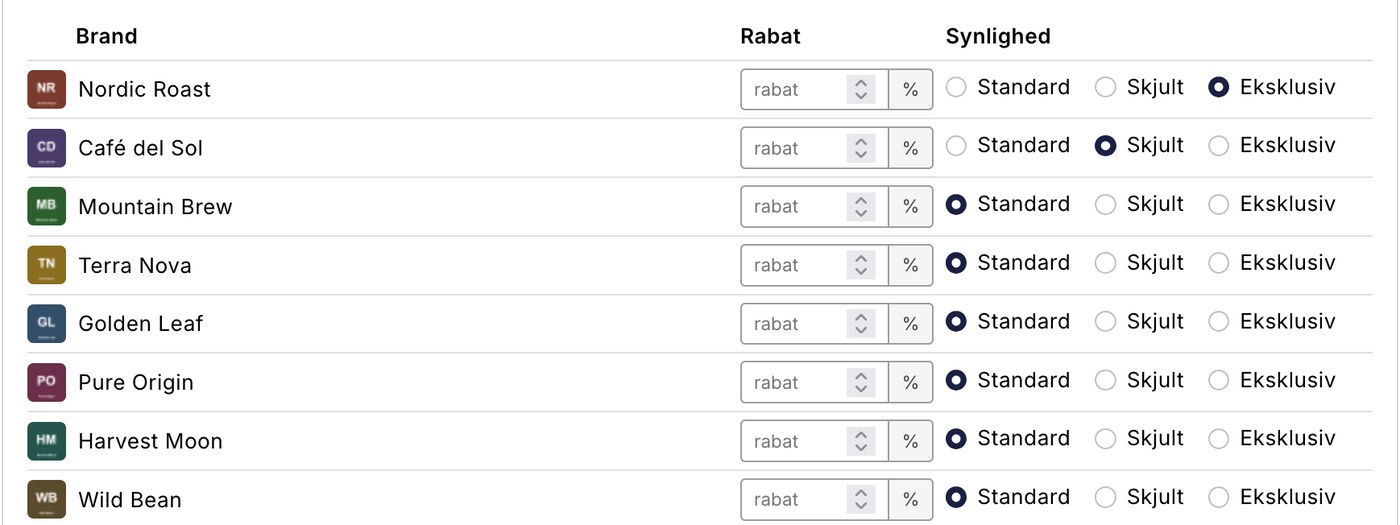
In addition to prices, the group can also have its own access to brands. Each brand can be set to Standard, Hidden, or Exclusive for the group. Hidden removes the brand from view for that specific group, while Exclusive does the opposite and reserves the brand so that only the group’s customers can view and purchase it. "Exclusive" is designed for private labels and reseller agreements where the products must appear in the same store as everything else but must not be visible to the general public. Read more in " Hide or Lock Brands for Specific Customer Groups."
Company Accounts with Multiple Users
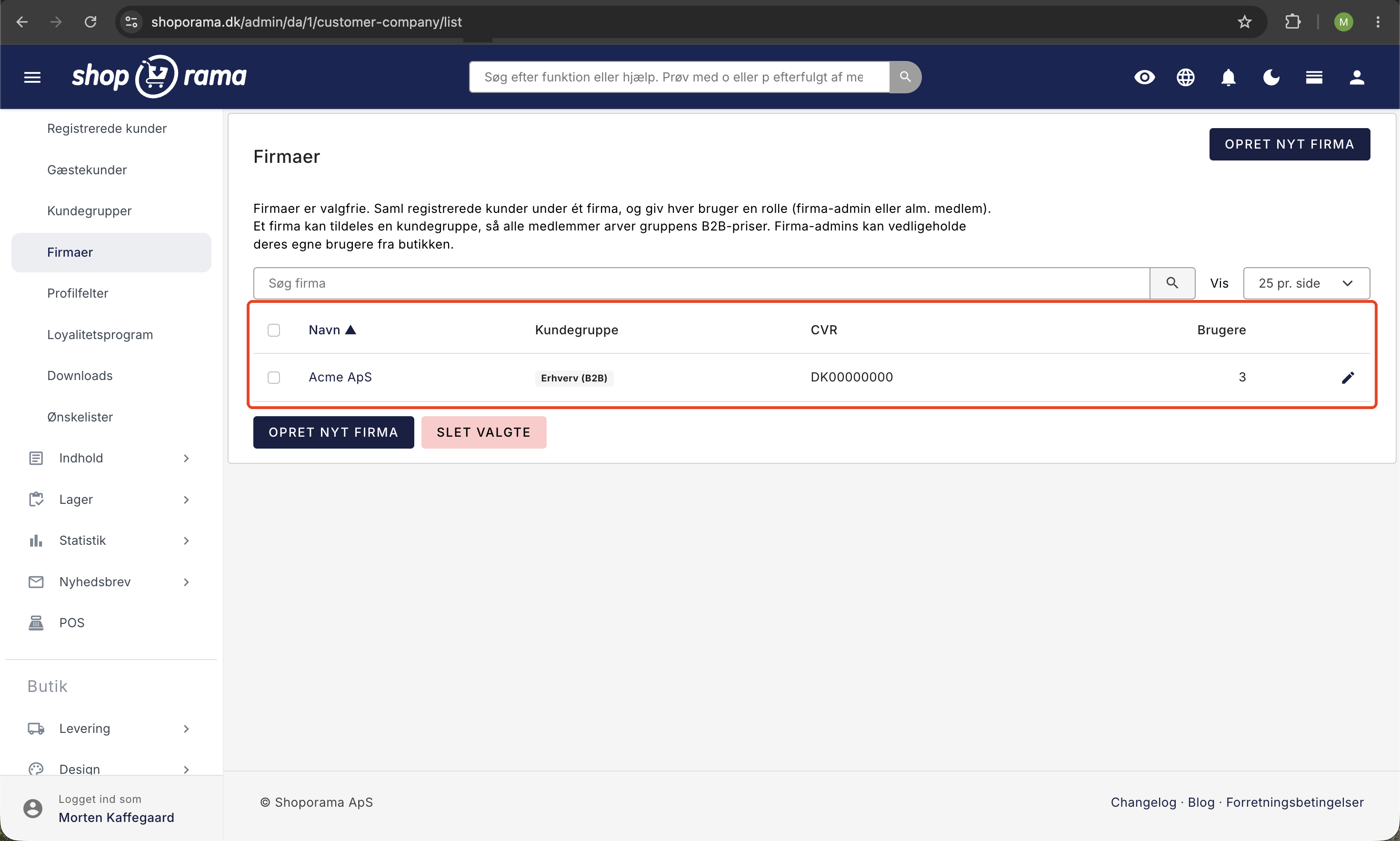
A company can have multiple buyers under the same company, each with their own role. The company’s identity—that is, its CVR, EAN, and address—as well as prices are automatically inherited by members, and the company administrator can add colleagues and manage roles directly from the store. See “Company Accounts with Multiple Users and Roles.”
Quick Reordering
Business customers often reorder the same items. With quick ordering, customers can search for items by SKU, EAN, or name, add multiple items to the cart at once, upload a file with item codes and quantities, or reorder from a previous order. Read more in Quick Reordering for Business Customers.
Customer Types at Checkout
Shoporama supports three customer types at checkout:
- B2C (Private), i.e., individual customers. Enabled by default.
- B2B (Business), meaning business customers with a CVR number.
- B2G (Public), meaning public institutions with an EAN number.
Which customer types customers can select at checkout depends on your theme. In the Montana and B2B themes, you can enable or disable them under Design → Theme Settings in the "Checkout: Address" group using "Enable Business (B2B)" and "Enable Public (EAN)"; Delaware has similar settings. If you only have B2C enabled, your customers won’t be able to enter a CVR or EAN number.
B2B Fields in Checkout
When B2B is enabled, the following additional fields appear in checkout:
- Company name, i.e., the name of the business.
- CVR number, required for B2B customers.
- EAN number, used for B2G (government procurement).
- EAN reference, an optional reference field for EAN orders.
These fields are saved both on the order and in the customer profile, so the customer doesn’t have to fill them out again on their next purchase. If the customer has a company associated with them via a business account, the company information is automatically inherited.
VAT Handling and Reverse Charge
Shoporama automatically handles VAT based on customer type and country. Under Shipping → Countries, you can specify a B2B VAT rate, a B2C VAT rate, and a VAT zone (home country, EU, or the rest of the world) for both B2B and B2C, respectively.
When a customer enters a CVR number, Shoporama automatically applies the B2B VAT rate for the selected country. This makes it easy to handle VAT-exempt sales to EU businesses in accordance with the reverse charge rules. If you sell to businesses in other EU countries, you can also have VAT numbers automatically validated against the EU’s VIES register, so that VAT is only removed for a confirmed number. Read more in Reverse Charge and VIES Validation.
If the B2B VAT rate is set to 0%, the price depends on how you enter your prices. If you enter them excluding VAT, the business customer automatically pays the price excluding VAT. If you enter them including VAT, the customer will, by default, pay the price you entered, minus 0 DKK in VAT.
If you’d prefer that business customers in other EU countries pay the price excluding VAT once their VAT number has been verified, enable both “Validate VAT numbers against VIES (EU)” and “Adjust prices to the destination country’s VAT rate” under Webshop → General. Note that this adjustment applies to all customers, not just business customers. Private customers in countries with a different VAT rate than your own will also see a different price. With a 25% Danish VAT rate, an item priced at 125 DKK, for example, will cost 119 DKK for a private customer in Germany, where the B2C VAT rate is 19%. A country without a specified B2C VAT rate is considered to have a 0% rate, so check the rates under Shipping → Countries before enabling this feature. Read more in the article on prices including VAT.
E-conomic Integration with B2B
If you use E-conomic as your accounting system, Shoporama automatically supports the separation of B2B and B2C customers:
- Customer Groups: You can specify separate customer groups for private and business customers.
- VAT Zone: The correct VAT zone (home country, EU, or rest of the world) is automatically applied to the invoice based on the B2B/B2C settings for the customer’s country.
- EAN number: Transferred to E-conomic so that it appears on the invoice.
- Company Name: Used as the contact name in E-conomic for B2B customers.
- Discounts: Gift cards, promotional discounts, and redeemed loyalty points are transferred as separate lines on the invoice with the correct net amount. This applies regardless of whether the customer is subject to 25 percent Danish VAT, 0 percent VAT under the reverse charge mechanism for EU business-to-business sales, or exports to countries outside the EU.
Read more about the full integration in “How the E-conomic Integration Works.”
Shipping and Delivery for B2B
The company name is automatically used for shipments via PostNord, GLS, and other shipping providers. The company name appears as the primary name on package labels, while the contact person’s name appears as the secondary name.
B2B in-store and self-service
B2B prices aren’t just for the online store. They apply when you sell from a physical checkout or let the customer use self-service.
At a staffed POS, staff can select a business customer in the customer selector. Search for the customer by company name or CVR number, select them, and the entire cart will be calculated using the customer’s own group prices. The order is linked to the customer, so the purchase is included in their purchase history. Read more in POS (Point of Sale).
With self-service POS, you can set up a login-based terminal where the customer logs in and places orders at their own prices. This is ideal for reordering: a warehouse employee scans the items that are out of stock on their phone or at a fixed terminal, logs in with the retailer, and places an order directly at agreed-upon B2B prices. If you want to allow only logged-in customers, you can enable “Require login,” so the terminal becomes exclusively for business reorders. Read more in Self-Service POS and in Quick Reorder for Business Customers.
How to Get Started with B2B
- If you want a closed retailer store with customer-specific prices, select the B2B theme under Design.
- Create customer groups under Customers, and assign them discounts, special prices, or volume discounts.
- Enable the customer types you need (B2B and B2G) under Design → Theme Settings so that the CVR and EAN fields are displayed.
- Set up tax rates and tax zones under Shipping → Countries for the relevant countries, and enable VIES validation under Webstore → General, if necessary. If you enter prices including VAT, and business customers in other EU countries are to pay the price excluding VAT, this requires both VIES validation and “Adjust prices to the delivery country’s VAT rate.”
- Select payment methods, such as invoice, and specify separate customer groups in E-conomic if you use it.
Frequently Asked Questions
Can I sell to both consumers and businesses from the same store?
Yes. Shoporama supports B2C, B2B, and B2G in the same store. It’s all data-driven, so a customer without a customer group shops as a regular consumer, while a group customer sees their business prices.
Can I restrict access to the store so that only authorized resellers see the prices?
Yes. With the B2B theme, the store is login-based. Guests see a login page, and only approved customers see the product range and prices.
How is VAT handled for business customers in the EU?
When the customer enters a CVR number, Shoporama uses the B2B VAT rate for that country, so VAT-free EU sales (reverse charge) are handled automatically. If you enable VIES validation, VAT is removed only when a confirmed VAT number is provided. However, if you enter prices including VAT, the customer will pay the same price as a retail customer, but with 0 DKK in VAT, unless both VIES validation and “Adjust prices to the delivery country’s VAT rate” are enabled.
Can a business have multiple buyers on the same account?
Yes, with business accounts. Multiple users can be associated with the same company and assigned roles, and the company administrator can add colleagues themselves. See the guide to business accounts.
Can customers pay by invoice?
Yes. You can offer invoicing as a payment method, and a PDF invoice is automatically attached to the order email so the customer has the documentation ready for their accounting.
Do business customers get their own prices in the physical store?
Yes. At the POS, staff select the customer in the customer selector (search by company name or CVR number), and the entire sale is then calculated using the customer’s group prices.
Can a warehouse employee reorder directly from us?
Yes. With the self-service POS, the employee can log in and place orders at their own B2B prices, either on a dedicated terminal or via a QR code on their phone.
Does B2B work with my E-conomic integration?
Yes. B2B and B2C customers can be separated into distinct customer groups; the correct VAT zone is automatically applied to the invoice; and the company name and EAN number are transferred to E-conomic.
Related articles
Are the numbers in the backend with or without VAT?
Answer whether the revenue figures on the Shoporama backend are with or without VAT.
Zero searches and search analytics
Learn how to use Shoporama's search analytics to find searches without results and optimize your online store.
Create EAN payment as a payment method
Guide to setting up EAN payment (invoice payment for businesses) on your Shoporama online store.
Related features
B2B webshop
A B2B webshop sells to business customers with customer pricing, CVR validation and invoicing. Read about B2B e-commerce and features.
B2B webshop
Shoporama now offers a full-featured B2B solution: a login-based store, customer group pricing, volume discounts, company accounts with roles,...
B2B online store
B2B Online Store with Business Central
Sell to businesses and have the orders imported into Business Central as sales invoices or sales orders with a CVR number, open items for invoice...
Nu kan du drive en rigtig B2B-webshop med Shoporama
Shoporama now offers a full-featured B2B solution: a login-based store, customer group pricing, volume discounts, corporate accounts, VIES reverse...
New Free App Sends Online Store Orders to Business Central
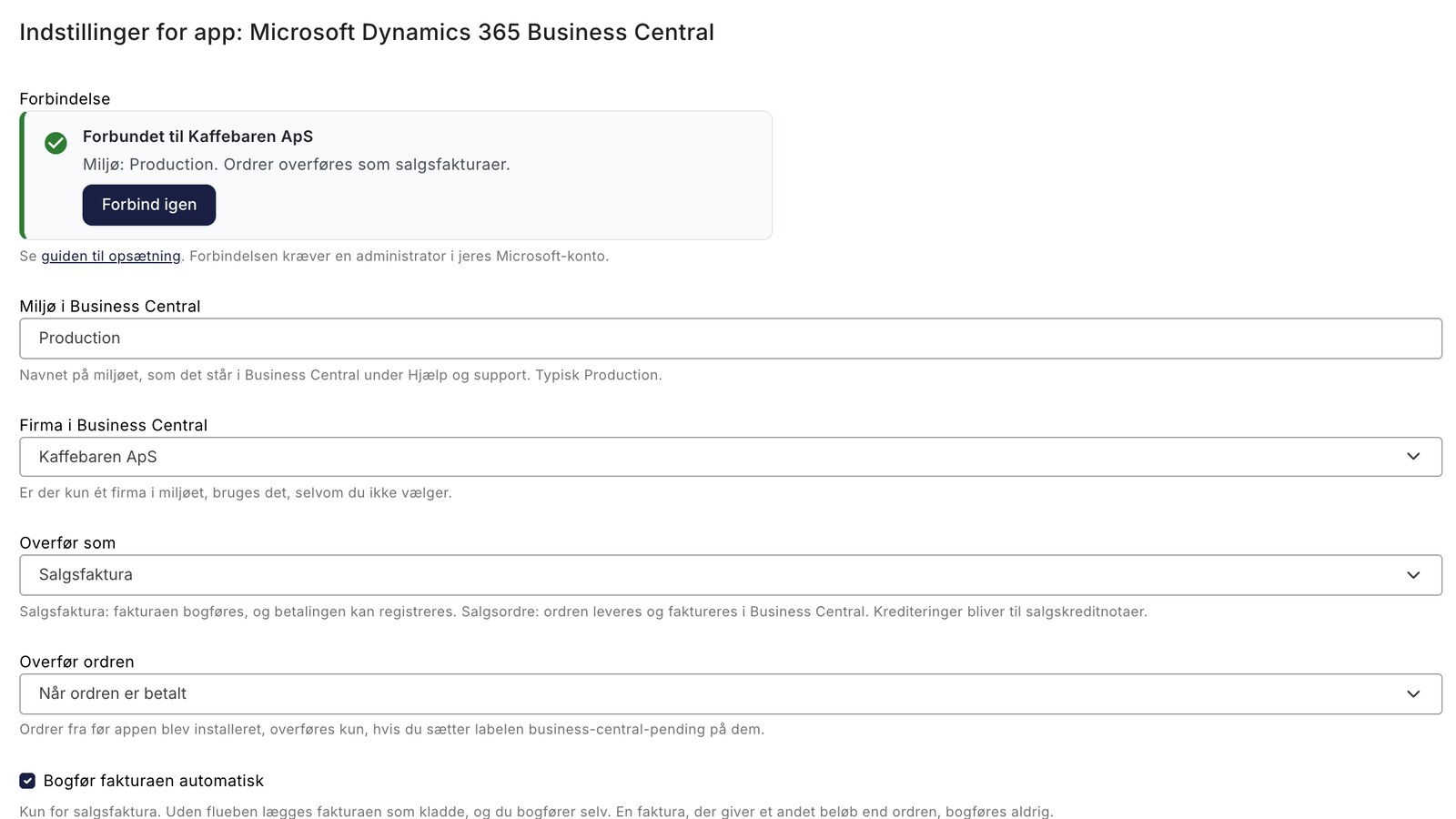
New on Shoporama: A free app sends orders from the online store to Business Central as posted sales invoices, including customer information, VAT,...
Theme Settings in MontanaB2B: Fields and B2B Features
An explanation of all fields in MontanaB2B's theme settings, plus the login screen, prices excluding VAT, customer groups, company accounts, and...
B2B Online Store with Uniconta
Sell to businesses and import the orders into Uniconta as sales orders with CVR, EAN, and prices excluding VAT. Here’s how Shoporama’s free...
Customer database
Complete customer database with profiles, order history, segmentation, customer groups and exports. Identify your best customers and communicate in...
Business Central Integration
Shoporama's free app transfers orders to Business Central as posted sales invoices or sales orders, records payments, and displays errors on the...
Customer group
A customer group segments customers with different prices and discounts. Read about customer groups in webshops and B2B e-commerce.
Self-service POS—customers scan and pay on their own
Hide or lock brands for specific customer groups
Customer groups in Shoporama can now hide a brand entirely or make it exclusive so that only the group's customers can view and purchase it. Set...
Online Store with Business Central
Connect your online store to Microsoft Dynamics 365 Business Central using Shoporama's free app. Orders are posted as sales invoices with sales...
Montana and MontanaB2B: All Modules in the Page Designer
A guide to all 25 modules in the page designer for Montana and MontanaB2B: banners, products, categories, text, content items, and...